🔍 Read the full analysis: 9 Best E Ink Tablets For Reading And Handwriting: Which One Matches Your Style? on ThorstenMeyerAI.com

Get business pricing on monitors, keyboards and dev gear
- Business-only prices and quantity discounts
- Tax-exempt purchasing
- Multiple users, one account, clear invoices
TL;DR
A buyer’s guide ranks nine E Ink tablets for different needs, with the reMarkable Paper Pure presented as the focused-writing pick and the BOOX Note Air6 C as a more flexible color option. The recommendations are based on screen size, writing tools, reading features and software approach; exact pricing, performance testing and compatibility details are not provided.
A nine-device E Ink tablet roundup from ThorstenMeyerAI.com, the original analysis, identifies the reMarkable Paper Pure as its focused-writing pick and the BOOX Note Air6 C as its flexible color choice. The guide compares devices for people choosing between a distraction-light notebook, a broader reading and app workflow, and a more portable screen; its rankings are recommendations, not the result of disclosed standardized testing.
The guide says its ranking weighs screen size, writing tools, reading features and software approach, emphasizing how each tablet might fit a routine rather than simply counting specifications, much like other E Ink tablets for note taking. It recommends the Paper Pure for handwriting, citing its 10.3-inch screen and a bundle that includes a Marker Plus and folio. The BOOX Note Air6 C is positioned for readers who also want color notes and a broader digital workflow; the supplied material lists 6GB of RAM and 64GB of storage.
The remaining picks cover different compromises: the Kindle Scribe (3rd Generation) combines a large display with Amazon’s reading library, while the larger reMarkable Paper Pro is another option for buyers prioritizing writing space. The lineup also includes the BOOX Note Air5 C, BOOX Go Color 7 Gen II, BOOX Go models and Penstar eNote 2. The source does not provide a full model-by-model specification table or explain every device’s exact place in the ranking.
Across the list, size and display type are the main dividing lines, as in other E Ink tablet comparisons. The guide says 7-inch BOOX Go devices favor portability, while 10.3-inch and larger screens leave more room for documents and notes. Color models may suit charts, highlights and illustrated material, but the source cautions that color can involve tradeoffs in contrast, simplicity or portability. Black-and-white models may better suit plain text and monochrome handwriting.
The 9 picks
- 1
 reMarkable Paper Pro 11.8-Inch Color E Ink Tablet Bundle with Marker Plus and…View on Amazon →
- 2
 reMarkable Paper Pro Digital Notebook with Marker PlusView on Amazon →
- 3
 BOOX Note Air6 C 10.3-Inch Color E Ink Tablet, 6GB RAM, 64GB StorageView on Amazon →
- 4
 Kindle Scribe 64GB (Newest Model) – 11" Paper-like Display with Premium PenView on Amazon →
- 5
 reMarkable Paper Pure 10.3-Inch Tablet with Marker Plus and Ocean Blue Sleeve…View on Amazon →
- 6
 Penstar eNote 2 E-Ink Digital Notebook with Pen, 10.3" AI eNote TabletView on Amazon →
- 7
 BOOX Note Air5 C 10.3-Inch Color E Ink Tablet, 6GB RAM, 64GB StorageView on Amazon →
- 8
 BOOX Go 7 Black-and-White E Ink Tablet, 4GB RAM, 64GB StorageView on Amazon →
- 9
 BOOX Go Color 7 Gen II E-Ink Tablet, 7-Inch, 64GB, BlackView on Amazon →
Choosing Between Focus and Flexibility
The roundup matters to buyers because E Ink tablets are often asked to do several jobs at once: replace a paper notebook, serve as an e-reader and handle documents. The recommendations argue that those uses do not automatically align. A larger writing surface can help with reports and diagrams but may be less convenient to carry, while a compact reader can be easier to hold yet restrictive for full-page annotation.
Its practical advice is to start with the material and routine, not a headline feature. A buyer who mainly reads novels may not benefit from a large notebook display; someone marking up documents may value page area more than pocketability. Likewise, color is a task-specific choice, not a universal upgrade. The guide’s central takeaway is that software flexibility, screen size and writing feel can matter more than storage or bundled accessories when those extras do not match how the device will be used.
Products Worth Considering

Kindle Paperwhite (12th Generation, 2024), 16 GB, 7-inch Display, Black

Samsung Galaxy Tab A11+ 11-Inch Tablet, 6GB RAM, 128GB Storage, Expandable Storage, Gray
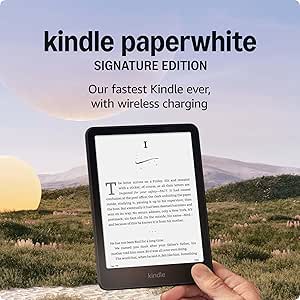
Kindle Paperwhite Signature Edition, 32 GB (12th Generation, 2024), Metallic Black
As an affiliate, we earn on qualifying purchases.
How the Nine Picks Were Ranked
The source describes a comparative buyer’s guide rather than a report of a newly announced product or a formal laboratory test. Its stated method gives more weight to practical fit: a notebook should make handwriting straightforward, and a reading-oriented tablet should suit the books and files its owner uses. Memory, storage, color and included accessories count when they affect what a buyer can do or need to purchase separately.
The guide places the Paper Pure first for its clear writing purpose and the Note Air6 C next for color and broader flexibility. It frames the reMarkable Paper Pro and Kindle Scribe as serving different priorities, and the compact BOOX Go models as portability choices rather than replacements for a full-size notebook. The supplied source does not include prices, battery results, measured display performance or detailed compatibility testing, so those points cannot be compared here.
“The reMarkable Paper Pure is the focused-writing pick.”
— ThorstenMeyerAI.com roundup
What the Comparison Leaves Open
The supplied material does not state when the guide was published, give prices, or specify the full feature set and ranking for all nine devices. It also does not describe hands-on testing methods, measured screen contrast, writing latency, battery life or independent verification of its recommendations. The picks should therefore be read as the source’s buyer guidance, not as independently established performance results.
Compatibility is another unresolved point. The guide advises buyers to check whether their preferred books, documents and services work on a specific tablet, but it does not list supported formats or app availability for each model. It also does not quantify the contrast or portability tradeoffs of color displays. Those details may affect an individual purchase and should be checked against current manufacturer information.
Checks to Make Before Buying
The next step for shoppers is to compare the nine models against their own routine: identify the largest documents they handle, whether color changes how they use notes, and whether they need a dedicated reading library or broader software options. Buyers should also check current pricing, included accessories and file compatibility for the exact model and configuration they are considering.
No follow-up testing or product announcement is specified in the source. Until more detailed comparisons are available, the guide’s clearest distinction remains between focused handwriting, flexible reading and apps, and compact portability; the best fit depends on which of those needs takes priority.
Key Questions
Which tablet does the roundup recommend for handwriting?
The guide names the reMarkable Paper Pure as its focused-writing pick, citing its 10.3-inch screen and included Marker Plus and folio bundle. That is the source’s editorial recommendation, not a claim of independently measured superiority.
Which pick is aimed at color notes and broader software use?
The BOOX Note Air6 C is presented as the flexible color option. The supplied material lists 6GB of RAM and 64GB of storage, but does not provide detailed app-compatibility tests.
Should I choose a color E Ink tablet?
Color may help with charts, highlights and illustrated material. The roundup says buyers focused on plain text and monochrome notes may prefer a black-and-white screen, and it does not treat color as an automatic improvement.
Are smaller E Ink tablets better for carrying?
The guide says 7-inch BOOX Go models favor portability. Smaller screens may be less comfortable for full-page documents or diagrams, so the choice depends on whether carrying ease or writing and document space matters more.
Does the source provide verified performance test results?
No standardized test results are included in the supplied material. It describes the ranking criteria but does not report measured battery life, screen performance, writing latency or prices.
Source: ThorstenMeyerAI.com