If you’re gearing up for a productive 2026 in software development and quality assurance, having the right accessories can make all the difference. Whether you’re a developer, tester, or QA specialist, choosing tools that enhance your workflow and comfort is essential for staying efficient and focused.

Get business pricing on monitors, keyboards and dev gear
- Business-only prices and quantity discounts
- Tax-exempt purchasing
- Multiple users, one account, clear invoices
This article is organized into key categories of must-have accessories, each highlighting top picks and practical advice. Use this checklist as a guide to identify what best fits your needs, ensuring you’re equipped with reliable, high-quality gear to tackle your projects confidently.
To get the most out of this guide, consider your specific work environment, compatibility needs, and personal preferences. Focus on features like performance, portability, ergonomic design, and expandability to make informed decisions that support your long-term productivity.
Key Programming Laptops
Choosing the right programming laptop is critical for smooth coding sessions and seamless multitasking. The Lenovo ThinkPad L16 stands out with its impressive specs, including 64GB DDR5 RAM and a 2TB SSD, offering ample speed and storage for complex development tasks. Its touchscreen adds versatility, especially useful for debugging or design work. When selecting a laptop, ensure it has adequate RAM, fast storage, and a comfortable keyboard, as these factors directly impact your productivity and comfort during long coding sessions.
Common mistakes include opting for underpowered machines or ignoring compatibility with your preferred development tools. Pay attention to port options, operating system, and battery life. A well-chosen laptop should balance power and portability, making it suitable for both office work and on-the-go coding. Remember to verify the size and weight if you plan to travel frequently, and check for compatibility with your existing peripherals.
What to look for:
- High RAM capacity (at least 16GB, ideally 32GB or more)
- Fast SSD storage (preferably 1TB or larger)
- Multiple USB-C and HDMI ports
- Comfortable, responsive keyboard
- Good battery life for portability
Lenovo ThinkPad L16 16" Touchscreen Laptop, 64GB DDR5, 2TB SSD, Windows 11 Pro

The Lenovo ThinkPad L16 is a reliable business laptop featuring a 16-inch touchscreen, powerful Intel Ultra 5 processor, 64GB DDR5 RAM, and a 2TB SSD. It offers durable design, long battery life, and versatile connectivity options, making it ideal for professionals, students, and small business users.
Pros:
- Powerful performance with 64GB DDR5 RAM and 2TB SSD
- Durable MIL-STD-810H certified design
- Versatile connectivity with Thunderbolt 4 and HDMI 2.1
- Long battery life with rapid charging
Cons:
- Resealed packaging may concern some buyers regarding original seal
- High memory and storage capacity may be unnecessary for casual users
- Premium features come at a higher price point
Best for: Professional developers needing powerful hardware
Not ideal for: Casual users or budget-conscious buyers
Bottom line: A reliable, high-performance laptop boosts productivity.
Reliable External Monitors
A high-quality external monitor can significantly improve your workspace, offering more screen real estate and better ergonomics. The VisionOwl Portable Monitor is designed for portability and versatility, with an 18.5-inch IPS display that supports USB-C and HDMI connections. This makes it perfect for remote work, travel, or expanding your desktop setup at the office. When selecting an external monitor, consider factors like screen size, resolution, and connectivity options to match your workflow needs.
Many buyers overlook the importance of color accuracy, refresh rate, and port compatibility. For QA and development tasks, a monitor with good color reproduction and sharp resolution helps in testing and design work. Ensure the monitor supports your device’s ports, and if you often work remotely, look for features like lightweight design and easy setup. Compatibility with your laptop’s video output is crucial to avoid frustration and ensure seamless integration.
What to look for:
- IPS display for accurate colors
- Multiple connectivity options (USB-C, HDMI)
- Portability and lightweight design
- Good screen resolution (Full HD or higher)
- Durability for travel use
VisionOwl Portable Monitor for Laptop, 18.5-Inch IPS USB-C HDMI Travel Second Sc
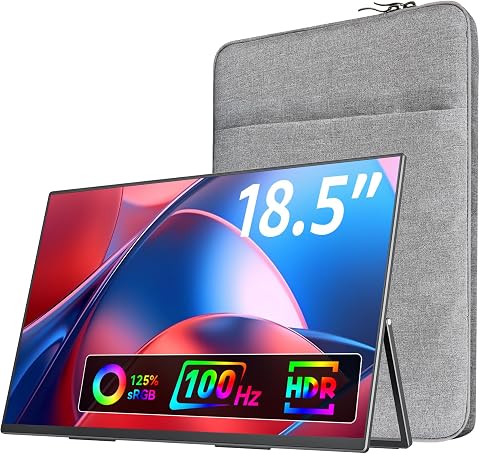
The VisionOwl portable monitor features an 18.5-inch 1080p FHD IPS display, lightweight design, and high refresh rate for smooth gaming and multitasking. It offers wide compatibility with various devices, VESA mountability, and a built-in stand for versatile use on the go.
Pros:
- Large 18.5-inch FHD IPS display provides clear and vibrant visuals.
- Lightweight and portable, ideal for travel and on-the-go use.
- High refresh rate (100Hz) enhances gaming experience with smoother motion.
- Wide device compatibility with USB-C and HDMI connections.
Cons:
- Limited to 1080p resolution, may not satisfy users seeking higher resolution.
- Built-in speakers may not deliver high-quality audio for critical listening.
- Requires compatible USB-C or HDMI ports for connection.
Best for: Remote workers and on-the-go professionals
Not ideal for: Stationary setups with large desk space
Bottom line: Enhance your workspace with a portable, high-quality monitor.
Quality Mechanical Keyboards
A mechanical keyboard can transform your typing experience, offering better feedback, durability, and comfort. The ASUS ROG Azoth Extreme Wireless Mechanical Gaming Keyboard combines performance with versatility, featuring customizable keys and wireless connectivity. Such keyboards are ideal for long coding sessions, where responsiveness and comfort are paramount. When choosing a mechanical keyboard, look for switch type, build quality, and compatibility with your devices.
Many users make the mistake of selecting keyboards based solely on aesthetics without considering switch sound, actuation force, and key layout. For software development or QA testing, a keyboard with tactile feedback and reliable wireless connection minimizes fatigue and interruptions. Confirm the keyboard’s compatibility with your operating system and ensure it has the features you need, such as programmable keys or backlit options for working in low-light environments.
What to look for:
- High-quality mechanical switches (Cherry MX, etc.)
- Wireless connectivity with low latency
- Durable build quality
- Customizable keys
- Backlit for low-light work
ASUS ROG Azoth Extreme Wireless Mechanical Gaming Keyboard

The ASUS ROG Azoth Extreme is a premium wireless mechanical keyboard featuring a compact 75% layout, hot-swappable switches, and a full-color OLED touchscreen. It offers tri-mode connectivity, customizable switches, and a durable aluminum chassis, making it ideal for gaming and productivity.
Pros:
- Versatile tri-mode connectivity with long battery life
- Premium build quality with aluminum chassis and carbon fiber plate
- Full-color OLED touchscreen for system info and customization
- Hot-swappable switches for easy customization
Cons:
- High price may be a barrier for some users
- Complex features might require a learning curve
- Limited switch options without additional customization
Best for: Developers and testers seeking comfort
Not ideal for: Casual users or those preferring membrane keyboards
Bottom line: A premium mechanical keyboard enhances typing comfort.
Ergonomic Office Chairs
An ergonomic office chair is essential for maintaining comfort and preventing strain during long work hours. The HON Ignition Series High-Back Mesh Office Chair offers excellent support with adjustable features, breathable mesh material, and a sleek design. Proper chair selection can improve posture, reduce fatigue, and promote overall well-being. When evaluating chairs, focus on lumbar support, adjustability, and material quality to ensure long-term comfort.
Many buyers overlook the importance of proper fit and adjustability, which are key to avoiding back pain. Test for adjustable height, tilt tension, and armrest positioning to ensure a customized fit. Material quality also matters; breathable mesh helps keep you cool during extended periods of sitting. Avoid chairs that lack lumbar support or have limited adjustability, as these can lead to discomfort over time. Remember, investing in a good chair is investing in your health and productivity.
What to look for:
- Adjustable lumbar support
- Height and armrest adjustability
- Breathable mesh material
- Reliable build quality
- Comfortable seat padding
HON Ignition Series High-Back Mesh Office Chair – Black

The HON Ignition Series high-back mesh chair offers adjustable features including recline, back height, and arm positions, providing customizable comfort for long hours of work. Its breathable mesh design keeps you cool, and durable materials ensure long-lasting use with a lifetime warranty.
Pros:
- Adjustable recline, arm height, and width for personalized comfort
- Breathable mesh back and seat keep you cool during long work sessions
- Durable construction with a lifetime warranty ensures long-term use
- Supports users up to 300 lbs
Cons:
- May be more expensive than basic office chairs
- Assembly required, which can be time-consuming
- Limited color options (only black)
Best for: Long hours of sitting at a desk
Not ideal for: Short-term or occasional use
Bottom line: Prioritize comfort with a supportive ergonomic chair.
High-Performance Storage Devices
Efficient storage solutions are vital for managing large projects, backups, and collaborative workflows. The UGREEN NAS DXP8800 Plus 8-Bay Business NAS provides ample space and reliable access for multiple users, making it ideal for teams and demanding workloads. When choosing a storage device, consider capacity, expandability, and speed. An enterprise-grade NAS can streamline your data management and enhance productivity.
Many overlook the significance of compatibility with existing network infrastructure or overestimate the importance of raw speed alone. Instead, focus on ease of setup, scalability, and security features. For QA and development environments, a robust NAS ensures your data is safe, accessible, and easy to share. Be sure to verify the device’s compatibility with your network and the number of users it needs to support, to avoid bottlenecks and data loss.
What to look for:
- Multiple drive bays (8 or more)
- Support for RAID configurations
- Fast data transfer speeds
- Scalability options
- User-friendly management interface
UGREEN NAS DXP8800 Plus 8-Bay Business NAS
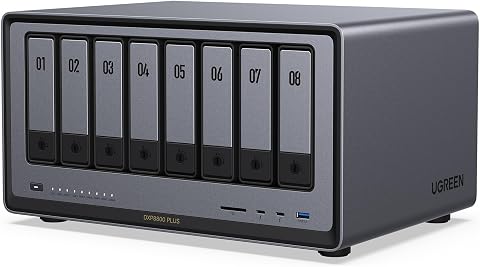
The UGREEN NAS DXP8800 Plus is an enterprise-grade 8-bay network-attached storage device designed for demanding businesses, offering high performance, massive storage capacity up to 272TB, and dual 10GbE network ports for fast data transfer. It features a powerful 12th Gen Intel Core i5 processor, comprehensive security, and broad device compatibility, making it suitable for large studios, IT team
Pros:
- High-performance with a powerful Intel Core i5 processor
- Massive storage capacity up to 272TB with flexible RAID options
- Fast data transfer speeds with dual 10GbE ports
- Broad device compatibility and comprehensive security features
Cons:
- Hard drives are not included and must be purchased separately
- Supports wired Ethernet only, no Wi-Fi connectivity
- Complex setup may require technical expertise
Best for: Teams needing reliable, expandable storage
Not ideal for: Single-user or casual storage needs
Bottom line: A high-capacity NAS enhances data management.
Effective Testing Devices
While specific testing devices are not listed, it’s crucial to have reliable testing tools for quality assurance and debugging. These can include hardware testers, network analyzers, or software simulation environments. The right equipment helps identify issues early, saving time and improving product quality. When selecting testing devices, prioritize accuracy, compatibility, and ease of use.
Common mistakes include underinvesting in proper tools or choosing devices that lack compatibility with your systems. Evaluate your testing needs carefully—whether you’re working on hardware, network, or software—and select tools that integrate seamlessly into your workflow. Remember, investing in quality testing equipment reduces debugging time and enhances overall product reliability.
What to look for:
- Compatibility with your systems
- High accuracy and reliability
- Ease of use and integration
- Durability for frequent use
- Support for relevant protocols and standards
Start your 2026 tech upgrade by focusing on these essential accessories that boost productivity, comfort, and reliability. Prioritize quality and compatibility to ensure your investments pay off in the long run.
Remember, a well-equipped workspace not only enhances your efficiency but also makes your workday more enjoyable. Happy shopping, and here’s to a successful year ahead in software development and QA!
Halloween Picks
halloween
As an affiliate, we earn on qualifying purchases.