
If you’re looking for the best 4K monitors for your MacBook in 2026, I recommend options like portable OLED displays, high-performance monitors with USB-C Power Delivery, and professional-grade screens with wide color gamuts. From sleek 27-inch models with HDR10 to larger 32-inch screens with ergonomic stands, there’s something for every workflow. Keep in mind connectivity and color accuracy. If you want more details, stick around – I’ll guide you through the top choices and features.
Key Takeaways
- Prioritize 4K monitors with dual USB-C ports supporting 90W+ power delivery for seamless MacBook connectivity and charging.
- Look for high color accuracy with wide gamuts like DCI-P3 and Adobe RGB, ideal for creative professionals.
- Ensure monitors have ergonomic stands and adjustable features for comfortable extended use.
- Consider HDR support, high brightness, and contrast for vibrant visuals and enhanced media experience.
- Check compatibility with Thunderbolt 3/4, DisplayPort Alt Mode, and multiple input options for future-proof versatility.
| 14″ 4K OLED Portable Monitor with Speakers and VESA |  | Top Visual Fidelity | Screen Size: 14 inches | Resolution: 4K UHD (3840×2160) | Connectivity Ports: 2 USB-C, 1 HDMI | VIEW LATEST PRICE | See Our Full Breakdown |
| BenQ MA320U 32″ 4K Monitor with USB-C and Mac Compatibility |  | MacBook Compatible | Screen Size: 32 inches | Resolution: 4K UHD (3840×2160) | Connectivity Ports: 2 USB-C, 2 HDMI | VIEW LATEST PRICE | See Our Full Breakdown |
| Samsung ViewFinity S8 4K UHD Monitor with HDR10 |  | Creative Professional | Screen Size: 27 inches | Resolution: 4K UHD (3840×2160) | Connectivity Ports: HDMI, DisplayPort, USB-A/B | VIEW LATEST PRICE | See Our Full Breakdown |
| Dell 27″ 4K USB-C Monitor with Speakers |  | Gaming & Multimedia | Screen Size: 27 inches | Resolution: 4K UHD (3840×2160) | Connectivity Ports: USB-C, HDMI | VIEW LATEST PRICE | See Our Full Breakdown |
| LG 27UP850K-W 27-inch 4K UHD IPS Monitor |  | Color Accuracy Leader | Screen Size: 27 inches | Resolution: 4K UHD (3840×2160) | Connectivity Ports: USB-C, HDMI, USB 3.0 | VIEW LATEST PRICE | See Our Full Breakdown |
| BenQ 27” 4K Monitor with USB-C & Adjustable Stand |  | Premium Mac Display | Screen Size: 27 inches | Resolution: 4K UHD (3840×2160) | Connectivity Ports: USB-C, HDMI | VIEW LATEST PRICE | See Our Full Breakdown |
| INNOCN 27″ 4K USB-C Monitor with HDR and Speakers |  | HDR Creativity | Screen Size: 27 inches | Resolution: 4K UHD (3840×2160) | Connectivity Ports: USB-C, HDMI, DisplayPort | VIEW LATEST PRICE | See Our Full Breakdown |
| ASUS ProArt 27” 4K HDR Professional Monitor |  | Professional Editing | Screen Size: 27 inches | Resolution: 4K UHD (3840×2160) | Connectivity Ports: USB-C, HDMI, DisplayPort | VIEW LATEST PRICE | See Our Full Breakdown |
| True 4K Portable Monitor 15.6″ UHD HDMI USB-C | 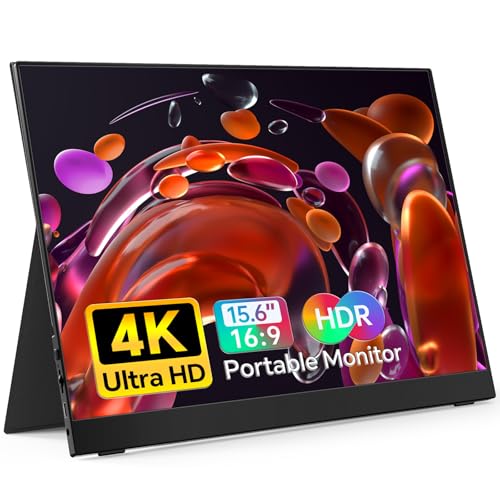 | Ultra Portable | Screen Size: 15.6 inches | Resolution: 4K UHD (3840×2160) | Connectivity Ports: USB-C, HDMI | VIEW LATEST PRICE | See Our Full Breakdown |
| LG 27US500-W 27-Inch 4K UHD HDR Monitor |  | All-in-One Performance | Screen Size: 27 inches | Resolution: 4K UHD (3840×2160) | Connectivity Ports: HDMI, DisplayPort, USB | VIEW LATEST PRICE | See Our Full Breakdown |
| BenQ MA270UP 27” 4K Monitor with USB-C and P3 Color |  | Space-Saving Design | Screen Size: 27 inches | Resolution: 4K UHD (3840×2160) | Connectivity Ports: USB-C, HDMI, USB | VIEW LATEST PRICE | See Our Full Breakdown |
| Samsung ViewFinity S7 27-Inch 4K UHD Monitor |  | Ergonomic Comfort | Screen Size: 27 inches | Resolution: 4K UHD (3840×2160) | Connectivity Ports: HDMI, DisplayPort, USB | VIEW LATEST PRICE | See Our Full Breakdown |
| 15.6″ 4K Portable Monitor with Speakers and HDMI |  | Versatile Travel Monitor | Screen Size: 15.6 inches | Resolution: 4K UHD (3840×2160) | Connectivity Ports: USB-C, HDMI, DisplayPort | VIEW LATEST PRICE | See Our Full Breakdown |
| LG 27UP650K-W 27″ 4K UHD IPS Monitor |  | Value for Creators | Screen Size: 27 inches | Resolution: 4K UHD (3840×2160) | Connectivity Ports: HDMI, DisplayPort, USB | VIEW LATEST PRICE | See Our Full Breakdown |
More Details on Our Top Picks
14″ 4K OLED Portable Monitor with Speakers and VESA
If you’re looking for a portable 4K display that delivers stunning visuals and seamless connectivity for your MacBook, the 14″ OLED Portable Monitor with Speakers and VESA is an excellent choice. It features OLED self-luminous technology, offering vivid colors, deep blacks, and high contrast. Factory-calibrated for accuracy, it supports 100% DCI-P3 and 10-bit color depth, perfect for creative work. With a brightness of 350 nits and a 1ms response time, visuals are crisp and lag-free. Lightweight at just 3.48 pounds, it includes built-in speakers, a protective sleeve, and VESA compatibility for versatile mounting. It’s ideal for travel, remote work, or on-the-go editing.
- Screen Size:14 inches
- Resolution:4K UHD (3840×2160)
- Connectivity Ports:2 USB-C, 1 HDMI
- Built-in Speakers:Yes
- VESA Mount Compatibility:Yes
- Adjustable Stand/Ergonomics:Yes (kickstand, tilt, VESA)
- Additional Feature:Factory-calibrated color accuracy
- Additional Feature:Built-in dual speakers
- Additional Feature:180° adjustable kickstand
BenQ MA320U 32″ 4K Monitor with USB-C and Mac Compatibility
Looking for a 4K monitor that seamlessly integrates with your MacBook? The BenQ MA320U offers stunning 3840×2160 resolution on a 32-inch screen, with vibrant P3 wide color gamut calibrated for Mac compatibility. Its ergonomic stand adjusts for comfort during long work sessions. With dual USB-C ports supporting 90W power delivery, plus HDMI options, connecting and charging your MacBook or iPad is effortless. Built-in controls let you adjust brightness and volume directly from your MacBook keyboard, maintaining visual accuracy. Weighing around 34 pounds, it’s ideal for professional setups, backed by reliable support and positive reviews.
- Screen Size:32 inches
- Resolution:4K UHD (3840×2160)
- Connectivity Ports:2 USB-C, 2 HDMI
- Built-in Speakers:No
- VESA Mount Compatibility:No
- Adjustable Stand/Ergonomics:Yes (height, tilt, swivel)
- Additional Feature:MacBook direct control
- Additional Feature:90W Power Delivery
- Additional Feature:Sturdy ergonomic stand
Samsung ViewFinity S8 4K UHD Monitor with HDR10
The Samsung ViewFinity S8 4K UHD Monitor with HDR10 stands out as an excellent choice for designers and creators who demand vibrant visuals and precise color accuracy. Its 27-inch 4K display delivers sharp detail and a high pixel density, making every image look crisp. HDR10 support guarantees true-to-life colors with deeper contrast, supporting over a billion colors for vivid visuals. Multiple connection options like HDMI, DisplayPort, and USB ports make setup easy and versatile. The ergonomic stand allows height, tilt, swivel, and pivot adjustments for comfort. Certified for eye care, it reduces flickering and blue light, perfect for long creative sessions.
- Screen Size:27 inches
- Resolution:4K UHD (3840×2160)
- Connectivity Ports:HDMI, DisplayPort, USB-A/B
- Built-in Speakers:Yes
- VESA Mount Compatibility:Yes
- Adjustable Stand/Ergonomics:Yes (height, tilt, pivot, swivel)
- Additional Feature:TÜV-certified eye care
- Additional Feature:90° pivot feature
- Additional Feature:3-year warranty included
Dell 27″ 4K USB-C Monitor with Speakers
For professionals seeking a sleek, high-resolution display with excellent color accuracy and integrated audio, the Dell 27″ 4K USB-C Monitor with Speakers stands out as an ideal choice. Its 27-inch 4K IPS panel delivers vibrant, precise colors with 99% sRGB coverage, perfect for detailed work and multimedia. The 120Hz refresh rate and AMD FreeSync Premium ensure smooth visuals during gaming or fast-paced tasks. With HDR readiness and ComfortView Plus technology, it diminishes blue light for all-day comfort. The USB-C port supports up to 65W power delivery, simplifying connectivity. Plus, the re-engineered speakers provide spacious sound, making this monitor a versatile, high-performance option for MacBook users.
- Screen Size:27 inches
- Resolution:4K UHD (3840×2160)
- Connectivity Ports:USB-C, HDMI
- Built-in Speakers:Yes
- VESA Mount Compatibility:No
- Adjustable Stand/Ergonomics:Yes (tilt, pivot, height)
- Additional Feature:AMD FreeSync Premium
- Additional Feature:120Hz refresh rate
- Additional Feature:Spacious integrated audio
LG 27UP850K-W 27-inch 4K UHD IPS Monitor
If you’re seeking a versatile 4K monitor that balances stunning visuals with seamless connectivity, the LG 27UP850K-W is an excellent choice for MacBook users. Its 27-inch 4K UHD IPS panel delivers sharp images and vibrant colors, covering 95% of the DCI-P3 color gamut. Support for VESA DisplayHDR 400 enhances contrast and brightness, perfect for content creation and immersive viewing. With USB-C that provides 90W power delivery, along with HDMI, DisplayPort, and USB 3.0 ports, it offers flexible connectivity. The monitor’s adjustable stand and multitasking features make it both ergonomic and highly functional for work and entertainment.
- Screen Size:27 inches
- Resolution:4K UHD (3840×2160)
- Connectivity Ports:USB-C, HDMI, USB 3.0
- Built-in Speakers:Yes
- VESA Mount Compatibility:Yes
- Adjustable Stand/Ergonomics:Yes (tilt, height, pivot)
- Additional Feature:Switch multitasking app
- Additional Feature:DCI-P3 95% color
- Additional Feature:Brightness auto-adjustment
BenQ 27” 4K Monitor with USB-C & Adjustable Stand
Designed specifically for MacBook users who want vibrant, color-accurate visuals, the BenQ 27” 4K Monitor with USB-C and an adjustable stand offers seamless integration and professional-quality display features. It’s calibrated for Mac, delivering rich P3 wide color gamut and accurate color reproduction. With 2 HDMI and 2 USB-C ports, it supports 90W power delivery and device charging, simplifying connectivity. The integrated MacBook controls let me adjust brightness and volume directly from my keyboard. Its adjustable stand allows for ergonomic positioning through height, tilt, swivel, and pivot adjustments. This monitor’s bright, vivid display makes it perfect for creative work and extended use.
- Screen Size:27 inches
- Resolution:4K UHD (3840×2160)
- Connectivity Ports:USB-C, HDMI
- Built-in Speakers:Yes
- VESA Mount Compatibility:Yes
- Adjustable Stand/Ergonomics:Yes (height, tilt, swivel, pivot)
- Additional Feature:MacBook control integration
- Additional Feature:Dual USB-C ports
- Additional Feature:Adjustable height/tilt
INNOCN 27″ 4K USB-C Monitor with HDR and Speakers
The INNOCN 27″ 4K USB-C Monitor with HDR and Speakers stands out as an excellent choice for creative professionals and power users who demand sharp visuals and versatile connectivity. Its 3840×2160 resolution and advanced IPS panel deliver vibrant, accurate images across a wide 178° viewing angle. With HDR400 support and over a billion colors, it offers stunning contrast and color depth, perfect for photo, video editing, and gaming. Multiple connectivity options—including USB-C, HDMI, and DisplayPort—make it easy to connect to various devices. The ergonomic stand and VESA compatibility guarantee comfortable use. Built-in speakers and a sleek, frameless design complete this versatile, high-performance display.
- Screen Size:27 inches
- Resolution:4K UHD (3840×2160)
- Connectivity Ports:USB-C, HDMI, DisplayPort
- Built-in Speakers:Yes
- VESA Mount Compatibility:Yes
- Adjustable Stand/Ergonomics:Yes (swivel, tilt, height, pivot)
- Additional Feature:Frameless design
- Additional Feature:VESA wall-mountable
- Additional Feature:Multiple ergonomic adjustments
ASUS ProArt 27” 4K HDR Professional Monitor
For creative professionals demanding top-tier color accuracy, the ASUS ProArt 27” 4K HDR Professional Monitor stands out as an excellent choice. Its UHD 3840 x 2160 resolution and wide-view IPS panel deliver sharp, vibrant visuals at 178° viewing angles. Factory pre-calibrated with Delta E < 2, it covers 99% of DCI-P3 and Adobe RGB, ensuring precise color reproduction. The monitor offers versatile connectivity, including DisplayPort over USB-C with 96W Power Delivery, HDMI, and a USB hub. Ergonomic adjustments and HDR support enhance usability, while its sturdy build and 3-year warranty make it a reliable tool for professional workflows.
- Screen Size:27 inches
- Resolution:4K UHD (3840×2160)
- Connectivity Ports:USB-C, HDMI, DisplayPort
- Built-in Speakers:Yes
- VESA Mount Compatibility:Yes
- Adjustable Stand/Ergonomics:Yes (height, tilt, pivot)
- Additional Feature:Calman verified calibration
- Additional Feature:96W Power Delivery
- Additional Feature:Adobe Creative Cloud included
True 4K Portable Monitor 15.6″ UHD HDMI USB-C
If you’re looking for a portable 4K display that combines stunning visuals with effortless connectivity, the True 4K Portable Monitor 15.6″ UHD HDMI USB-C is an excellent choice. Its 15.6-inch IPS panel delivers crisp, detailed images with 3840×2160 resolution, while 100% Adobe RGB and 400 nits brightness ensure vibrant, accurate colors. The ultra-narrow bezel and frameless design enhance immersion, and at just 1.8 pounds, it’s easy to carry anywhere. Dual inputs—USB-C and HDMI—make it compatible with laptops, gaming consoles, and more. Plug-and-play setup simplifies use, making it perfect for work, gaming, or multimedia on the go.
- Screen Size:15.6 inches
- Resolution:4K UHD (3840×2160)
- Connectivity Ports:USB-C, HDMI
- Built-in Speakers:Yes
- VESA Mount Compatibility:Yes
- Adjustable Stand/Ergonomics:Yes (swivel, tilt, height, pivot)
- Additional Feature:2-year warranty
- Additional Feature:Lightweight portability
- Additional Feature:Dual input ports
LG 27US500-W 27-Inch 4K UHD HDR Monitor
Looking for a monitor that delivers stunning visuals and precise color accuracy? The LG 27US500-W offers a 27-inch 4K UHD display with sharp details and vibrant colors. Its 1000:1 contrast ratio guarantees deep blacks, while HDR10 support and up to 90% DCI-P3 coverage make images come alive with rich, lifelike hues. Wide viewing angles keep visuals consistent from any position. Easy connectivity with HDMI and DisplayPort, plus Onscreen Control for customization, enhance usability. The ergonomic stand allows tilt adjustments for comfort, and its borderless design maximizes screen space. Perfect for digital artists, content creators, or multimedia enthusiasts seeking quality and versatility.
- Screen Size:27 inches
- Resolution:4K UHD (3840×2160)
- Connectivity Ports:HDMI, DisplayPort, USB
- Built-in Speakers:Yes
- VESA Mount Compatibility:Yes
- Adjustable Stand/Ergonomics:Yes (tilt, height, pivot)
- Additional Feature:Onscreen Control software
- Additional Feature:Borderless design
- Additional Feature:Wide viewing angles
BenQ MA270UP 27” 4K Monitor with USB-C and P3 Color
The BenQ MA270UP 27” 4K monitor stands out as an excellent choice for creative professionals and MacBook users who demand precise color accuracy and versatile connectivity. Its calibrated P3 wide color gamut delivers vibrant visuals, perfect for editing and design work. The adjustable stand ensures ergonomic comfort, while integrated MacBook controls let me easily tweak brightness and volume directly from my keyboard. With dual USB-C ports offering 90W power and multiple HDMI options, I can connect my devices seamlessly through a single cable. The sharp 3840 x 2160 display and high brightness levels make this monitor a premium, reliable tool for demanding workflows.
- Screen Size:27 inches
- Resolution:4K UHD (3840×2160)
- Connectivity Ports:USB-C, HDMI, USB
- Built-in Speakers:Yes
- VESA Mount Compatibility:Yes
- Adjustable Stand/Ergonomics:Yes (tilt, height, pivot)
- Additional Feature:Calibrated for Mac
- Additional Feature:VESA mount support
- Additional Feature:Multiple connectivity options
Samsung ViewFinity S7 27-Inch 4K UHD Monitor
For creative professionals seeking stunning visuals and versatile connectivity, the Samsung ViewFinity S7 27-Inch 4K UHD Monitor stands out as an excellent choice. Its 3840×2160 resolution delivers incredible detail, making intricate designs, videos, and complex projects pop. The wide color gamut and HDR10 technology guarantee vibrant, true-to-life colors with deep contrast. Multiple ports, including HDMI, DisplayPort, and USB options, simplify connecting peripherals. The easy setup stand requires no tools, allowing quick adjustments for ergonomic comfort. Plus, TÜV-certified eye care features reduce flickering and blue light, making long work sessions more comfortable. It’s a sleek, reliable monitor tailored for professional workflows.
- Screen Size:27 inches
- Resolution:4K UHD (3840×2160)
- Connectivity Ports:HDMI, DisplayPort, USB
- Built-in Speakers:Yes
- VESA Mount Compatibility:Yes
- Adjustable Stand/Ergonomics:Yes (height, tilt, pivot)
- Additional Feature:Easy setup stand
- Additional Feature:Eye Saver Mode
- Additional Feature:HDR10 support
15.6″ 4K Portable Monitor with Speakers and HDMI
This 15.6-inch 4K portable monitor stands out as an ideal choice for professionals and travelers who need sharp visuals on the go. It offers stunning 3840 x 2160 resolution with 380 nits brightness, delivering bright, detailed images. The wide 145% sRGB coverage guarantees vivid, accurate colors for work or entertainment. Weighing just 3.67 pounds, it’s lightweight and travel-friendly. With an adjustable kickstand and VESA compatibility, you can set it up easily anywhere. Built-in speakers enhance multimedia use, and the HDMI plus dual USB-C ports ensure versatile connectivity with laptops, gaming consoles, and more. It’s a compact, powerful companion for mobile productivity.
- Screen Size:15.6 inches
- Resolution:4K UHD (3840×2160)
- Connectivity Ports:USB-C, HDMI, DisplayPort
- Built-in Speakers:Yes
- VESA Mount Compatibility:Yes
- Adjustable Stand/Ergonomics:Yes (height, tilt, swivel, pivot)
- Additional Feature:VESA-compatible mount
- Additional Feature:Ultra-narrow bezels
- Additional Feature:Travel-friendly design
LG 27UP650K-W 27″ 4K UHD IPS Monitor
If you’re looking for a versatile 4K monitor that combines vibrant visuals with ergonomic features, the LG 27UP650K-W is an excellent choice. Its 27-inch UHD IPS display delivers sharp images and rich, accurate colors, supporting up to 95% DCI-P3 color coverage. With DisplayHDR 400 support and Black Stabilizer, it enhances both creative work and dark scene viewing, while dynamic action sync reduces input lag for smoother gameplay. Adjustable for tilt, height, and pivot, it ensures ergonomic comfort. Connectivity options include HDMI and DisplayPort, and eye-friendly features like Flicker Safe and Reader Mode make long hours more comfortable. It’s a solid, stylish addition to any MacBook setup.
- Screen Size:27 inches
- Resolution:4K UHD (3840×2160)
- Connectivity Ports:HDMI, DisplayPort, USB
- Built-in Speakers:Yes
- VESA Mount Compatibility:Yes
- Adjustable Stand/Ergonomics:Yes (tilt, height, pivot)
- Additional Feature:Flicker Safe technology
- Additional Feature:Reader Mode
- Additional Feature:Dynamic Action Sync
Factors to Consider When Choosing 4K Monitors for MacBook
When selecting a 4K monitor for my MacBook, I focus on compatibility features like Thunderbolt or USB-C, which guarantee seamless connectivity. I also check for accurate display calibration, vibrant color gamut, and HDR support to match my creative needs. Additionally, ergonomic adjustments and various connectivity options help me find a monitor that’s both comfortable and versatile.
Compatibility Features Needed
Choosing a 4K monitor for your MacBook requires careful attention to compatibility features that guarantee seamless integration and ideal performance. First, look for USB-C ports with Power Delivery (PD) support, ideally 60W or higher, so your MacBook charges while in use. Verify the monitor is compatible with macOS, allowing you to control brightness, volume, and other settings directly from your MacBook’s keyboard or system preferences. Support for macOS-specific color profiles like P3 or Adobe RGB is essential for accurate color reproduction. Connectivity options such as Thunderbolt 3 or 4 are highly recommended, as they offer high-speed data transfer and better integration. Additionally, features like automatic brightness adjustment and system integration simplify setup and guarantee consistent, reliable performance.
Display Calibration Accuracy
Accurate display calibration is essential for ensuring that colors appear true to their source, especially for professional photo and video editing on a MacBook. Monitors with factory calibration and a Delta E score below 2 deliver high color accuracy right out of the box, minimizing manual adjustments. Support for wide color gamuts like DCI-P3 or Adobe RGB is crucial for achieving consistent, vibrant colors that match MacBook displays. True 4K monitors with calibration profiles optimized for macOS help maintain visual uniformity across devices. Additionally, regular calibration tools or hardware calibration options are indispensable for preserving color precision over time, which is especially important for creative professionals relying on accurate visuals. Prioritizing calibration accuracy ensures your work remains precise and trustworthy.
Connectivity Options Available
Selecting a 4K monitor for your MacBook requires careful attention to connectivity options to guarantee seamless performance. I recommend choosing a monitor with USB-C ports that feature Power Delivery, so you can connect and charge your MacBook with a single cable. If you plan to connect multiple devices or use older equipment, ensure it has HDMI ports for versatility. For faster data transfer and the ability to daisy-chain multiple monitors, look for Thunderbolt 3 or 4 support over USB-C. Additionally, verify that the USB-C port supports DisplayPort Alt Mode to deliver high-resolution video and audio signals necessary for 4K content. Having multiple options like USB-C, HDMI, and DisplayPort maximizes compatibility with various MacBook models and peripherals, making your setup more flexible and future-proof.
Ergonomic Adjustability Features
Ergonomic adjustability features are essential for creating a comfortable and healthy workspace when using a 4K monitor with your MacBook. These features, like height, tilt, swivel, and pivot, allow you to position the monitor for ideal comfort and reduce strain during long hours. Monitors with adjustable stands support multiple ergonomic configurations, including a 90-degree pivot for portrait mode, which is great for reading or coding. Proper adjustments help align the monitor at eye level, improving posture and lowering the risk of repetitive strain injuries. Many models offer quick, tool-free controls for easy customization, allowing you to adapt your setup effortlessly. Incorporating these features ensures a personalized workspace, boosting both comfort and productivity during extended use.
Color Gamut and HDR Support
When choosing a 4K monitor for your MacBook, paying attention to color gamut and HDR support can make a significant difference in your visual experience. A wider color gamut like DCI-P3 or Adobe RGB ensures more vibrant, accurate colors, which is vital for professional creative work. HDR support, including standards like HDR10 or HDR400, improves contrast and color depth, delivering lifelike visuals and better detail in dark and bright scenes. Monitors with high color accuracy and HDR capabilities help display content as creators intended, maintaining fidelity across devices. Combining broad color gamuts with HDR support elevates multimedia editing, gaming, and video playback on your MacBook, providing a richer, more immersive visual experience. These specifications are key indicators of a monitor’s ability to deliver professional-grade, high-fidelity visuals.
Port Selection and Power
Choosing the right port options on a 4K monitor is essential for a seamless MacBook experience, especially if you want to avoid carrying multiple cables or adapters. Look for a USB-C port with Power Delivery (PD) that delivers at least 60W, so your MacBook charges efficiently while working. Verify that the monitor includes multiple connectivity options like HDMI and extra USB-C ports, offering versatility for various devices. Ensure the USB-C port supports Thunderbolt 3 or 4, or DisplayPort Alt Mode, for smooth high-res video and data transfer. Confirm that the power output matches your MacBook’s charging needs to eliminate the need for separate chargers. Monitors with built-in USB hubs can also expand peripheral connections, keeping your workspace neat and organized.
Frequently Asked Questions
How Do 4K Monitors Improve Macbook Productivity?
4K monitors boost my MacBook productivity by providing sharper visuals and more screen space, allowing me to multitask seamlessly. With crystal-clear images, I can work on detailed projects like photo editing or coding without straining my eyes. The extra resolution also makes it easier to view multiple windows side by side, saving time and keeping me focused on my tasks. Overall, they make my workflow more efficient and enjoyable.
Are 4K Monitors Compatible With Older Macbook Models?
Did you know that over 60% of older MacBook models can connect to 4K monitors? Yes, they are compatible, but it depends on the ports and graphics capabilities. I’ve found that most Thunderbolt or HDMI ports on older Macs work well with 4K displays, though you might need adapters. I recommend checking your specific model’s specs to guarantee seamless compatibility and peak performance.
What Is the Typical Latency for 4K Monitors Connected to Macbooks?
The typical latency for 4K monitors connected to MacBooks usually ranges between 1 to 5 milliseconds. I’ve noticed that most modern monitors with good refresh rates keep latency low, making them perfect for both work and light gaming. When I connect my MacBook, I make sure I use a high-quality cable or dock, which helps keep latency minimal and my experience smooth and responsive.
Do 4K Monitors Support Macbook-Specific Features Like Touch Bar?
Think of a 4K monitor as a canvas—vivid and expansive, but it’s not a magic mirror for MacBook-specific features like the Touch Bar. These monitors don’t support the Touch Bar directly; it’s integrated into the MacBook’s hardware. However, you’ll find some models with customizable touch controls or accessory options that mimic that functionality. So, while not a perfect match, they still enhance your workflow beautifully.
How Do Color Accuracy and Calibration Vary Across 4K Monitors for Macbooks?
Color accuracy and calibration can vary quite a bit across 4K monitors for MacBooks. I’ve found that higher-end models often come factory-calibrated, offering precise color reproduction ideal for professional work. Cheaper options might need manual calibration to match your needs. It’s essential to verify features like AdobeRGB coverage and hardware calibration support to guarantee your monitor delivers consistent, accurate colors for design, photography, or video editing.
Conclusion
Choosing the right 4K monitor for your MacBook isn’t just about pixels; it’s about elevating your entire experience. Think of it as finding the perfect lens to see your world clearer and more vibrant. Remember, the right monitor can transform your workspace from ordinary to extraordinary—making every detail pop like a masterpiece. So, choose wisely, and let your vision unfold in stunning clarity—because your best work deserves the best display.