
This checklist is for developers, QA teams, and anyone who spends long stretches working at a computer. It helps you consider the parts of a workstation that affect posture and comfort alongside the tools you use throughout the day.

Get business pricing on monitors, keyboards and dev gear
- Business-only prices and quantity discounts
- Tax-exempt purchasing
- Multiple users, one account, clear invoices
The sections are organized by workstation component, from seating and desk height to lighting, wrist support, foot support, and mouse choice. Each slot highlights what to check for and the kinds of fit or compatibility details that can be easy to miss when shopping.
Use the checklist to compare each pick with your workspace and work habits. Check dimensions, adjustment ranges, connection needs, and desk or monitor compatibility before choosing; prioritize the changes that address your daily discomfort or setup constraints first.
Ergonomic office chair
A chair is the foundation of a workstation because its seat and back support shape how you sit through long coding, testing, and review sessions. The Flysky Ergonomic Mesh Office Chair with Adjustable Headrest and Lumbar puts headrest and lumbar adjustment in the product name, making those settings central to evaluating whether it suits your posture.
A common mistake is choosing a chair by appearance or a feature list without checking whether its proportions fit the person using it. Compare the seat dimensions and adjustment ranges with your height, leg length, and desk height. Confirm that the lumbar support can sit where your lower back needs it, and that the headrest can be positioned comfortably rather than pushing your head forward. Check the chair’s footprint and clearance against your desk and room, too.
Mesh is part of this pick’s description, but material alone does not establish comfort or fit. If possible, assess the seat and back support in person, and review the assembly and adjustment instructions before committing. A good match should let you sit with feet supported and shoulders relaxed while keeping your screen and input devices within easy reach.
What to look for:
- Seat width and depth that fit your body
- Lumbar position and adjustment range
- Headrest height and angle adjustment
- Chair height that works with your desk
- Foot support and room clearance
Flysky Ergonomic Mesh Office Chair with Adjustable Headrest and Lumbar Support,

This ergonomic mesh office chair has an S-shaped backrest, lumbar support, flip-up armrests, and a height- and angle-adjustable headrest. The seat height adjusts by 4 inches and the backrest reclines from 90° to 120°; each chair has a stated 320 lb weight capacity.
Pros:
- Adjustable headrest, seat height, and reclining backrest
- Mesh construction and high-density foam cushion are designed for breathability and support
- Flip-up armrests and lumbar support
- Listed 320 lb maximum weight capacity
Cons:
- Assembly is required
- 10-chair pack may be more than needed for individual buyers
Best for: People seeking adjustable headrest and lumbar support
Not ideal for: Workspaces that cannot accommodate the chair’s footprint
Bottom line: Confirm the seat dimensions and support positions suit your body and desk before choosing this chair.
Adjustable standing desk
A desk converter can let you change your working height while keeping your existing desk in place. The VERSADESK PowerPro 40-Inch Electric Standing Desk Converter is described as a 40-inch electric converter, so check both its usable surface area and the space it needs on your current desk before deciding whether it fits your setup.
One frequent buying mistake is assuming a converter will accommodate every monitor, keyboard, and accessory just because it raises and lowers. Measure the items you plan to place on it, including stands or arms, and compare their combined footprint with the converter’s work surface. Also check the desk’s depth, available clearance, and whether the added height leaves enough room for your keyboard and mouse. Confirm the electrical connection and controls can be reached where the converter will sit.
For comfortable use, the raised position should let you keep shoulders relaxed and elbows near your sides while typing. The lowered position should work with your chair and screen height, too. Consider how you will manage cables as the surface moves, and make sure the base can sit securely on the desk. The right converter is one that fits your equipment and allows a usable seated and standing setup.
What to look for:
- Surface dimensions for your monitor and input devices
- Desk depth and base clearance
- Raised height relative to your screen and posture
- Power connection and control placement
- Cable slack through the full movement range
VERSADESK PowerPro 40-Inch Electric Standing Desk Converter
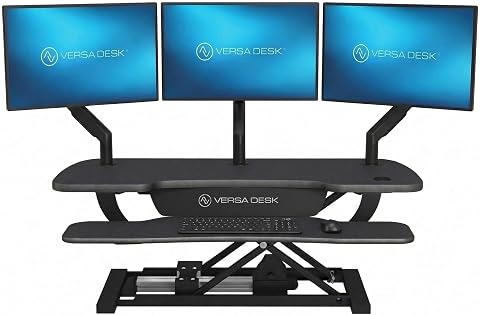
This motorized standing desk converter has a split-level design for monitors, a laptop, and a keyboard, with push-button height adjustment and a built-in USB charging port. Its carbon steel frame supports up to 80 lbs, and it includes cable-routing grommets, a child safety lock, and a lifetime warranty.
Pros:
- Electric lift enables convenient sit-to-stand adjustments
- Supports up to three monitors plus a laptop
- Built-in USB port and cable-routing grommets
- Ships fully assembled and includes a lifetime warranty
Cons:
- Monitor and monitor arm are not included
- Monitor arm is sold separately
Best for: People who want an electric converter for an existing desk
Not ideal for: Setups that need more surface area than the converter provides
Bottom line: Measure the desk, equipment, and working heights to confirm the converter fits your setup.
Monitor light bar
A monitor light bar is a screen-adjacent lighting option for a workstation. The BenQ ScreenBar Halo 2 LED Monitor Light Bar with Wireless Controller a includes a wireless controller in its name, so consider whether the control style and the bar’s placement will work with your monitor setup.
Compatibility is the key detail to verify. Check your monitor’s top edge, thickness, curve, and available clearance against the product’s mounting requirements. A bar that does not sit securely or obstructs a webcam can become a nuisance. Also consider nearby shelves or a second display, since they may affect placement or access to the controls. Confirm what power connection the light requires and whether the cable can reach an outlet without crossing your work area.
Another common mistake is expecting a light bar to solve every lighting issue by itself. Think about the light already in the room and how you position your display, then check the product’s adjustment and control details against your preferences. The wireless controller may be useful if you want to change settings without reaching for the monitor, but make sure its placement is convenient and that its operation suits your workflow. Prioritize secure mounting and accessible controls when comparing options.
What to look for:
- Monitor thickness, curve, and mounting compatibility
- Clearance for webcams or other accessories
- Power source and cable reach
- Controller placement and operation
- Adjustment options that suit your workspace
BenQ ScreenBar Halo 2 LED Monitor Light Bar with Wireless Controller and Motion

The BenQ ScreenBar Halo 2 is an adjustable LED monitor light designed to reduce eye strain with glare-free illumination and customizable color temperature. It features wireless control, automatic on/off, and fits curved monitors, making it ideal for work, study, and gaming environments.
Pros:
- Reduces eye fatigue with glare-free, balanced illumination
- Wireless controller allows easy adjustment of brightness and color temperature
- Fits a wide range of monitor sizes and curved screens without damage
- High color accuracy (CRI > 95) suitable for professional work
Cons:
- Requires USB power source, limiting placement options
- May be more expensive compared to basic monitor lights
- Some users might find the setup complex
Best for: People seeking a monitor-mounted light with wireless control
Not ideal for: Monitors whose shape or accessories prevent secure mounting
Bottom line: Check the mounting requirements, accessory clearance, and power arrangement before selecting this light bar.
Wrist rest set
A wrist rest set can help organize the contact points around a keyboard and mouse, but comfort depends on how the pieces fit your hands and setup. The Ergonomic Mouse Pad with Wrist Support and Keyboard Wrist Rest Set combines both, so evaluate the keyboard and mouse fit together rather than treating them as unrelated accessories.
Measure your keyboard’s width and depth and compare them with the rest’s dimensions. Check whether the keyboard has a compact or full-size layout, and whether its front edge is raised or unusually shaped. For the mouse pad, consider the space available for mouse movement and whether its wrist support will line up with your normal grip. A common mistake is choosing rests that are too tall, too firm, or too far from the input device, which can leave wrists bent rather than relaxed.
Wrist rests are generally most useful as support during pauses between input, not as a reason to press your wrists into a fixed position while typing or moving the mouse. Check the surface material and whether the pieces can stay stable on your desk. If you alternate between keyboard layouts or switch hands, confirm the set’s size and arrangement suit those habits. The goal is a neutral, comfortable position that works with your equipment.
What to look for:
- Rest dimensions matched to keyboard size
- Mouse pad area for your usual movement
- Height relative to keyboard and desk
- Stable placement on your work surface
- Surface material that feels comfortable to you
Ergonomic Mouse Pad with Wrist Support and Keyboard Wrist Rest Set

This ergonomic set includes a mouse pad and keyboard wrist rest crafted with memory foam for long-lasting support and comfort. The design features a 15-degree slope, massage beads, and a silky fabric surface to promote wrist health and precise control during extended use.
Pros:
- Provides ergonomic support to reduce wrist strain
- Comfortable massage bead design promotes blood flow
- Non-slip PU base ensures stability during use
- Easy to clean and maintain
Cons:
- May be too large for small desks
- Memory foam may flatten over time with heavy use
Best for: People wanting coordinated keyboard and mouse wrist supports
Not ideal for: Users whose keyboard or mouse layout does not fit the set
Bottom line: Compare the rests’ dimensions and height with your actual keyboard, mouse, and desk.
Foot rest
A foot rest can provide a place to support your feet when chair height and desk position do not line up comfortably. The Step-to-Adjust Foot Rest with Infinite Height Adjustment emphasizes height adjustment, making its adjustment method and usable range the first details to check.
A common mistake is buying a foot rest without considering how it changes your seated posture. With your chair adjusted to the desk, check whether your feet can rest flat and your knees remain comfortable; then determine whether a foot rest would help or raise your legs too much. Compare the product’s height range and platform dimensions with your leg length and available space under the desk. Make sure it can fit around the desk base and does not interfere with chair movement.
Also consider how the step-to-adjust mechanism works in everyday use. Confirm you can change the height from your seated position if that matters to you, and check whether the platform remains stable as you shift your feet. If you share the workstation, an adjustable option may be useful, but the range still needs to suit each user. Aim for comfortable foot support that lets your legs rest without forcing your knees or hips into an awkward position.
What to look for:
- Adjustment range relative to chair height
- Platform size for your feet and footwear
- Clearance around desk legs and chair wheels
- Stability while shifting foot position
- Adjustment mechanism that is easy to operate
Step-to-Adjust Foot Rest with Infinite Height Adjustment
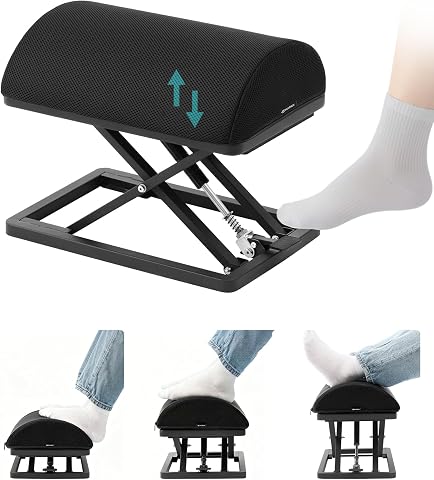
This carbon steel foot rest adjusts from 2.7 to 13.1 inches with a foot tap and has non-slip pads for stability. Its ergonomic high-density foam cushion has a removable, washable cover, and the foot rest arrives ready to use without assembly.
Pros:
- Adjusts height with a foot tap
- Sturdy carbon steel construction with non-slip pads
- Ergonomic foam cushion with washable cover
- Ready to use without assembly
Cons:
- Risk of finger entrapment during operation
- Heavy at 9.5 lb
Best for: People who need adjustable foot support at a desk
Not ideal for: Setups without room beneath the desk for a platform
Bottom line: Confirm the height range and platform fit support a comfortable seated position in your workspace.
Ergonomic mouse
A mouse is used repeatedly across coding, testing, navigation, and review, so its shape and controls should suit your hand and work style. The Logitech MX Master 4 Ergonomic Wireless Mouse with Haptics – Graphite identifies both wireless operation and haptics; check whether those connection and feedback features match the devices and software you use.
Fit matters more than a product’s ergonomic label. Compare the mouse’s shape and size with your hand, grip, and preferred hand. If possible, try it before buying, especially if you have smaller hands or switch between fingertip and palm grips. Review the button layout and scrolling controls, and check whether the software supports your operating system and allows the customizations you want. Confirm the wireless connection type works with your computer and that charging or battery needs fit your routine.
A frequent mistake is focusing on extra controls while overlooking how the mouse feels during ordinary pointing and dragging. Consider the width of your desk and mouse pad, and whether the shape lets your wrist stay relaxed without reaching. Haptics may appeal to some workflows, but confirm how they function and whether you can adjust them. Choose based on hand fit and daily tasks, then verify connectivity and software compatibility.
What to look for:
- Mouse dimensions and shape for your hand
- Button placement for your grip and tasks
- Wireless compatibility with your computer
- Operating system support for customization
- Haptics and scrolling controls that suit your workflow
Logitech MX Master 4 Ergonomic Wireless Mouse with Haptics – Graphite

The Logitech MX Master 4 is an ergonomic wireless mouse featuring customizable haptic feedback, a dynamic Actions Ring for quick tool access, and a MagSpeed scroll wheel for precise, fast scrolling. It offers up to 70 days of battery life, advanced connectivity options, and sustainable materials, making it ideal for productivity and comfort.
Pros:
- Customizable haptic feedback enhances user interaction
- Fast and precise MagSpeed scroll wheel
- Long battery life with quick charging capability
- Ergonomic design reduces hand stress
Cons:
- Requires Logi Options+ app for advanced customization
- Charging cable not included
Best for: People seeking a wireless ergonomic mouse with haptics
Not ideal for: Users whose hand size or grip conflicts with its shape
Bottom line: Try the shape if possible, then confirm wireless and software compatibility with your computer.
If you are prioritizing purchases, start with the change that addresses your clearest day-to-day fit issue. Check chair and desk alignment first, then consider foot support or a converter if your seated or standing position needs attention. Add wrist supports, lighting, and a mouse after confirming they fit your equipment and habits. This needs-first order helps you focus on the parts of the workstation that matter most to you.
Use the measurements and compatibility checks in each section to narrow your choices, and adjust one part of the setup at a time so you can tell what feels better. A comfortable workstation is personal, and small, well-matched changes can make your daily routine feel more manageable. Keep this checklist handy as your work setup evolves.
Halloween Picks

Max Fun 10-Foot Halloween Dragon and Pumpkin Inflatable Archway with LED Lights

MGparty 14.5 ft Halloween Inflatable Walk-In Pumpkin House with LED Lights

HOPOCO Halloween Pumpkin Fog Machine with 12 LED Colors & Remote Control
As an affiliate, we earn on qualifying purchases.