The Deco 7 Pro Tri-Band BE10000 is my best overall choice for gaming because its WiFi 7 and tri-band design offer a strong balance of speed and mesh capacity. For gamers who want gaming-focused features, the ASUS ROG Rapture GT6 stands out, while the TP-Link Deco X55 offers a more restrained WiFi 6 alternative. The main tradeoffs are wireless backhaul capacity, the cost of newer WiFi generations, and whether your devices can use the available features. A mesh system can improve coverage, but a wired connection to the console or PC remains the more dependable choice for latency-sensitive play. Read on for the full comparison and guidance on matching a system to your home.

Get business pricing on monitors, keyboards and dev gear
- Business-only prices and quantity discounts
- Tax-exempt purchasing
- Multiple users, one account, clear invoices
Key Takeaways
- Tri-band models lead this lineup for wireless mesh flexibility: the amazon.com/dp/B0CN8QLS4K?tag=featurebuddies-20&ascsubtag=dc-898139″ target=”_blank” rel=”nofollow sponsored noopener”>Deco 7 Pro BE10000, Deco 7 Pro BE63, and ASUS ROG GT6 offer an additional band that can help separate mesh traffic from client connections.
- WiFi 7 is not an automatic gaming win: its benefits depend on compatible devices and a strong internet plan; WiFi 6 and 6E systems may be a better fit for homes with older gear.
- The ASUS ROG GT6 is the lineup’s clearest gaming-oriented option, while most Deco, Orbi, and eero picks focus more on whole-home coverage and straightforward network management.
- Kit size matters as much as model choice: the XE75 appears in both two- and three-pack versions, the X55 in one- and three-unit options, and Orbi 370 in two-, three-, and four-pack configurations.
- Budget-friendly older standards still have a role: Deco S4 and eero 6+ can suit less demanding or smaller setups, but they offer less headroom for newer devices than the WiFi 7 picks.
| Deco 7 Pro Tri-Band WiFi 7 BE10000 Whole Home Mesh System 6-Stream 10 Gbps |  | Best for Very Large Homes | Wi-Fi standard: Wi-Fi 7 (802.11be) | Bands: Tri-band | Maximum Wi-Fi speed: Up to 10 Gbps | VIEW ON AMAZON | See Our Full Breakdown |
| TP-Link Deco S4 Mesh AC1900 WiFi System (3-Pack) |  | Best Budget-Friendly Coverage | Number of units: 3 | Wi-Fi standard: Wi-Fi 5 (802.11ac) | Speed class: AC1900 (1200 Mbps listed) | VIEW ON AMAZON | See Our Full Breakdown |
| ASUS ROG Rapture GT6 (2-Pack) AX10000 Tri-Band WiFi 6 Gaming Mesh System |  | Best for Gaming-Focused Controls | Wi-Fi standard: Wi-Fi 6 | Bands: Tri-band | Maximum speed: Up to 10,000 Mbps | VIEW ON AMAZON | See Our Full Breakdown |
| Deco 7 Dual-Band BE5000 WiFi 7 Mesh Wi-Fi System 4-Stream 5 Gbps, 240 MHz |  | Best Wi-Fi 7 Step-Up for Coverage | Wi-Fi standard: Wi-Fi 7 (802.11be) | Frequency bands: Dual-band | Maximum speed: Up to 5 Gbps | VIEW ON AMAZON | See Our Full Breakdown |
| TP-Link Deco 7 Pro BE63 Tri-Band WiFi 7 Whole Home Mesh System |  | Best for Multi-Device Gaming Setups | Wi-Fi standard: Wi-Fi 7 (802.11be) | Bands: Tri-band | Maximum Wi-Fi speed: Up to 10 Gbps | VIEW ON AMAZON | See Our Full Breakdown |
| TP-Link Deco XE70 Pro AXE4900 Tri-Band WiFi 6E Mesh WiFi System, 3-Pack |  | Best for Wired Gaming Across a Large Home | Wi-Fi standard: Wi-Fi 6E (802.11ax) | Bands: Tri-band, including 6 GHz | Maximum stated Wi-Fi speed: 4.9 Gbps | VIEW ON AMAZON | See Our Full Breakdown |
| TP-Link Deco XE75 AXE5400 Tri-Band WiFi 6E Mesh System, 3-Pack |  | Best for High-Capacity Wi-Fi 6E Coverage | Wi-Fi standard: Wi-Fi 6E (802.11ax) | Bands: Tri-band | Maximum stated speed: 5,400 Mbps | VIEW ON AMAZON | See Our Full Breakdown |
| TP-Link Deco X55 AX3000 WiFi 6 Mesh System (3-Pack) |  | Best Value for Wired Wi-Fi 6 Gaming | Wi-Fi standard: Wi-Fi 6 (802.11ax) | Bands: Dual-band | Maximum stated data rate: 3,000 Mbps | VIEW ON AMAZON | See Our Full Breakdown |
| TP-Link Deco X55 AX3000 WiFi 6 Mesh System (1-Pack) | 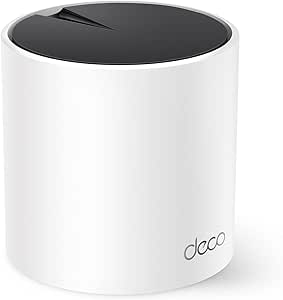 | Best Single-Node Starter | Wi-Fi standard: Wi-Fi 6 (AX3000) | Coverage: Up to 2,500 sq. ft. | Units: 1 | VIEW ON AMAZON | See Our Full Breakdown |
| NETGEAR Orbi 370 Series WiFi 7 Mesh System, Up to 4,000 sq ft., 2 Pack |  | Best Wi-Fi 7 Upgrade for Mid-Sized Homes | Wi-Fi standard: Wi-Fi 7 (802.11be) | Bands: Dual-band | Maximum stated speed: Up to 5 Gbps | VIEW ON AMAZON | See Our Full Breakdown |
| NETGEAR Orbi 370 Series WiFi 7 Mesh System, 3 Pack |  | Best for Large Homes on WiFi 7 | WiFi generation: WiFi 7 | Maximum stated speed: Up to 5 Gbps | Coverage: Up to 6,000 sq. ft. | VIEW ON AMAZON | See Our Full Breakdown |
| TP-Link Deco XE75 AXE5400 Tri-Band WiFi 6E Mesh System, 2-Pack |  | Best WiFi 6E Value for Gaming | WiFi generation: WiFi 6E | Advertised speed: Up to 5,400 Mbps | Frequency bands: Tri-band: 6 GHz, 5 GHz, 2.4 GHz | VIEW ON AMAZON | See Our Full Breakdown |
| NETGEAR Orbi 370 Series WiFi 7 Mesh System, 4 Pack |  | Best for Very Large or Multi-Storey Homes | WiFi generation: WiFi 7 | Maximum stated speed: Up to 5 Gbps | Coverage: Up to 8,000 sq. ft. | VIEW ON AMAZON | See Our Full Breakdown |
| Deco 7 Pro Tri-Band BE14000 Wi-Fi 7 Mesh System, 10Gbps Internet, 3 Pack |  | Best Premium WiFi 7 Gaming Mesh | WiFi generation: WiFi 7 | Advertised combined speed: Up to 14 Gbps | Frequency bands: Tri-band: 6 GHz, 5 GHz, 2.4 GHz | VIEW ON AMAZON | See Our Full Breakdown |
| Amazon eero 6+ mesh wifi system – Supports internet plans up to a Gigabit, Coverage up to 4,500 sq. ft., Connect 75+ devices, 3-pack |  | Best for Simple Gigabit Gaming Setups | WiFi generation: WiFi 6 | Speed class: AX3000 | Supported internet plan: Up to a gigabit | VIEW ON AMAZON | See Our Full Breakdown |
| mesh wifi systems for gaming | Coverage | Wi-Fi standard |
|---|---|---|
| Deco 7 Pro Tri-Band WiFi 7 BE1 | Up to 7,600 sq. ft. | Wi-Fi 7 (802.11be) |
| TP-Link Deco S4 Mesh AC1900 Wi | Up to 5,500 sq. ft. | Wi-Fi 5 (802.11ac) |
| ASUS ROG Rapture GT6 | Up to 5,800 sq. ft. | Wi-Fi 6 |
| Deco 7 Dual-Band BE5000 WiFi 7 | Up to 6,600 sq. ft. | Wi-Fi 7 (802.11be) |
| TP-Link Deco 7 Pro BE63 Tri-Ba | Up to 5,800 sq. ft. | Wi-Fi 7 (802.11be) |
| TP-Link Deco XE70 Pro AXE4900 | Up to 7,200 sq. ft. | Wi-Fi 6E (802.11ax) |
| TP-Link Deco XE75 AXE5400 Tri- | Up to 7,200 sq. ft. | Wi-Fi 6E (802.11ax) |
| TP-Link Deco X55 AX3000 WiFi 6 | Up to 6,500 sq. ft. | Wi-Fi 6 (802.11ax) |
| TP-Link Deco X55 AX3000 WiFi 6 | Up to 2,500 sq. ft. | Wi-Fi 6 (AX3000) |
| NETGEAR Orbi 370 Series WiFi 7 | Up to 4,000 sq. ft. | Wi-Fi 7 (802.11be) |
| NETGEAR Orbi 370 Series WiFi 7 | Up to 6,000 sq. ft. | — |
| TP-Link Deco XE75 AXE5400 Tri- | Up to 5,500 sq. ft. | — |
| NETGEAR Orbi 370 Series WiFi 7 | Up to 8,000 sq. ft. | — |
| Deco 7 Pro Tri-Band BE14000 Wi | Up to 8,100 sq. ft. | — |
| Amazon eero 6+ mesh wifi syste | Up to 4,500 sq. ft. | — |
More Details on Our Top Picks
Deco 7 Pro Tri-Band WiFi 7 BE10000 Whole Home Mesh System 6-Stream 10 Gbps
For gaming across a large, device-heavy home, this Deco 7 Pro pairs Wi-Fi 7 with coverage listed at up to 7,600 sq. ft. Its tri-band design and AI-driven roaming are intended to keep devices connected as players move between rooms, while four 2.5G WAN/LAN ports give wired consoles or a gaming PC useful connection options. Compared with the Deco 7 Pro BE63, this model claims wider coverage; both offer tri-band Wi-Fi 7 and multi-gig ports, so the larger coverage figure is the main distinction in the supplied specs. That reach does not guarantee low latency at every spot: walls, placement, and backhaul conditions still matter. I would skip it for a small home or a setup where basic gaming needs do not justify its advanced feature set.
Pros:- Tri-band Wi-Fi 7 supports a high-capacity wireless network across multiple rooms.
- Listed coverage of up to 7,600 sq. ft. suits larger homes better than the Deco 7 Pro BE63’s stated 5,800 sq. ft.
- Four 2.5G WAN/LAN ports allow multi-gig wired connections for compatible gaming equipment.
- Supports over 200 devices and includes AI-driven roaming.
Cons:- Coverage figures depend on home layout, node placement, and obstacles; distant wireless links may still affect gaming consistency.
- Advanced networking and security features may be more involved than a casual household needs.
- Requires a separate modem for internet service.
Best for: Gamers in large, multi-room homes who need mesh coverage for consoles, PCs, and many other connected devices.
Not ideal for: Apartment gamers or households with a modest device count who do not need broad coverage or advanced network features.
- Wi-Fi standard:Wi-Fi 7 (802.11be)
- Bands:Tri-band
- Maximum Wi-Fi speed:Up to 10 Gbps
- Coverage:Up to 7,600 sq. ft.
- Device capacity:Over 200 devices
- Ethernet ports:Four 2.5G WAN/LAN ports
- USB:USB 3.0
- Features:AI-Roaming, HomeShield security, VPN support, mesh compatibility
Our verdict“Choose this Deco 7 Pro if broad Wi-Fi 7 coverage and several multi-gig wired connections matter more than a simpler, smaller mesh setup.”
TP-Link Deco S4 Mesh AC1900 WiFi System (3-Pack)
The Deco S4 is the practical pick for gamers whose main problem is dead zones, not a need for the newest wireless standard. Its three-unit mesh is rated for up to 5,500 sq. ft., and two Ethernet ports per unit make a wired console connection possible wherever a node can be placed. That can be more useful than a higher headline speed if the current router struggles to reach a bedroom or den. The tradeoff is its Wi-Fi 5 dual-band design: unlike the Deco 7 BE5000, it lacks Wi-Fi 7, and it has less headroom for newer, demanding networks. I’d choose it for basic online play and broad coverage on a modest connection, but not for buyers building a high-performance gaming network to last through future upgrades.
Pros:- Three units provide listed coverage of up to 5,500 sq. ft.
- Each unit has two Ethernet ports, enabling wired connections near mesh nodes.
- Supports wired backhaul, which can help avoid relying solely on wireless links between units.
- Deco app management, parental controls, and Alexa compatibility are included.
Cons:- Wi-Fi 5 is an older standard than the Wi-Fi 7 used by the Deco 7 BE5000.
- Dual-band operation offers less wireless capacity than the tri-band systems in this roundup.
- Requires a separate modem for most internet service providers.
Best for: Budget-conscious households with several rooms to cover, a modest internet plan, and a console that can connect by Ethernet to a nearby Deco unit.
Not ideal for: Competitive gamers seeking Wi-Fi 7, a newer standard, or extra wireless capacity for a high-speed connection and many active devices.
- Number of units:3
- Wi-Fi standard:Wi-Fi 5 (802.11ac)
- Speed class:AC1900 (1200 Mbps listed)
- Frequency bands:Dual-band: 2.4 GHz and 5 GHz
- Coverage:Up to 5,500 sq. ft.
- Maximum device count:Up to 100
- Ethernet ports:6 total; 2 per unit
- Backhaul:Wired backhaul supported
Our verdict“Pick the Deco S4 if you need affordable whole-home coverage and Ethernet access near a node, but skip it for a new high-capacity gaming network.”
ASUS ROG Rapture GT6 (2-Pack) AX10000 Tri-Band WiFi 6 Gaming Mesh System
The ROG Rapture GT6 is the most explicitly gaming-oriented choice here, with tri-band Wi-Fi 6, a 2.5 Gbps WAN port, and ASUS ROG branding aimed at performance-focused networks. Its stated coverage of up to 5,800 sq. ft. makes the two-pack a fit for larger homes, while the extra band can give mesh traffic more room than a dual-band option such as the Deco S4. It is not the newest wireless generation, though: the Deco 7 Pro BE63 offers Wi-Fi 7 and multi-gig ports across its listed connections, making it a stronger fit for buyers prioritizing newer standards and wired expansion. GT6 specs supplied here do not spell out specific game-prioritization tools, so I would not buy it on the assumption of a particular latency feature. Setup complexity is another tradeoff.
Pros:- Tri-band Wi-Fi 6 offers more wireless capacity than the dual-band Deco S4.
- Listed coverage of up to 5,800 sq. ft. suits many larger homes.
- A 2.5 Gbps WAN port supports a multi-gig internet connection.
- Includes WPA3 security and a 1.7 GHz tri-core processor.
Cons:- Wi-Fi 6 is an older generation than the Wi-Fi 7 offered by the Deco 7 Pro BE63.
- The supplied specs do not identify specific game-prioritization controls.
- Setup may be challenging for non-technical users, and performance can vary with placement and surroundings.
Best for: Gamers who want a purpose-built ROG mesh system, tri-band Wi-Fi 6, and a 2.5 Gbps WAN connection for a larger home.
Not ideal for: Buyers who want Wi-Fi 7, clearly specified gaming-priority controls, or a particularly simple setup process.
- Wi-Fi standard:Wi-Fi 6
- Bands:Tri-band
- Maximum speed:Up to 10,000 Mbps
- Coverage:Up to 5,800 sq. ft.
- WAN port speed:2.5 Gbps
- Ports:4
- Processor:1.7 GHz tri-core
- Security:WPA3, WPA2, WPS
Our verdict“Choose the GT6 if you want a gaming-branded tri-band Wi-Fi 6 mesh with a multi-gig WAN port, not if Wi-Fi 7 is your priority.”
Deco 7 Dual-Band BE5000 WiFi 7 Mesh Wi-Fi System 4-Stream 5 Gbps, 240 MHz
This Deco 7 suits gamers who want Wi-Fi 7 coverage across a broad area without moving to a tri-band system. Its listed reach of up to 6,600 sq. ft. exceeds the Deco S4’s 5,500 sq. ft., and its 2.5 Gbps port gives a nearby console or PC a wired option. Against the Deco 7 Pro BE63, it trades tri-band operation and four multi-gig ports for a dual-band configuration and two ports. That makes the BE5000 a less flexible choice for several wired gaming devices or busy wireless backhaul, even though its coverage claim is substantial. For gaming, Wi-Fi 7 is a useful newer platform, but it cannot by itself remove latency caused by a congested internet connection or a weak mesh link.
Pros:- Wi-Fi 7 provides a newer wireless standard than the Wi-Fi 6 ROG Rapture GT6.
- Listed coverage reaches up to 6,600 sq. ft.
- A 2.5 Gbps port supports a wired connection for compatible gaming equipment.
- Supports more than 150 devices and can be managed through the Deco app.
Cons:- Dual-band operation has less wireless capacity than the tri-band Deco 7 Pro BE63.
- Two ports limit wired-device flexibility compared with the BE63’s four 2.5G WAN/LAN ports.
- Requires a separate modem for internet service.
Best for: Gamers who want Wi-Fi 7 and broad mesh coverage, with one or two nearby wired devices rather than a large multi-gig setup.
Not ideal for: Households with several wired gaming devices or buyers who specifically want tri-band mesh and more than two ports per system unit.
- Wi-Fi standard:Wi-Fi 7 (802.11be)
- Frequency bands:Dual-band
- Maximum speed:Up to 5 Gbps
- Coverage:Up to 6,600 sq. ft.
- Supported devices:Over 150
- Number of ports:2
- Port speed:2.5 Gbps
- Security protocols:WPA3, WPA2, WPA-Personal
Our verdict“Choose the Deco 7 BE5000 for Wi-Fi 7 and wide coverage when two ports and dual-band capacity are enough for your gaming setup.”
TP-Link Deco 7 Pro BE63 Tri-Band WiFi 7 Whole Home Mesh System
For a home with multiple consoles, gaming PCs, and smart devices competing for network capacity, the Deco 7 Pro BE63 combines tri-band Wi-Fi 7 with support for over 200 devices. Its four 2.5G WAN/LAN ports offer more wired flexibility than the dual-band Deco 7 BE5000, making it easier to connect several compatible devices or other network equipment. The supplied coverage figure is up to 5,800 sq. ft., less than the 7,600 sq. ft. claimed for the other Deco 7 Pro in this roundup, so it is the more restrained choice for very large homes. AI-driven roaming and HomeShield add network management and security features, but neither can guarantee a particular ping. It also needs a separate modem, and some advanced features may carry subscription requirements.
Pros:- Tri-band Wi-Fi 7 provides a high-capacity platform for gaming and other active devices.
- Four 2.5G WAN/LAN ports offer more multi-gig wired options than the Deco 7 BE5000.
- Supports over 200 devices.
- Includes AI-Roaming, HomeShield security, and VPN support.
Cons:- Listed coverage of up to 5,800 sq. ft. is less than the other Deco 7 Pro’s stated 7,600 sq. ft.
- Some advanced features may require a subscription.
- Requires a separate modem, and real coverage depends on placement and home construction.
Best for: Households with several gaming systems, wired-capable devices, and a high count of connected equipment that need a tri-band Wi-Fi 7 mesh.
Not ideal for: Buyers with very large properties who need the widest stated coverage, or households seeking a basic mesh network without advanced features.
- Wi-Fi standard:Wi-Fi 7 (802.11be)
- Bands:Tri-band
- Maximum Wi-Fi speed:Up to 10 Gbps
- Coverage:Up to 5,800 sq. ft.
- Device support:Over 200 devices
- Ethernet ports:Four 2.5G WAN/LAN ports
- USB:USB 3.0
- Features:AI-Roaming, HomeShield security, VPN support, mesh
Our verdict“Pick the BE63 if your priority is tri-band Wi-Fi 7 and several multi-gig wired connections rather than maximum listed coverage.”
TP-Link Deco XE70 Pro AXE4900 Tri-Band WiFi 6E Mesh WiFi System, 3-Pack
The Deco XE70 Pro is a strong fit when gaming PCs or consoles can connect by Ethernet but wireless devices still need broad coverage. Each unit has a 2.5 Gbps port alongside two Gigabit ports, giving you useful flexibility for a wired gaming setup and faster-than-Gigabit connections. Its tri-band Wi-Fi 6E adds a 6 GHz band that can reduce interference for compatible devices, while the three-unit kit is listed for coverage up to 7,200 sq. ft.
Compared with the Deco XE75, this model’s clearest gaming advantage is its 2.5 Gbps port; the XE75 offers a higher stated aggregate Wi-Fi speed. The tradeoff is that the XE70 Pro remains Wi-Fi 6E, not Wi-Fi 7, and the 6 GHz band’s benefits depend on device compatibility and signal reach. Its three-unit footprint may also be more than a smaller home needs.
Pros:- One 2.5 Gbps WAN/LAN port and two Gigabit ports on each unit support flexible wired connections.
- Tri-band Wi-Fi 6E includes a 6 GHz band for compatible devices in crowded wireless environments.
- Three-unit system is listed for coverage up to 7,200 sq. ft.
- Supports wired and wireless backhaul, so units can link over Ethernet where available.
Cons:- Wi-Fi 6E is an older generation than the Wi-Fi 7 Orbi 370 and other Wi-Fi 7 systems in the roundup.
- The 6 GHz band requires compatible devices and may provide less reach through walls than lower-frequency bands.
- A three-unit setup can be unnecessary for smaller homes and adds placement and management needs.
Best for: Players with a large, multi-room home who want a wired gaming PC or console connection plus Wi-Fi 6E coverage for newer devices.
Not ideal for: Buyers seeking Wi-Fi 7, or residents of smaller homes who do not need a three-unit mesh kit.
- Wi-Fi standard:Wi-Fi 6E (802.11ax)
- Bands:Tri-band, including 6 GHz
- Maximum stated Wi-Fi speed:4.9 Gbps
- Coverage:Up to 7,200 sq. ft.
- Units:3
- Ethernet ports per unit:One 2.5 Gbps WAN/LAN port and two Gigabit ports
- Device capacity:Up to 200 devices
- Security protocols:WPA-PSK, WPA2-PSK, WPA3
Our verdict“Choose the Deco XE70 Pro if broad Wi-Fi 6E coverage and a 2.5 Gbps wired connection matter more to your gaming setup than having Wi-Fi 7.”
TP-Link Deco XE75 AXE5400 Tri-Band WiFi 6E Mesh System, 3-Pack
The Deco XE75 suits households where several people game, stream, and work across a large home, and where compatible Wi-Fi 6E devices can use its tri-band 6 GHz network. Its listed coverage reaches 7,200 sq. ft., matching the three-pack Deco XE70 Pro, while its stated 5.4 Gbps aggregate speed is higher. That makes the XE75 the stronger pick on paper for households prioritizing wireless capacity over a faster-than-Gigabit Ethernet port.
Against the Deco X55 three-pack, the XE75 adds 6 GHz and tri-band operation, which can help relieve congestion but will not make every game faster on its own. The supplied details do not specify a 2.5 Gbps port, so buyers planning a multi-gig wired gaming PC should check port requirements before choosing it. HomeShield features may also depend on the service tier.
Pros:- Tri-band Wi-Fi 6E provides a 6 GHz band for compatible devices.
- Three-unit system is listed for coverage up to 7,200 sq. ft.
- Stated maximum aggregate speed of 5.4 Gbps exceeds the Deco XE70 Pro’s stated 4.9 Gbps.
- Deco app setup and HomeShield security features support straightforward network management.
Cons:- The supplied product details do not confirm a 2.5 Gbps Ethernet port for multi-gig wired gaming.
- 6 GHz benefits are limited to compatible devices and can be reduced by walls and distance.
- Some HomeShield features may require a separate subscription.
Best for: Large households with Wi-Fi 6E-capable gaming devices and multiple simultaneous streamers who want a three-node mesh.
Not ideal for: Gamers who need a confirmed 2.5 Gbps Ethernet connection, or households with mostly older devices that cannot use 6 GHz.
- Wi-Fi standard:Wi-Fi 6E (802.11ax)
- Bands:Tri-band
- Maximum stated speed:5,400 Mbps
- Coverage:Up to 7,200 sq. ft.
- Units:3
- Ports:9 total
- Memory:512 MB RAM
- Security protocols:WPA3, WPA2, WPA-Personal
Our verdict“Pick the Deco XE75 for a large, busy home that can make use of Wi-Fi 6E, but verify Ethernet needs if wired multi-gig gaming is a priority.”
TP-Link Deco X55 AX3000 WiFi 6 Mesh System (3-Pack)
The three-pack Deco X55 is the practical choice for players who want mesh coverage and Ethernet connections without moving up to Wi-Fi 6E. Each unit has three Gigabit Ethernet ports, giving you options for a wired console, PC, or nearby switch. Its listed coverage of 6,500 sq. ft. is a little lower than the Deco XE75 and XE70 Pro, but the system still targets broad whole-home coverage and supports up to 150 devices.
Compared with those tri-band Deco models, the X55 is dual-band Wi-Fi 6, so it lacks a dedicated 6 GHz band and has a lower stated maximum speed of 3 Gbps. That distinction matters most when many wireless devices compete for airtime; it matters less when your gaming system is wired and your home does not need cutting-edge wireless capacity. It is not a Wi-Fi 7 option like the Orbi 370.
Pros:- Three Gigabit Ethernet ports per unit provide useful wired connection options.
- Three-unit coverage is listed at up to 6,500 sq. ft.
- Supports up to 150 devices, according to the product description.
- Wi-Fi 6 mesh supports current phones, PCs, consoles, and smart-home devices.
Cons:- Dual-band Wi-Fi 6 lacks the 6 GHz band found in the Deco XE75 and XE70 Pro.
- Its stated maximum data rate of 3 Gbps is below the XE75 and Wi-Fi 7 Orbi 370.
- Gigabit Ethernet ports do not provide a 2.5 Gbps wired link.
Best for: Households wanting a three-node mesh with several Gigabit Ethernet connections for wired gaming devices and broad coverage.
Not ideal for: Players with Wi-Fi 6E or Wi-Fi 7 devices who want a 6 GHz band or newer wireless standards.
- Wi-Fi standard:Wi-Fi 6 (802.11ax)
- Bands:Dual-band
- Maximum stated data rate:3,000 Mbps
- Coverage:Up to 6,500 sq. ft.
- Units:3
- Ethernet ports per unit:3 Gigabit Ethernet ports
- Device capacity:Up to 150 devices
- Security protocols:WPA3, WPA2, WPA-Personal
Our verdict“Choose the Deco X55 three-pack if you want broad Wi-Fi 6 mesh coverage and multiple wired gaming connections without needing 6 GHz or Wi-Fi 7.”
TP-Link Deco X55 AX3000 WiFi 6 Mesh System (1-Pack)
Unlike the three-pack Deco X55, this single Deco X55 is aimed at someone who needs one central router now and may expand coverage later. It can run as a standalone router or join a Deco mesh, and its three Ethernet ports offer convenient wired connections for a gaming console, PC, or switch near the router. Wi-Fi 6 support and app-based setup make it a straightforward starting point for a smaller home or a focused gaming area.
Its listed coverage is 2,500 sq. ft., far below the three-unit X55 kit’s 6,500 sq. ft. figure, so it is not a whole-home fix for a large or multi-storey layout. Compared with the Wi-Fi 6E Deco XE75, it also lacks 6 GHz and tri-band capacity. The single unit is best treated as an entry point, not a mesh system that will automatically eliminate distant dead zones.
Pros:- Can function as a standalone router or as part of a Deco mesh.
- Three Ethernet ports support wired devices near the router.
- Wi-Fi 6 offers a current-generation connection for compatible gaming devices.
- App-based setup simplifies initial network configuration.
Cons:- One unit is listed for 2,500 sq. ft., less coverage than the three-pack Deco X55.
- Dual-band Wi-Fi 6 has no 6 GHz band for compatible devices.
- A single node may leave dead zones in large or complex floor plans.
Best for: Apartment dwellers or gamers in a smaller home who need one Wi-Fi 6 router with wired ports and may add Deco nodes later.
Not ideal for: People trying to cover a large, multi-storey home immediately, or users seeking tri-band Wi-Fi 6E or Wi-Fi 7.
- Wi-Fi standard:Wi-Fi 6 (AX3000)
- Coverage:Up to 2,500 sq. ft.
- Units:1
- Ethernet ports:3 per unit
- Mesh compatibility:Compatible with Deco mesh
- Security:TP-Link HomeShield
- Setup:App-based
Our verdict“The single Deco X55 makes sense for a smaller home or a gradual mesh build, but choose the three-pack if you need broad coverage right away.”
NETGEAR Orbi 370 Series WiFi 7 Mesh System, Up to 4,000 sq ft., 2 Pack
The Orbi 370 two-pack brings Wi-Fi 7 to a router-and-satellite setup designed for homes where one router struggles to reach a gaming room or basement. Its listed coverage is 4,000 sq. ft., and Enhanced Backhaul prioritizes the link between the two units so the satellite can serve distant devices more reliably. The stated speed reaches 5 Gbps, and the 2.5 Gbps port gives a wired gaming PC or console a multi-gig connection when the rest of the network supports it.
Compared with the three-pack Deco XE70 Pro, the Orbi has newer Wi-Fi 7 but less listed coverage and fewer included units. Its dual-band design also differs from the XE70 Pro’s tri-band setup, and the product description lists support for up to 70 devices rather than the larger Deco systems’ capacity. NETGEAR Armor has a trial period, with ongoing service requiring a separate subscription.
Pros:- Wi-Fi 7 support offers a newer wireless generation than the Wi-Fi 6E Deco XE70 Pro.
- 2.5 Gbps port supports multi-gig wired connections.
- Router and satellite are listed to cover up to 4,000 sq. ft.
- Enhanced Backhaul is designed to prioritize the router-to-satellite connection.
Cons:- Two-pack coverage is lower than the three-pack Deco XE70 Pro and XE75 listings.
- Dual-band design lacks the additional band available on tri-band Wi-Fi 6E alternatives.
- Listed capacity is up to 70 devices, and ongoing NETGEAR Armor service requires a separate subscription after its trial.
Best for: Gamers in a mid-sized home who want Wi-Fi 7, a router-satellite layout, and a 2.5 Gbps wired connection.
Not ideal for: Large homes needing three or more included nodes, or households with more than 70 connected devices.
- Wi-Fi standard:Wi-Fi 7 (802.11be)
- Bands:Dual-band
- Maximum stated speed:Up to 5 Gbps
- Coverage:Up to 4,000 sq. ft.
- Units:2: router and satellite
- Device capacity:Up to 70 devices
- Ethernet:2.5 Gbps port
- Security:WPA2-PSK, WPA3
Our verdict“Choose the Orbi 370 two-pack for Wi-Fi 7 and a 2.5 Gbps wired gaming link in a mid-sized home, not for maximum whole-home node count.”
NETGEAR Orbi 370 Series WiFi 7 Mesh System, 3 Pack
The three-pack Orbi 370 is a sensible fit for gamers who need broad coverage more than flagship wireless capacity. Its advertised reach of up to 6,000 sq. ft. and WiFi 7 speeds up to 5 Gbps give a larger home room for consoles, PCs, and other busy devices without relying on one router at the edge of its range. Compared with the Orbi 370 four-pack, this set uses fewer units and targets a smaller footprint; choose the four-pack if coverage across more rooms or floors is the priority. The stated 2.5 Gbps LAN bandwidth can also suit a fast wired connection, though the listed port count and placement details are less clear than on the Deco 7 Pro. The tradeoffs are an Armor subscription after its trial and performance that still depends on satellite placement and building layout.
Pros:- Advertised coverage up to 6,000 sq. ft. helps extend connectivity across a large home.
- WiFi 7 supports newer compatible devices and speeds up to 5 Gbps.
- 2.5 Gbps LAN bandwidth offers a faster wired connection than standard gigabit networking.
- The Orbi app provides setup and network management, and the system can be expanded with more satellites.
Cons:- NETGEAR Armor security requires a subscription after the trial period.
- Wireless performance varies with home construction and satellite placement.
- The listed specifications provide less port detail than the Deco 7 Pro BE67.
Best for: Gamers in larger homes who want WiFi 7 coverage for several rooms and prefer app-guided setup.
Not ideal for: Buyers with a small home, or gamers who want the highest specified capacity and multi-gig port detail; the Deco 7 Pro BE67 is a stronger fit for those needs.
- WiFi generation:WiFi 7
- Maximum stated speed:Up to 5 Gbps
- Coverage:Up to 6,000 sq. ft.
- Pack size:3 units
- Maximum supported devices:Up to 70
- LAN port bandwidth:2.5 Gbps
- Security protocols:WPA3, WPA2-PSK
- Management:App
Our verdict“Choose this three-pack for WiFi 7 coverage across a sizable home, but opt for the four-pack if your layout needs more mesh nodes.”
TP-Link Deco XE75 AXE5400 Tri-Band WiFi 6E Mesh System, 2-Pack
The Deco XE75 two-pack is the practical middle ground for gamers who want a dedicated 6 GHz band without moving to a WiFi 7 system. Tri-band operation gives compatible devices another band to use, which can ease competition with older devices on a crowded home network. Its stated coverage of up to 5,500 sq. ft. is generous for two units, though real coverage depends on walls and placement. Compared with the newer NETGEAR Orbi 370, the XE75 trades WiFi 7 for WiFi 6E, but offers a clear three-band setup and app-based management. The listed total speed is 5,400 Mbps; that figure is shared across bands and is not a promise of gaming latency or a single-device download rate. You will need a modem for most providers, and some controls depend on the app or voice features.
Pros:- Tri-band WiFi 6E includes a 6 GHz band for compatible devices.
- Advertised coverage reaches up to 5,500 sq. ft. with two units.
- App-guided setup and management make mesh configuration approachable.
- WPA3 support and TP-Link HomeShield provide network security features.
Cons:- WiFi 6E is an older generation than WiFi 7 systems such as the Orbi 370.
- A modem is required for most internet service providers.
- The 5,400 Mbps figure is combined system capacity, not a guaranteed speed for one gaming device.
Best for: Gamers with WiFi 6E devices who want tri-band mesh coverage and a two-unit setup for a medium-to-large home.
Not ideal for: Buyers seeking WiFi 7, or anyone who needs a complete internet connection without a separate modem.
- WiFi generation:WiFi 6E
- Advertised speed:Up to 5,400 Mbps
- Frequency bands:Tri-band: 6 GHz, 5 GHz, 2.4 GHz
- Coverage:Up to 5,500 sq. ft.
- Pack size:2 units
- Ports:6
- Security protocols:WPA3, WPA2, WPA
- Warranty:2 years
Our verdict“Pick the Deco XE75 if you want tri-band 6 GHz mesh for WiFi 6E devices without stepping up to WiFi 7.”
NETGEAR Orbi 370 Series WiFi 7 Mesh System, 4 Pack
When the challenge is getting a gaming connection through a sprawling or multi-storey home, the four-pack Orbi 370 prioritizes coverage with a stated reach of up to 8,000 sq. ft. and support for as many as 70 devices. It shares the three-pack’s WiFi 7 speed claim of up to 5 Gbps, but the extra unit gives you more flexibility to place mesh nodes near gaming rooms and other dead zones. Compared with the three-pack Orbi 370, this is the coverage-first choice, not a faster networking tier; its advantage is the additional node. That distinction matters because extra satellites cannot fix poor placement or an overloaded internet plan. The listing specifies a 2.5 Gbps LAN port, but only one port is stated, so wired-device options appear limited. Armor also becomes subscription-based after its trial.
Pros:- Advertised coverage of up to 8,000 sq. ft. targets larger homes.
- Four units provide more placement flexibility than the Orbi 370 three-pack.
- WiFi 7 supports newer compatible devices and speeds up to 5 Gbps.
- Supports up to 70 devices and can be expanded with additional satellites.
Cons:- The added mesh unit is unnecessary for many smaller homes.
- The listed specification provides only one port, limiting stated wired connectivity.
- NETGEAR Armor security requires a subscription after its trial, and actual coverage varies by layout.
Best for: Gamers in very large or multi-storey homes who need more mesh placement options and have many connected devices.
Not ideal for: Smaller households or players who need several wired ports at the router; the Orbi three-pack or Deco 7 Pro BE67 may suit those needs better.
- WiFi generation:WiFi 7
- Maximum stated speed:Up to 5 Gbps
- Coverage:Up to 8,000 sq. ft.
- Pack size:4 units
- Maximum supported devices:Up to 70
- Frequency:5 GHz
- LAN port bandwidth:2.5 Gbps
- Security protocol:WPA3
- Management:App
Our verdict“Choose the four-pack over the three-pack when broad, multi-level coverage matters more than minimizing the number of mesh units.”
Deco 7 Pro Tri-Band BE14000 Wi-Fi 7 Mesh System, 10Gbps Internet, 3 Pack
The Deco 7 Pro BE67 is the most feature-rich choice here for gamers building around multi-gig internet and newer WiFi 7 clients. Its tri-band WiFi 7, Multi-Link Operation, and listed 10 Gbps WAN/LAN port give compatible gear more ways to connect and leave room for a fast wired backhaul. The product claims up to 8,100 sq. ft. of coverage and support for more than 200 devices, placing it well beyond the Deco XE75 in generation and stated capacity. Those numbers are not a direct measure of lower ping, though: game latency still depends on the ISP, network congestion, and whether you can wire a console or PC. This three-pack also needs a modem for most providers, and its premium capabilities matter less if your devices cannot use WiFi 7 or your plan is modest.
Pros:- Tri-band WiFi 7 includes Multi-Link Operation for compatible clients.
- A 10 Gbps WAN/LAN port supports multi-gig internet and wired backhaul.
- Advertised coverage reaches up to 8,100 sq. ft. and support exceeds 200 devices.
- Includes 2.5 Gbps and 1 Gbps WAN/LAN ports plus USB 3.0.
Cons:- A modem must be purchased separately for most internet providers.
- Many of its WiFi 7 and multi-gig advantages require compatible devices and service.
- Its extensive capacity is more than many smaller households need, and stated wireless speeds do not guarantee lower gaming latency.
Best for: Gamers with WiFi 7 devices, multi-gig internet, and a large home who want 10 Gbps wired backhaul options.
Not ideal for: Players with older WiFi clients, basic internet plans, or small homes who will not use its high-capacity bands and multi-gig ports.
- WiFi generation:WiFi 7
- Advertised combined speed:Up to 14 Gbps
- Frequency bands:Tri-band: 6 GHz, 5 GHz, 2.4 GHz
- Coverage:Up to 8,100 sq. ft.
- Pack size:3 units
- Maximum supported devices:Over 200
- Ports:10 Gbps, 2.5 Gbps, 1 Gbps WAN/LAN; USB 3.0
- Maximum upstream data transfer rate:Up to 10 Gbps
- Management:Deco app, remote, voice
Our verdict“Choose the Deco 7 Pro BE67 if you can use its WiFi 7 and 10 Gbps connectivity; otherwise, a WiFi 6E system such as the Deco XE75 may be a better match.”
Amazon eero 6+ mesh wifi system – Supports internet plans up to a Gigabit, Coverage up to 4,500 sq. ft., Connect 75+ devices, 3-pack
The eero 6+ suits gamers who want a straightforward mesh network for a gigabit-class plan rather than the newest wireless generation. Its WiFi 6 support, TrueMesh routing, and 160 MHz channel bandwidth can help keep everyday traffic moving across a home, while the three-pack is rated to cover up to 4,500 sq. ft. Compared with the Deco XE75, eero gives up tri-band 6 GHz and WiFi 6E, but its app-led setup and compatibility with previous-generation eero devices can appeal to households already using the brand. For gaming, the two gigabit Ethernet ports on each unit offer a useful wired option; neither mesh WiFi nor a speed rating guarantees low latency. Advanced security and network controls may require a subscription, and a modem is still needed if your service requires one.
Pros:- Supports internet plans up to a gigabit and includes two auto-sensing gigabit Ethernet ports per unit.
- Three units are rated to cover up to 4,500 sq. ft.
- TrueMesh routing and app-guided setup target simple, consistent home networking.
- Built-in Zigbee and Thread smart-home hub can connect compatible devices without a separate hub.
Cons:- Dual-band WiFi 6 lacks the 6 GHz band available on the Deco XE75.
- It does not offer WiFi 7 or multi-gig Ethernet for newer high-speed setups.
- Some security and network management features require a separate subscription.
Best for: Gamers on gigabit-or-lower internet who value simple app setup, broad everyday coverage, and wired gigabit ports.
Not ideal for: WiFi 6E or WiFi 7 device owners, multi-gig subscribers, and gamers seeking tri-band mesh; the Deco XE75 or Deco 7 Pro BE67 is better suited.
- WiFi generation:WiFi 6
- Speed class:AX3000
- Supported internet plan:Up to a gigabit
- Coverage:Up to 4,500 sq. ft.
- Pack size:3 units
- Maximum supported devices:75+
- Wired connectivity:Two auto-sensing gigabit Ethernet ports per unit
- Smart-home connectivity:Zigbee, Thread, Bluetooth Low Energy 5.0
- Security protocols:WPA3, WPA2
Our verdict“Pick the eero 6+ for easy gigabit mesh coverage and wired gaming connections, but choose a tri-band system if you need 6 GHz or newer WiFi.”

How We Picked
I ranked these systems for the problems gamers actually face: inconsistent coverage, competition from other household traffic, limited placement options, and the cost of buying more capability than their devices can use. I gave weight to WiFi generation, band configuration, wired connection options where specified, kit size, and whether the system’s feature set speaks directly to gaming. Mesh performance depends on layout and walls as well as headline speed, so I treated advertised capacity as context rather than a promise of game latency or throughput.
The order favors systems with a useful balance of gaming headroom, mesh flexibility, and practical fit—not simply the newest standard or largest pack. The Deco 7 Pro BE10000 leads for its tri-band WiFi 7 positioning; the ROG GT6 earns a distinct place for gaming-focused design. WiFi 6E and WiFi 6 kits rank as sensible alternatives when device compatibility, coverage needs, or simplicity matter more than a WiFi 7 upgrade. Pack-size variants are judged as buying configurations, not as separate performance classes.
| mesh wifi systems for gaming | Wi-Fi standard |
|---|---|
| Deco 7 Pro Tri-Band WiFi 7 BE1 | Wi-Fi 7 (802.11be) |
| TP-Link Deco S4 Mesh AC1900 Wi | Wi-Fi 5 (802.11ac) |
| ASUS ROG Rapture GT6 | Wi-Fi 6 |
| Deco 7 Dual-Band BE5000 WiFi 7 | Wi-Fi 7 (802.11be) |
| TP-Link Deco 7 Pro BE63 Tri-Ba | Wi-Fi 7 (802.11be) |
| TP-Link Deco XE70 Pro AXE4900 | Wi-Fi 6E (802.11ax) |
| TP-Link Deco XE75 AXE5400 Tri- | Wi-Fi 6E (802.11ax) |
| TP-Link Deco X55 AX3000 WiFi 6 | Wi-Fi 6 (802.11ax) |
| TP-Link Deco X55 AX3000 WiFi 6 | Wi-Fi 6 (AX3000) |
| NETGEAR Orbi 370 Series WiFi 7 | Wi-Fi 7 (802.11be) |
| NETGEAR Orbi 370 Series WiFi 7 | — |
| TP-Link Deco XE75 AXE5400 Tri- | — |
| NETGEAR Orbi 370 Series WiFi 7 | — |
| Deco 7 Pro Tri-Band BE14000 Wi | — |
| Amazon eero 6+ mesh wifi syste | — |
Factors to Consider When Choosing Mesh Wifi Systems For Gaming
For gaming, the right mesh system is the one that gives your console or PC a stable route to the router without buying features your setup cannot use. I would start with connection method and home layout, then compare bands, device compatibility, and the work needed to manage the network.
Prioritize the gaming device’s connection
A mesh system does not automatically make a wireless gaming connection as steady as Ethernet. If your console or PC sits near a mesh node, check whether the system gives you a practical way to wire that device to the node. A wired link from node to gaming device can remove one wireless hop, but the node still needs a reliable connection back to the main unit. Avoid placing the satellite in the room with the weakest signal and expecting it to repair that signal on its own. For a fixed gaming setup, moving a node or running Ethernet may help more than paying for a higher advertised WiFi speed.
Understand what tri-band and WiFi 7 can—and cannot—do
Extra bands can give a mesh system more room to carry traffic, particularly when nodes communicate wirelessly and several people are online. That added capacity is not the same as lower ping in every game: distance, interference, routing, and the game server still matter. WiFi 7 is most compelling when your devices can use its newer capabilities or you want more headroom for future upgrades. If most of your household devices use older WiFi standards, a capable WiFi 6 or 6E kit may be a more sensible match. Compare the system’s band setup with your actual clients instead of choosing by generation number alone.
Match the pack size to the floor plan
Buying more nodes than a home needs can add setup work and create overlapping coverage without fixing a poor placement plan. Start by identifying the dead zones, construction materials, and the distance between the router location and gaming room. A larger pack can help in a sprawling or multi-level home, but walls and floors may make a carefully placed smaller kit perform better than several crowded nodes. Models sold in multiple pack sizes, such as the Deco XE75, Deco X55, and Orbi 370, let you compare coverage needs without assuming that the largest bundle is best. Choose a layout that preserves a strong link between nodes.
Check the feature set you will actually manage
Gaming-focused controls can be useful if you want to prioritize a console, inspect connected devices, or adjust network behavior when the household is busy. They are less valuable if you prefer a set-and-forget system and do not plan to change settings. Before buying, check which controls are included, which require an account or subscription, and whether the app exposes the settings you want. Simple management can be a real benefit for a household that needs quick troubleshooting. Do not assume every mesh kit offers the same level of control just because it has an app.
Spend for a bottleneck, not a headline number
A faster mesh system cannot raise the speed of an internet plan beyond its limits, and it cannot make a distant game server respond faster. Paying for WiFi 7 or a premium tri-band setup makes more sense when wireless backhaul, multiple active users, or newer client devices are limiting your current network. For a single wired gaming PC and a modest number of household devices, stable placement and good coverage may matter more than peak capacity. Budget older-generation options can be appropriate when the goal is to remove a dead zone rather than upgrade every device. Before replacing a working setup, identify whether the actual problem is WiFi coverage, the internet connection, or the game service.
Frequently Asked Questions
Will a mesh WiFi system lower ping in online games?
It can help if your current connection suffers from weak WiFi coverage, dropouts, or congestion between rooms. Mesh cannot guarantee lower ping, since internet routing, the game server, and local interference all affect response time. If the gaming device can connect by Ethernet to the main router or a well-connected mesh node, that is usually the steadier arrangement. Compare results at the same time of day before and after any change, since household traffic can vary. Treat mesh as a way to improve the path through your home, not as a fix for every latency problem.
Should I choose WiFi 7 if my console or PC does not support it?
Not just for gaming. A WiFi 7 mesh system can still connect to older devices, but those devices cannot use WiFi 7-only capabilities. The upgrade may make sense if you plan to replace client devices soon or need the extra capacity of a newer tri-band system for a busy home. If your current clients and internet plan are more modest, a WiFi 6 or 6E option may meet your needs with less unused capability. Check the wireless standards supported by the devices that matter most before deciding.
Is a two-pack or three-pack better for gaming?
The better pack is the one that can cover your home while keeping a strong link between each node. A two-pack may be enough for a compact floor plan or a gaming room near the main router; a three-pack can help when the home has more distance, levels, or difficult walls. Adding a node does not help if it is placed where it receives a poor connection from the rest of the mesh. Compare the layout and likely node positions before choosing between versions of the Deco XE75, Deco X55, or Orbi 370. If possible, leave room to test placement before settling on a permanent location.
Is a gaming-focused mesh system worth choosing over a general-purpose one?
It can be a good fit if you want gaming-related controls and expect to adjust how network traffic is handled. The ASUS ROG Rapture GT6 is the lineup’s clearest gaming-focused option, while many Deco, Orbi, and eero models emphasize whole-home connectivity. A gaming label alone does not promise better latency, especially when the limiting issue is a weak node connection or the internet service. Compare the actual controls, ports, and mesh configuration with your setup. If you mainly need dependable coverage, a general-purpose system may be the more straightforward choice.
What should I troubleshoot before replacing my router with mesh?
First, check whether the issue affects one room or every device, and whether it occurs over Ethernet as well as WiFi. If wired play is also unstable, the internet connection, modem, or game service may be the source rather than wireless coverage. For a room-specific problem, try repositioning the router, reducing obstacles, or checking for interference before buying a new system. Note how many people and devices use the network during a typical gaming session. That diagnosis can show whether you need broader coverage, more wireless capacity, or help from your internet provider.
Conclusion
Best overall: I would start with the Deco 7 Pro Tri-Band BE10000 for a balanced WiFi 7 and tri-band setup. Best value: the Deco X55 is the practical WiFi 6 pick for buyers who need coverage more than the newest standard. Best premium: choose the Deco 7 Pro BE14000 if you want a higher-capacity WiFi 7 system and have devices and a home network that can use it. Best for beginners: the eero 6+ is a straightforward option for a household prioritizing simple whole-home setup over gaming controls. For gamers who want a purpose-built feature set, the ASUS ROG Rapture GT6 is the specific-use choice. Before deciding, match the pack size to your floor plan and use a wired connection for the gaming device when you can.
Halloween Picks
halloween
As an affiliate, we earn on qualifying purchases.