
Programming-themed board games turn ideas such as sequencing, logic, and debugging into hands-on play, but they vary widely in how much actual coding they teach. ThinkFun Code Master is my best overall pick for focused programming logic, while X-Code stands out for cooperative group play and Robo Rally for lively, competitive robot programming. The main tradeoff is between structured puzzles that teach step-by-step reasoning and social games that prioritize interaction and replayability. Age range, player count, and whether adults want to play along also shape the right choice. Read on for the full breakdown of all 11 games and which kind of learner each suits best.

Get business pricing on monitors, keyboards and dev gear
- Business-only prices and quantity discounts
- Tax-exempt purchasing
- Multiple users, one account, clear invoices
Key Takeaways
- Code Master leads for solo logic practice: its programming-puzzle focus makes it the clearest pick for players who want structured problem-solving rather than a general STEM theme.
- X-Code and Robo Rally serve different groups: X-Code favors cooperative planning, while Robo Rally turns programmed actions into competitive, unpredictable movement.
- Younger children have several entry points: Code & Go Mouse Mania and CoderMindz are aimed at early learners, but parents should match the game’s direction and reading demands to the child.
- MatataStudio Game Box emphasizes variety: its five-game format offers more ways to play, though buyers should check whether its breadth fits their preference for one deeper, focused game.
- Cybersecurity, AI, and robot racing widen the theme: Hacker, CoderMarz, and Into the Machine explore distinct ideas, so the most suitable choice depends on whether the learner wants a topic-led game or core sequencing practice.
| CoderMarz Educational Board Game: Mars, Coding, and Artificial Intelligence |  | Best for Space-and-AI Themes | Players: 2–4 | Recommended age: 6 years and up | Genre: Educational | VIEW LATEST PRICE | See Our Full Breakdown |
| Coder Bunnyz STEM Coding Board Game | 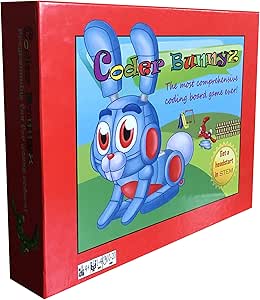 | Best for Young Beginners | Players: 4 | Recommended age: 4 years and up | Minimum age listed: 36 months | VIEW LATEST PRICE | See Our Full Breakdown |
| ThinkFun Code Master Programming Logic Game |  | Best Solo Logic Puzzles | Players: 1 | Recommended age: 8 years and up | Levels: 60 | VIEW LATEST PRICE | See Our Full Breakdown |
| MatataStudio Game Box: 5 Programming Board Games for Coding Set |  | Best Add-On for MatataStudio Owners | Product type: Educational STEM add-on | Compatibility: MatataStudio Coding Set and Coding Set Pro | Games included: 5 | VIEW LATEST PRICE | See Our Full Breakdown |
| ThinkFun Hacker Cybersecurity Coding Board Game, Ages 10+ |  | Best for Older Cybersecurity Fans | Recommended age: 10 years and up | Challenges: 120 | Included components: Game grid, control panel, challenge booklet, agent tokens, movement and revolving platform tiles, transaction tiles and tokens, data file tokens, exit point tokens, virus token, alarm token, lock tokens, solution booklet | VIEW LATEST PRICE | See Our Full Breakdown |
| X-Code Cooperative Strategy Board Game – 2‑8 Players, Ages 8+ |  | Best for Fast Cooperative Play | Players: 2–8 | Age range: 8 years and up | Estimated playing time: 3 minutes | VIEW LATEST PRICE | See Our Full Breakdown |
| Learning Resources Code & Go Mouse Mania Board Game |  | Best for Young Coding Beginners | Players: 2–4 | Recommended age: 5–8 years | Game type: STEM coding board game | VIEW LATEST PRICE | See Our Full Breakdown |
| CoderMindz AI and Coding Board Game for Kids Ages 6+ |  | Best for AI and Coding Concepts | Recommended age: 6 years and up | Listed number of players: 11 | Genre: Strategy | VIEW LATEST PRICE | See Our Full Breakdown |
| Into the Machine Robot Racing Strategy Board Game |  | Best for Tactical Robot Racing | Players: 2–5 | Recommended age: 14 years and up | Playing time: 45–60 minutes | VIEW LATEST PRICE | See Our Full Breakdown |
| Robo Rally Strategy Board Game |  | Best Overall for Robot Programming | Players: 2–6 | Recommended age: 12 years and up | Estimated playing time: 45 minutes | VIEW LATEST PRICE | See Our Full Breakdown |
| Hi-Q Code Breaker Board Game for Two Players, Ages 8+ |  | Best for Head-to-Head Deduction | Players: 2 | Recommended age: 8+ years | Code length: 5 colors | VIEW LATEST PRICE | See Our Full Breakdown |
| programming-themed board game | Recommended age | Players | Included components |
|---|---|---|---|
| CoderMarz Educational Board Ga | 6 years and up | 2–4 | — |
| Coder Bunnyz STEM Coding Board | 4 years and up | 4 | Game board, rule book, four instruction-card decks, game element tokens, bunny tokens, destinations, Bug Fixit! pieces, carrots, fences, puddles, die |
| ThinkFun Code Master Programmi | 8 years and up | 1 | — |
| MatataStudio Game Box: 5 Progr | 4–10 years | — | Two double-sided exploration maps, 28 paper cards, six paper crafts, seven building blocks, user guide, cloth bag, die |
| ThinkFun Hacker Cybersecurity | 10 years and up | — | Game grid, control panel, challenge booklet, agent tokens, movement and revolving platform tiles, transaction tiles and tokens, data file tokens, exit point tokens, virus token, alarm token, lock tokens, solution booklet |
| X-Code Cooperative Strategy Bo | — | 2–8 | 12 Time Cards, 3-minute timer, 48 Code Cards, 6 Wild Cards, game board |
| Learning Resources Code & Go M | 5–8 years | 2–4 | Game board, coding cards, player pieces, maze obstacles, and cheese wedges |
| CoderMindz AI and Coding Board | 6 years and up | — | — |
| Into the Machine Robot Racing | 14 years and up | 2–5 | — |
| Robo Rally Strategy Board Game | 12 years and up | 2–6 | — |
| Hi-Q Code Breaker Board Game f | 8+ years | 2 | Board with built-in storage tray, 192 code pegs, 60 key pegs, 2 player pegs |
More Details on Our Top Picks
CoderMarz Educational Board Game: Mars, Coding, and Artificial Intelligence
Mars exploration, coding, and artificial intelligence give CoderMarz a broader science theme than Coder Bunnyz, which focuses on guiding tokens through a maze. Its astronaut setting can help children connect programming ideas such as loops, functions, conditionals, and algorithms to a shared mission, while AI training and prediction add another layer beyond basic sequencing. The game supports 2–4 players, making it a better fit for family or small-group play than ThinkFun Code Master, which is designed for solo puzzle-solving. The tradeoff is that its wide subject mix may suit children more interested in space than players looking for a focused progression of programming puzzles. It is listed for ages 6 and up, so it is less suited to the youngest learners in this roundup.
Pros:- Combines Mars exploration, coding, and artificial intelligence in one theme.
- Introduces loops, functions, conditionals, algorithms, AI training, and prediction.
- Supports 2–4 players for family or group activities.
- Needs no batteries.
Cons:- Its mix of space science, coding, and AI may be less focused than a dedicated programming puzzle game.
- The listed age range starts at 6, limiting its fit for younger children.
- Components include cardboard and plastic.
Best for: Families or small groups with children 6 and up who want coding concepts paired with Mars exploration and introductory AI ideas.
Not ideal for: Buyers seeking a focused, solo sequence of coding puzzles, or children younger than the listed 6+ age range.
- Players:2–4
- Recommended age:6 years and up
- Genre:Educational
- Game mechanics:Area control, cooperative, deck building
- Educational objectives:Mars facts, coding, artificial intelligence
- Materials:Cardboard, plastic
- Batteries required:No
- Edition:Standard Edition
Our verdict“Choose CoderMarz for a small group of young learners who are drawn to Mars and AI as much as to coding.”
Coder Bunnyz STEM Coding Board Game
For a child just starting to think in instructions, Coder Bunnyz turns programming into a visible maze problem: players use cards to guide bunny tokens, collect carrots, and reach destinations. Its 13 levels introduce ideas from loops and conditionals to lists, stacks, and queues, giving it a wider stated concept range than the younger-child focus of CoderMarz. The age listing begins at 4, and no prior coding knowledge is required, which makes it an approachable family or classroom choice. The tradeoff is setup and rule handling: four instruction-card decks and a large collection of tokens and obstacles take more organization than ThinkFun Code Master’s single-player puzzle format. The product data also gives both “4 years and up” and a 36-month minimum age, so buyers should follow the more cautious listed age guidance.
Pros:- Uses a physical maze to make instruction sequencing easy to see.
- Includes 13 levels and concepts ranging from loops to lists, stacks, and queues.
- Requires no prior coding experience.
- Includes components for up to four players.
Cons:- Multiple decks, tokens, fences, and other pieces add setup and cleanup.
- The age information is inconsistent, listing both 4 years and up and a 36-month minimum.
- Its plastic components and guided maze format may appeal less to children seeking open-ended strategy.
Best for: Parents and educators introducing programming ideas to children around age 4 and up through shared, hands-on maze play.
Not ideal for: Families wanting a quick, low-setup game or a clearly consistent age recommendation; its many pieces and card decks need sorting and guidance.
- Players:4
- Recommended age:4 years and up
- Minimum age listed:36 months
- Levels:13
- Included components:Game board, rule book, four instruction-card decks, game element tokens, bunny tokens, destinations, Bug Fixit! pieces, carrots, fences, puddles, die
- Material:Plastic
- Genre:Educational, fantasy
- Edition:Standard Edition
Our verdict“Pick Coder Bunnyz when young beginners need a hands-on introduction and an adult can help manage the many pieces.”
ThinkFun Code Master Programming Logic Game
ThinkFun Code Master is the clearest solo-puzzle pick in this group: players plan a sequence of actions to collect power crystals across 60 progressively challenging levels. That format gives it a tighter focus on sequencing, conditional logic, and planning than Coder Bunnyz, whose maze play is built around multiple players and a broader set of learning concepts. Ten maps and tokens for actions and conditionals provide structured variation without requiring a second player, making it practical for independent problem-solving. The tradeoff is exactly that solo emphasis: it offers less shared play than CoderMarz or Coder Bunnyz, so it is a weaker choice for a family looking to solve challenges together. Its 8+ age listing also places it beyond the youngest beginner games here.
Pros:- Provides 60 levels that progress from beginner to expert.
- Focuses on sequential reasoning, planning, and programming logic.
- Single-player design works for independent activity.
- Includes maps, guide scrolls, action tokens, and conditional tokens.
Cons:- Designed for one player, limiting cooperative or family play.
- The 8+ age recommendation excludes younger learners targeted by Coder Bunnyz.
- Puzzle progression may feel less social than the group play in CoderMarz.
Best for: Children 8 and up who enjoy independent puzzles and want a structured progression in programming logic and planning.
Not ideal for: Families seeking a multiplayer coding game or buyers choosing for children under the listed 8+ age range.
- Players:1
- Recommended age:8 years and up
- Levels:60
- Maps:10
- Guide scrolls:12
- Action tokens:12
- Conditional tokens:8
- Materials:Cardboard, plastic
- Language:English
Our verdict“Choose Code Master for an older child who prefers working through programming puzzles alone rather than playing a group game.”
MatataStudio Game Box: 5 Programming Board Games for Coding Set
Five distinct activities make this the variety pick, with games including Treasure Hunt on Grassland, Rescue Sheep, Push Box Competition, and Matata Aeroplane Chess. That range can give children more ways to practice collaboration and logical thinking than the single maze structure of Coder Bunnyz. But this is not a standalone alternative: it is an add-on for the MatataStudio Coding Set or Coding Set Pro, so the value of the box depends on already owning compatible equipment. Its 4–10 age range is broad, while the included maps, paper cards, crafts, blocks, and guide support tabletop activities. Compared with ThinkFun Code Master, it favors varied group-style play over a defined solo ladder of 60 puzzles; buyers seeking a self-contained coding game should skip it.
Pros:- Includes five different programming-themed activities.
- Offers varied maps, cards, crafts, and building blocks.
- Designed to encourage collaboration, logical thinking, and critical thinking.
- Includes a user guide for family or school use.
Cons:- Requires a compatible Coding Set or Coding Set Pro to use as intended.
- It is an add-on rather than a complete standalone game.
- Its varied activity format does not provide the same clearly stated level progression as Code Master.
Best for: Families and educators who already own a MatataStudio Coding Set or Coding Set Pro and want more tabletop activities for children ages 4–10.
Not ideal for: First-time buyers without a compatible MatataStudio set, or anyone seeking a complete standalone board game.
- Product type:Educational STEM add-on
- Compatibility:MatataStudio Coding Set and Coding Set Pro
- Games included:5
- Game names:Treasure Hunt on Grassland; Rescue Sheep; Matata Football Competition; Push Box Competition; Matata Aeroplane Chess
- Recommended age:4–10 years
- Included components:Two double-sided exploration maps, 28 paper cards, six paper crafts, seven building blocks, user guide, cloth bag, die
- Play activity:Tabletop
- Color:Multicolor
Our verdict“Buy the Game Box only if you already have a compatible MatataStudio set and want more variety for young learners.”
ThinkFun Hacker Cybersecurity Coding Board Game, Ages 10+
Hacker gives programming play a cybersecurity frame, asking players to work through challenges involving a game grid, control panel, tokens, and tiles. Its 120 challenges, ranging from beginner to expert, offer a longer challenge track than Code Master’s 60 levels, while its stated focus on spatial reasoning, planning, and core programming skills suits older puzzle fans. The theme helps distinguish it from CoderMarz, which pairs coding with Mars exploration and AI rather than cybersecurity. The tradeoff is a higher entry age: it is listed for ages 10 and up, making it a poor fit for younger children attracted to Coder Bunnyz or MatataStudio’s age range. Players also need to track multiple tokens and tiles, so this is better for patient puzzle-solvers than anyone after a quick, social party-style game.
Pros:- Includes 120 challenges with difficulty ranging from beginner to expert.
- Uses a cybersecurity theme to set it apart from space- and maze-based coding games.
- Encourages logical and spatial reasoning, planning, and programming skills.
- Includes a challenge booklet and solution booklet.
Cons:- The 10+ age recommendation makes it less suitable for younger coding beginners.
- The many tokens and tiles require attention to setup and piece handling.
- Its challenge-focused format offers less emphasis on group play than CoderMarz.
Best for: Players age 10 and up who enjoy solo logic challenges and want programming concepts presented through a cybersecurity theme.
Not ideal for: Younger children, players who prefer group conversation over puzzle-solving, or buyers seeking a simple game with few pieces.
- Recommended age:10 years and up
- Challenges:120
- Included components:Game grid, control panel, challenge booklet, agent tokens, movement and revolving platform tiles, transaction tiles and tokens, data file tokens, exit point tokens, virus token, alarm token, lock tokens, solution booklet
- Materials:Cardboard, plastic
- Edition:Standard Edition
- Model number:1920
- Warranty:No manufacturer warranty
Our verdict“Choose Hacker for an older child who wants a substantial, cybersecurity-themed puzzle sequence and is comfortable managing multiple pieces.”
X-Code Cooperative Strategy Board Game – 2‑8 Players, Ages 8+
X-Code makes coding-adjacent problem solving a shared, timed challenge: players cooperate to crack codes and finish missions before a three-minute timer runs out. Its ten progressively harder levels give families a clear path from introductory rounds to tougher teamwork, while the illustrated rules and online tutorial lower the barrier to starting. Compared with Robo Rally, which asks players to program individual robot moves and adapt to a busy factory board, X-Code emphasizes communication and quick group decisions rather than detailed programming sequences. That makes it a better fit for lively family or classroom sessions, but less suited to players seeking a deep simulation of writing or debugging code. The short timer brings energy, though it can feel stressful, and the limited set of levels may constrain replay once a group has completed them.
Pros:- Cooperative play makes communication and joint problem solving central.
- Three-minute rounds suit groups with limited play time.
- Ten levels increase the challenge as players gain confidence.
- Illustrated rules and an online tutorial help new groups get started.
Cons:- The timer may pressure players who prefer a slower pace.
- Replay variety may narrow after players finish the ten missions.
- The code-cracking theme offers less direct robot-programming practice than Robo Rally.
Best for: Families or youth groups who want a cooperative, quick-playing introduction to code-breaking and shared problem solving for up to eight players.
Not ideal for: Players looking for detailed programming mechanics, relaxed turn planning, or extensive replay content after finishing the ten levels.
- Players:2–8
- Age range:8 years and up
- Estimated playing time:3 minutes
- Game mechanic:Cooperative
- Missions:10 progressively harder levels
- Included components:12 Time Cards, 3-minute timer, 48 Code Cards, 6 Wild Cards, game board
- Dimensions:7.5 × 2.63 × 10.75 inches
- Weight:1.2 pounds
Our verdict“Choose X-Code for short, energetic cooperative sessions, but pick Robo Rally if you want players to program robot movement in more detail.”
Learning Resources Code & Go Mouse Mania Board Game
Code & Go Mouse Mania is the most age-accessible pick in this group, using coding cards to send pieces through a maze, around obstacles, and toward cheese. Children practice sequencing and planning by arranging commands before moving, so the screen-free format turns an abstract coding idea into a visible route. Compared with CoderMindz, which introduces broader topics such as loops, functions, and artificial intelligence, Mouse Mania keeps its focus narrower and more concrete; that simplicity suits early learners but gives older children less conceptual range. Its 2–4 player format works for a small family or classroom table, although the command-and-plan structure still asks children to follow instructions carefully. This is an entry point, not a deep programming game, and the listed age range of 5–8 means it may lose appeal as children seek more complex challenges.
Pros:- Coding cards make sequencing visible and hands-on.
- Maze obstacles give children a clear problem to solve with each route.
- Screen-free play supports use at home or in a classroom.
- Two to four players can plan and play together.
Cons:- The age range and simple maze focus may limit appeal for older children.
- Players need to follow commands and plan sequences, which can frustrate some younger learners.
- It covers fewer programming concepts than CoderMindz.
Best for: Parents and early-elementary educators seeking a screen-free first activity in sequencing for children ages 5–8, with room for a few players to participate.
Not ideal for: Older children or adults wanting advanced coding ideas, a longer strategic game, or play for groups larger than four.
- Players:2–4
- Recommended age:5–8 years
- Game type:STEM coding board game
- Core concepts:Sequencing, strategy, and problem solving
- Included components:Game board, coding cards, player pieces, maze obstacles, and cheese wedges
- Model number:LER2863
- Manufacturer:Learning Resources
- Warranty:No manufacturer warranty
Our verdict“Choose Mouse Mania for a young child’s first hands-on sequencing game; choose CoderMindz when the learner is ready for a broader set of coding and AI concepts.”
CoderMindz AI and Coding Board Game for Kids Ages 6+
CoderMindz reaches beyond basic movement commands, linking robot-themed play to ideas such as image recognition, training, inference, loops, functions, conditionals, and algorithms. That breadth makes it a stronger fit for parents or educators who want a discussion starter about how coding and AI work, rather than only a route-planning activity. Compared with Code & Go Mouse Mania, it offers a much wider concept list, but the added scope may be harder for younger players to grasp without adult guidance. The product description also mentions a downloadable curriculum, which could help teachers connect play to a lesson; its stated limited availability makes that support less dependable as a long-term resource. The player-count data is unclear: the listing says 11, so groups should verify how that figure works before choosing it for a specific table or classroom.
Pros:- Covers AI ideas including image recognition, training, and inference.
- Introduces loops, functions, conditionals, and algorithms.
- Designed for home, school, and club settings.
- A downloadable curriculum is described as available.
Cons:- The listed player count of 11 is difficult to interpret.
- The curriculum is described as available for a limited time.
- Its broad concept list may require adult explanation for younger children.
Best for: Parents, teachers, and club leaders who want a robot-themed game to introduce children ages 6 and up to both programming vocabulary and introductory AI ideas.
Not ideal for: Buyers who need a clearly documented player limit, a guaranteed long-term curriculum resource, or a very simple first sequencing game.
- Recommended age:6 years and up
- Listed number of players:11
- Genre:Strategy
- Educational objective:Teach artificial intelligence and computer programming concepts
- Concepts described:Image recognition, training, inference, loops, functions, conditionals, and algorithms
- Operation mode:Manual
- Dimensions:11.8 × 9.1 × 2 inches
- Weight:2.3 pounds
Our verdict“Choose CoderMindz for a broad introduction to AI and coding, but pick Code & Go Mouse Mania for a simpler and more clearly scoped first lesson in sequencing.”
Into the Machine Robot Racing Strategy Board Game
Into the Machine puts worker placement alongside robot racing: players use a pit crew to operate terminals and maneuver circle-bots and hex-bot teammates through a two-way relay race. The variable board setups change the route, while the terminal actions give turns more strategic texture than a straightforward race. Compared with Robo Rally, which centers on programming robots with cards to traverse factory hazards, this game leans more on team movement and worker placement; choose it for tactical choices across a longer session, not for the clearest simulation of programming instructions. A 45–60-minute play time and recommended age of 14+ also make it less convenient for younger family groups than X-Code. The listing gives conflicting age guidance, with product details stating 10+ and manufacturer information stating 14+, so I would check the intended edition information before buying for younger players. Separate mini expansions add further races and gadgets.
Pros:- Combines tactical racing with worker placement and action combinations.
- Variable board setups change the challenges between games.
- Supports groups of up to five players.
- Two robot types and relay-style racing give the theme a distinctive structure.
Cons:- Age guidance conflicts between product details and manufacturer information.
- The 45–60-minute session is longer than quick introductory options such as X-Code.
- Additional races and gadgets are available through separate mini expansions.
Best for: Strategy-game groups ages 14 and up who enjoy worker placement, changing board layouts, and a longer robot-racing session for two to five players.
Not ideal for: Younger families, players seeking direct programming-card mechanics, or buyers who need unambiguous age guidance without checking the edition.
- Players:2–5
- Recommended age:14 years and up
- Playing time:45–60 minutes
- Game type:Robot racing, worker placement, strategy
- Board setup:Variable
- Designer:Kasper Lapp
- Material:Plastic
- Brand and model:AEG, AEG-1014
Our verdict“Choose Into the Machine for a longer, worker-placement take on robot racing, but pick Robo Rally if programming robot instructions is your priority.”
Robo Rally Strategy Board Game
Robo Rally is the strongest match for the programming-themed brief: players use personal card decks to plan robot movements through a factory, then contend with hazards, checkpoints, and other robots. That programming-card system makes anticipation and adaptation part of the race, while four double-sided boards allow more than 80 course combinations. Compared with Into the Machine, which layers worker placement onto team racing, Robo Rally puts programmed movement closer to the center of play. It also supports up to six players, more than Into the Machine’s five, though its 45-minute session and many card and component types ask more of the group than quick games such as X-Code. The depth brings a learning cost: players need to manage several kinds of cards and components, and age guidance differs between the listing and manufacturer information (12+ versus 14+).
Pros:- Programming-card play connects planning with tactical adaptation.
- More than 80 course combinations give the factory boards substantial layout variety.
- Six pre-painted robot figures are ready for play.
- Supports two to six players.
Cons:- Multiple card types and components create more rules and tracking than beginner games.
- Age guidance differs between the listing and manufacturer information.
- A 45-minute session may not suit groups looking for a short activity.
Best for: Families with older children, hobby gamers, and groups of two to six who want robot racing built around planning movement with programming cards.
Not ideal for: Young children, players seeking a quick and simple introduction, or groups who dislike tracking several card types and components.
- Players:2–6
- Recommended age:12 years and up
- Estimated playing time:45 minutes
- Course combinations:Over 80
- Robot figures:6 pre-painted miniatures
- Factory gameboards:4 double-sided
- Programming cards:120 cards across 6 decks of 20
- Edition and model:Standard Edition, RGS02576
Our verdict“Choose Robo Rally for the roundup’s clearest blend of robot racing and programmed movement, provided your group is ready for a more involved game.”
Hi-Q Code Breaker Board Game for Two Players, Ages 8+
Hi-Q Code Breaker earns its place for turning programming-adjacent logic into a direct contest: one player sets a secret five-color sequence, and the other uses color-and-position clues to narrow it down. With more than 2,000 possible codes and up to 30 attempts, the puzzle can reward careful deduction without requiring prior coding knowledge. Compared with ThinkFun Code Master, which focuses on solo programming logic, this game makes reasoning social and competitive. That simplicity also limits its reach: it is built for exactly two players and does not teach commands, sequencing, or code execution. The built-in peg storage helps keep the small pieces together, though the pegs can still be misplaced. Choose it for focused parent-child or sibling play, not for a group activity or a broad introduction to programming.
Pros:- Color-and-position clues give players a clear, repeatable deduction challenge.
- More than 2,000 possible codes support replay with different puzzles.
- Turn-taking makes it easy for a child and adult to play together.
- Built-in storage tray helps contain the pegs between games.
Cons:- Designed for exactly two players, limiting use at larger game nights.
- Small pegs can be lost, despite the storage tray.
- The focus is code-breaking deduction rather than programming mechanics.
Best for: Two-player households seeking a straightforward logic challenge for children aged eight and up to play with an adult or sibling.
Not ideal for: Families wanting a group game, a solo puzzle, or hands-on practice with programming concepts such as commands and sequences.
- Players:2
- Recommended age:8+ years
- Code length:5 colors
- Possible code combinations:More than 2,000
- Codebreaker attempts:Up to 30
- Included components:Board with built-in storage tray, 192 code pegs, 60 key pegs, 2 player pegs
- Code peg colors:Green, orange, white, blue, red, pink, grey, yellow
- Material:Plastic
- Board dimensions:14 x 6 x 1 inches
Our verdict“Choose Hi-Q Code Breaker for compact, two-player deduction play; choose Code Master instead if you want a solo puzzle built around programming logic.”

How We Picked
I compared the 11 games by how clearly play connects to programming concepts, including sequencing, logic, debugging, and strategy. I also weighed age fit, player count, opportunities for independent or cooperative play, replay potential, and how much explanation a family may need before the game gets going. A coding-themed name alone was not enough: the strongest placements go to games with a clear connection between player decisions and computational thinking.
The ranking favors broad usefulness first, then distinct strengths for particular ages, group sizes, or subject interests. That puts Code Master ahead for its focused logic-puzzle role, while X-Code and Robo Rally rank for very different social experiences. Games with a narrower audience or a specialized theme sit lower, not because they lack appeal, but because they suit fewer kinds of buyers. I treated product details and stated age ranges as selection cues, rather than assuming that every child in an age band will find the same level of challenge comfortable.
Factors to Consider When Choosing Programming-themed Board Games
The best choice depends less on the word “coding” on the box and more on the kind of thinking and play your household wants. These factors can help you choose a game that gets used, rather than one that sounds educational but misses your group’s needs.
Choose the Learning Goal Before the Theme
Games in this roundup connect to programming in different ways: some emphasize sequences and logic, while others frame decisions through robotics, AI, or cybersecurity. Decide whether you want a direct introduction to programming-style problem solving or a game that uses a tech subject as its setting. A focused puzzle can make cause and effect easier to see, but it may offer less conversation and variety than a theme-led group game. A broad STEM theme can invite curiosity without teaching coding concepts in depth. Avoid choosing from the box title alone; check how players actually make decisions. If your learner already knows basic sequences, a new setting or strategic twist may hold attention better than another introductory exercise.
Match Challenge to the Player, Not Just the Age Label
Age guidance is a starting point, not a guarantee that a game will feel easy or engaging. Reading load, ability to follow multi-step rules, patience with puzzles, and comfort with abstract instructions all affect the experience. A younger child may enjoy moving pieces and solving short challenges but lose interest when a game depends on extended planning. An older beginner may want meaningful choices rather than activities that feel designed for much younger players. When possible, look for clear examples of the game’s core task before buying. Picking a game that is slightly approachable can help a family play together; picking one far below a learner’s level can make the coding theme feel superficial.
Decide Whether Play Should Be Solo, Cooperative, or Competitive
Player interaction changes the lesson as much as the rules do. A solo logic game gives a learner room to pause, retry, and spot mistakes without pressure, while a cooperative game turns planning into a shared conversation. Competitive robot games can make consequences memorable, but they may reward quick reactions and tactical disruption as much as careful programming. Think about how your group handles mistakes and disagreements before choosing a format. For siblings or classroom groups, cooperation can keep one confident player from taking over, though it still helps when the game gives each person a meaningful role. For a solo learner, check that the game has a satisfying individual mode rather than relying on a full table.
Look at Replay Value and Variety
A game built around a fixed set of puzzles may be useful for repeated practice, but its appeal can fade once the challenges become familiar. Games with changing board layouts, player choices, or varied modes may stay interesting longer, though their rules can take more effort to teach. Multi-game sets promise variety, but buyers should ask whether each activity will suit the same age and attention span. A single focused game can be the better fit when a learner wants to master one kind of problem. Consider who will reset the game and whether setup feels manageable for ordinary play sessions. A theoretically rich box is poor value for your household if its format makes it difficult to bring to the table.
Check Group Size, Play Time, and Adult Support
Before choosing, picture the actual setting: a short one-on-one session, a family game night, or a classroom station with several children waiting to play. Player counts influence whether a game supports quiet practice or active group discussion, while turn structure affects how long anyone waits. Younger players may need an adult to read instructions, model a first move, or help recover from a mistake; that can be a benefit if you want shared learning, but a burden if the game needs to run independently. Check the listed player count and instructions rather than assuming a coding game is automatically suitable for a class. For regular use, choose a format that fits the time and supervision you can provide. This practical match often matters more than a long feature list.
Pay for the Experience You Will Use
More components, multiple activities, or a polished theme do not automatically create a better learning fit. Paying more makes sense when the extra variety, group play, or subject matter directly supports how your family plans to use the game. A compact logic game may be a stronger choice than a larger box if the goal is occasional, focused practice. Conversely, a group that wants changing challenges may benefit from a game with wider replay options. Check whether the game’s appeal depends on adult facilitation, since that affects its practical value after the first play. Prioritize repeated use and a good fit over the amount of material included.
Frequently Asked Questions
Which game is the best choice for teaching programming logic rather than just using a tech theme?
ThinkFun Code Master is the clearest starting point in this roundup for focused programming-style logic. Its role is more about solving structured problems than joining a broad technology-themed adventure. If the learner is drawn to cooperation, X-Code offers a different route through shared planning; it is less of a direct solo puzzle experience. For a competitive group, Robo Rally makes programmed actions visible through movement and changing outcomes. Decide whether the learning goal is careful individual reasoning or applying plans in a social game. That distinction will matter more than which box uses the most technical vocabulary.
Which options are most suitable for a child who is new to coding?
Code & Go Mouse Mania and CoderMindz are aimed at younger learners, while Code Master provides a more focused logic-puzzle route for children ready for that style of challenge. A child’s reading comfort and patience with multi-step instructions matter as much as the age guidance. If the child enjoys moving pieces and concrete tasks, a game with visible actions may be easier to approach than abstract puzzle rules. An adult can make an introductory game more useful by asking the child to predict what a sequence will do before trying it. Pick the simplest format the learner will still find engaging, rather than assuming the youngest target age is automatically the easiest experience.
Can one game work for both solo practice and family game night?
Not every programming-themed board game serves both purposes equally well. A focused logic game is often easier to play alone, while cooperative and competitive options gain much of their appeal from other players. If you want one box for both settings, check whether its individual challenges remain satisfying without a group and whether the multiplayer rules give everyone a real role. Code Master and X-Code represent different strengths here: one emphasizes individual problem solving, the other shared strategy. A family can also prefer different games for different occasions rather than expecting a single box to meet every need. Make the player count and play format part of the decision before settling on a theme.
Should I choose a game about AI or cybersecurity over a general coding game?
Choose by the learner’s curiosity and your intended outcome. CoderMarz and CoderMindz bring AI into the theme, while ThinkFun Hacker focuses on cybersecurity; these can be engaging entry points for children already interested in those subjects. A general logic game is usually a more direct match if the main goal is sequencing and problem solving. Specialized themes can prompt useful discussion, but a subject label alone does not tell you how much programming practice happens during play. Check whether the actual decisions fit the learner’s skill level and interest. If you want both subject exploration and coding fundamentals, treat them as complementary rather than interchangeable choices.
What should I choose for a group with mixed ages or different experience levels?
Start with the youngest player who will participate regularly, then check whether older or more experienced players still get meaningful decisions. Cooperative games such as X-Code can give a mixed group a shared goal, though adults may need to avoid solving every challenge for children. Competitive games can suit groups that enjoy changing outcomes, but differences in reading ability or strategic experience may affect fairness. A set with multiple activities, such as MatataStudio Game Box, may offer more ways to match different sessions, though variety does not automatically mean every activity fits every player. For a classroom or family group, consider turn waiting and adult support alongside the age range. A short trial session, where available, can reveal more than selecting by age label alone.
Conclusion
For the broadest match, I recommend ThinkFun Code Master as best overall for focused programming logic. MatataStudio Game Box is my best value-style pick for variety if your household wants several programming activities in one set, while Robo Rally is the best premium-style choice for a lively strategy experience when your group enjoys competitive play. For younger beginners, start by comparing Code & Go Mouse Mania with CoderMindz and match the format to the child’s comfort with instructions and abstract ideas. Choose X-Code for cooperative group planning, ThinkFun Hacker for cybersecurity interest, or CoderMarz for an AI-and-Mars theme. The right pick is the one whose style of thinking, player format, and level of challenge your group will return to.