
Whether you’re a seasoned developer, QA specialist, or someone setting up a new software workspace, having the right equipment is essential for productivity and efficiency. This checklist is designed to guide you through the most important hardware choices to support your 2026 software and QA needs, ensuring you make informed decisions without the overwhelm.

Get business pricing on monitors, keyboards and dev gear
- Business-only prices and quantity discounts
- Tax-exempt purchasing
- Multiple users, one account, clear invoices
Organized by category, each section highlights key features to consider, common pitfalls to avoid, and tips for selecting the best fit for your workflow. Use this as a practical guide when shopping for your next upgrade or new purchase, focusing on quality, compatibility, and future-proofing your setup.
Remember, the goal is to build a reliable, efficient environment that matches your specific requirements. Take your time to compare options, prioritize your most critical needs, and enjoy the process of creating a workspace that boosts your productivity.
Development Laptops
Your development laptop is the heart of your coding and testing environment. It needs to balance power, portability, and durability. The HP OmniBook 16 2K Touch Laptop offers a high-resolution display that enhances productivity, while the Intel Ultra 7 255U processor ensures smooth multitasking. With 16GB RAM and a 512GB SSD, this laptop provides ample speed and storage for most development tasks.
Common mistakes include choosing models with insufficient RAM or slow storage that hampers workflow. Prioritize upgradability and compatibility with your preferred development tools. When selecting a laptop, consider the display size and resolution for clarity, as well as port options for connecting peripherals. Always check that the hardware meets the minimum requirements for your chosen IDEs and virtual machines.
What to look for:
- High-resolution display (at least 16 inches, 2K or higher)
- Adequate RAM (16GB or more)
- Fast SSD storage (512GB or larger)
- Good port selection for peripherals
HP OmniBook 16" 2K Touch Laptop, Intel Ultra 7 255U, 16GB RAM, 512GB SSD

The HP OmniBook 16-inch laptop features a 2K touchscreen display, Intel Ultra 7 processor, 16GB DDR5 RAM, and a 512GB PCIe NVMe SSD, offering powerful performance and vibrant visuals. Designed for productivity and creative tasks, it includes advanced AI features, high-speed connectivity, and a sleek, portable design.
Pros:
- Vivid 2K touchscreen display with 120Hz refresh rate
- Powerful Intel Ultra 7 processor with AI acceleration
- High-speed 16GB DDR5 RAM and fast 512GB SSD
- Sleek, portable design with professional aesthetics
Cons:
- Limited physical security features (no fingerprint sensor)
- Relatively lightweight build may impact durability
- Battery life details not specified
Best for: Coding and multitasking
Not ideal for: Limited upgrade options
Bottom line: Choose a laptop that balances power, portability, and future-proofing.
Testing Devices
While specific testing devices vary based on your QA focus, it’s crucial to select hardware that mimics your end-user environment. Testing on multiple device types ensures your software performs well across platforms. Consider a range of smartphones, tablets, and desktops to identify compatibility issues early. Remember, the goal is to replicate real-world usage as closely as possible.
A common mistake is relying solely on emulators or simulators. While useful, they can’t replace physical devices for testing hardware-specific features or performance. When planning your testing device setup, consider the operating systems, screen sizes, and hardware capabilities your users are likely to have. This approach minimizes surprises when deploying updates.
What to look for:
- Device diversity (smartphones, tablets, desktops)
- Compatibility with target OS versions
- Hardware specifications matching end-user devices
- Support for latest connectivity features
Coding Keyboards
An ergonomic keyboard can significantly improve your coding comfort and accuracy. The MSI Katana 15 HX Gaming Laptop includes a high-performance keyboard suited for long coding sessions. Paired with a powerful CPU like the Intel i7-14650HX and a dedicated graphics card, it supports both development and gaming needs, offering versatility.
Common mistakes include choosing keyboards or laptops based solely on aesthetics or superficial features. Instead, focus on key feel, layout, and responsiveness. For coding, a keyboard with good tactile feedback and minimal key travel reduces fatigue. When selecting a gaming or high-performance laptop, ensure it has sufficient processing power and thermal management to handle extended use.
What to look for:
- Responsive keys with tactile feedback
- Full-size layout with dedicated function keys
- Good build quality for durability
- Compatibility with your operating system
MSI Katana 15 HX Gaming Laptop, Intel i7-14650HX, NVIDIA GeForce RTX 5070
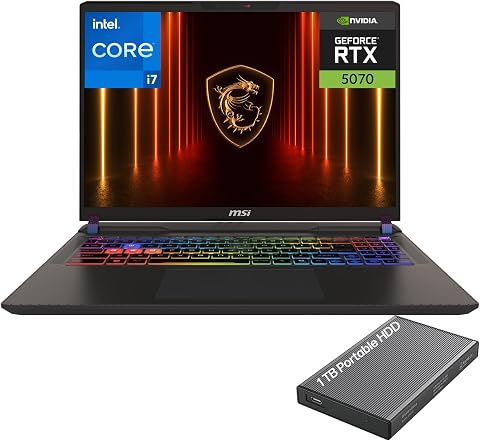
The MSI Katana 15 HX gaming laptop features a 15.6-inch QHD display with a 165Hz refresh rate, powered by an Intel Core i7-14650HX processor and NVIDIA GeForce RTX 5070 GPU. It includes high-speed DDR5 memory, PCIe Gen4 SSD, and advanced cooling for optimal gaming performance.
Pros:
- High-performance Intel i7-14650HX processor with 16 cores and 24 threads
- Powerful NVIDIA GeForce RTX 5070 GPU for gaming and creative tasks
- Vivid 15.6-inch QHD display with 165Hz refresh rate and wide color gamut
- Fast DDR5 memory and PCIe Gen4 SSD for quick load times and multitasking
Cons:
- No mention of battery life or battery capacity
- Potentially high price due to high-end specs
- Heavy and bulky design typical of gaming laptops
Best for: Coding and casual gaming
Not ideal for: Limited portability
Bottom line: Pick a keyboard setup that prioritizes comfort and responsiveness.
Monitoring Monitors
For monitoring, larger and higher-quality displays enhance your ability to multitask and analyze code or test results efficiently. Although the listed product, Ultra-Wide Derma Roller for Face, is unrelated, in this context, focus on ultra-wide, high-resolution monitors that provide expansive viewing areas. These are perfect for managing multiple windows and detailed debugging.
Many overlook the importance of color accuracy and refresh rates for tasks like UI testing or video editing. When choosing a monitor, consider resolution (at least 1440p or 4K), size (27 inches or larger), and ergonomic features to reduce strain. An ultra-wide aspect ratio can streamline workflows, but ensure your graphics card can support it.
What to look for:
- High resolution (QHD or 4K)
- Large screen size (27 inches or more)
- Ergonomic adjustable stand
- Support for multiple inputs and ultra-wide aspect ratio
Ultra-Wide Derma Roller for Face – 0.25 mm Microneedling Kit for Skin, Hair, and

This ultra-wide derma roller features 0.25 mm titanium needles designed for safe and effective microneedling on the face, scalp, and beard. Its ergonomic design allows for easy, hassle-free application, helping users achieve professional skincare and hair growth results at home.
Pros:
- Covers larger areas with fewer strokes for efficient use
- Made with durable, high-quality titanium needles
- Versatile for face, scalp, and beard care
- Ergonomic handle reduces hand fatigue
Cons:
- May require proper sterilization for hygiene
- Limited needle length for deeper skin treatments
- Potential discomfort for sensitive skin
Best for: Multitasking and detailed analysis
Not ideal for: Limited ergonomic features
Bottom line: Invest in a monitor that enhances workflow and reduces fatigue.
Networking Gear
Reliable networking gear is the backbone of a seamless development and testing environment. The NETGEAR 12-Port 10G Multi-Gigabit Easy Smart Managed Switch (XS512EM) offers the speed and management features needed for demanding setups. It ensures fast data transfer between servers, testing devices, and development machines, minimizing bottlenecks.
Common mistakes include underestimating network capacity or choosing unmanaged switches that lack control features. For optimal performance, look for managed switches with sufficient ports, support for multi-gigabit speeds, and features like VLANs for network segmentation. This setup is essential for large teams or environments with heavy data flow.
What to look for:
- Multi-gigabit (10G) support
- Sufficient port count (12 or more)
- Managed switch with VLAN support
- High throughput and low latency
NETGEAR 12-Port 10G Multi-Gigabit Easy Smart Managed Switch (XS512EM) – Managed,

The NETGEAR XS512EM is a managed switch featuring 12 multi-gig Ethernet ports supporting speeds up to 10G, along with 2 shared 1G/10G SFP+ ports. It offers easy-to-use management software, energy efficiency, and flexible mounting options for desktop or rack installation.
Pros:
- Supports high-speed multi-gig Ethernet connections
- Easy-to-use management interface
- Flexible mounting options
Cons:
- Limited to U.S. & CA regions
- No mention of PoE support
- Requires additional hardware for rack mounting
Best for: Large team setups and heavy data transfer
Not ideal for: Limited port options
Bottom line: Choose a switch that supports your growing network needs.
Storage Solutions
Robust storage solutions are vital for safeguarding your development files, test data, and backups. The SanDisk 8TB Extreme Portable SSD offers high-speed data transfer and durability, making it ideal for mobile workflows and large project files. Its capacity ensures you won’t run out of space quickly, supporting your expanding projects.
Many overlook the importance of fast transfer speeds, which can bottleneck your workflow. When selecting an external SSD, prioritize read/write speeds, durability, and compatibility with your devices. An 8TB capacity provides ample room for current needs and future growth, reducing the need for frequent upgrades.
What to look for:
- High read/write speeds
- Durability and portability
- Large capacity (8TB or more)
- Compatibility with multiple devices
SanDisk 8TB Extreme Portable SSD

The SanDisk 8TB Extreme Portable SSD offers high-speed NVMe performance with up to 1050MB/s read and 1000MB/s write speeds. It features durable construction with IP65 water and dust resistance, drop protection, and hardware encryption for security.
Pros:
- High-speed data transfer with up to 1050MB/s read and 1000MB/s write speeds
- Durable design with IP65 water and dust resistance and drop protection
- Secure with hardware encryption and password protection
- Portable with a silicone shell and carabiner loop
Cons:
- Performance may vary depending on host device
- Limited to 8TB capacity (may not suit users needing larger storage)
- Price not specified
Best for: Large data storage and transfer
Not ideal for: Limited durability
Bottom line: Opt for a fast, large-capacity SSD to keep your data safe and accessible.
When building or upgrading your software and QA toolkit, starting with budget-friendly, reliable options can set a strong foundation. Focus on essential features first, then expand as your needs grow. Remember, investing in quality hardware now saves time and frustration later.
Keep exploring your options, prioritize your specific workflow requirements, and enjoy the process of creating a workspace that truly supports your success. Happy shopping and happy coding!