
Welcome to our 2026 QA & Development Accessories Checklist—your ultimate guide for building a productive and ergonomic workspace. Whether you’re a seasoned developer, QA tester, or a tech enthusiast setting up a new home office, this list is tailored to help you choose reliable, efficient accessories that enhance your workflow.

Get business pricing on monitors, keyboards and dev gear
- Business-only prices and quantity discounts
- Tax-exempt purchasing
- Multiple users, one account, clear invoices
This article is organized into dedicated sections, each focusing on a specific type of accessory. We’ll provide insights into why each item matters, common pitfalls to avoid, and practical tips for selecting the right fit for your needs. Use this checklist as a reference guide to make informed decisions and optimize your setup for comfort and efficiency.
Simply browse through each section, review the recommendations, and consider your unique requirements before making a purchase. Remember, the best accessories are those that seamlessly integrate into your workflow, boost productivity, and are comfortable to use over long periods.
Laptop Stands
A good laptop stand can significantly improve your posture and reduce neck strain during long coding or testing sessions. The Model-X 2.0 Laptop Stand offers adjustable height and a rotatable design, making it a versatile choice for different working environments. It’s lightweight and portable, perfect for remote work or moving between locations. When choosing a laptop stand, ensure it provides enough elevation to keep your screen at eye level and has a sturdy base for stability. Compatibility with your laptop size and weight is crucial, so check specifications before purchasing. Avoid stands that are too flimsy or don’t offer height adjustment, as they can lead to discomfort or even accidents.
Proper positioning of your laptop can prevent strain and improve overall ergonomics, making this accessory a worthwhile investment. Look for stands with good ventilation features to prevent overheating, especially if you run intensive tasks. The right stand should also be easy to assemble and adjust, fitting seamlessly into your workspace without cluttering it.
What to look for:
- Adjustable height and tilt
- Stable, non-slip base
- Lightweight and portable
- Good ventilation features
- Compatibility with your laptop size
Model-X 2.0 Laptop Stand, Adjustable Height, Portable & Rotatable

The Model-X 2.0 Laptop Stand offers adjustable height from 1.8 to 10.4 inches to promote better posture and reduce neck strain. It is lightweight, foldable, and includes a travel pouch, making it ideal for travel and desk use.
Pros:
- Adjustable height for ergonomic comfort
- Portable and foldable design with travel pouch
- Swivel base for multi-angle positioning
- Supports a wide range of laptop sizes
Cons:
- May require retuning tension over time
- Limited to laptops up to 17 inches
- Some users might find the swivel mechanism loose
Best for: Remote workers and frequent movers
Not ideal for: Static desk setups without portability needs
Bottom line: Choose a stand that promotes comfort and adaptability.
Mechanical Keyboards
The KINESIS Freestyle Edge RGB Plus split mechanical keyboard is a game-changer for typists and developers. Its ergonomic split design helps reduce wrist strain, while the customizable RGB lighting adds a personal touch to your workspace. Mechanical keyboards are preferred for their tactile feedback and durability, making them ideal for long coding sessions or QA testing. When selecting a mechanical keyboard, consider the switch type—whether you prefer tactile, linear, or clicky responses—and ensure the layout suits your workflow, including programmable keys and ergonomic features. Avoid models with poor build quality or non-standard key layouts, which can hinder productivity or cause discomfort.
Investing in a quality mechanical keyboard can improve typing speed and accuracy, especially during extended periods of use. Compatibility with your operating system and desk space is also important—look for adjustable height and wrist support options. Remember, a well-chosen keyboard enhances your overall comfort and helps prevent repetitive strain injuries over time.
What to look for:
- Tactile, linear, or clicky switches
- Customizable RGB lighting
- Ergonomic design features
- Programmable keys
- Durable build quality
KINESIS Freestyle Edge RGB Plus Split Mechanical Keyboard

The KINESIS Freestyle Edge RGB Plus is a split mechanical keyboard featuring hot-swappable linear switches, customizable RGB lighting, ergonomic design, and a detachable palm support. It is fully programmable and includes Mac keycaps and a lift kit for versatile setup options.
Pros:
- Customizable RGB lighting for personalized aesthetics
- Hotswap switches allow easy switch replacement
- Ergonomic split design reduces strain during extended use
- Fully programmable keys for tailored workflows
Cons:
- May be complex for beginners unfamiliar with mechanical keyboards
- Split design might require an adjustment period
- Potentially higher price point due to advanced features
Best for: Developers and QA testers needing precision
Not ideal for: Casual users or those with limited desk space
Bottom line: Prioritize comfort and durability for extended use.
External Monitors
While we didn’t specify a particular model, adding an external monitor is a proven way to boost productivity, especially when multitasking or managing complex projects. A larger screen or dual monitors can reduce eye strain and make it easier to view multiple windows simultaneously. When choosing an external monitor, consider factors like screen size, resolution, and connectivity options. Compatibility with your existing setup, including ports and supported standards, is essential for seamless integration. Avoid monitors with poor color accuracy or limited adjustability, which can cause eye fatigue or ergonomic issues.
Ensure the monitor has adjustable height, tilt, and swivel features to optimize your viewing angle. A high-resolution display, such as 4K or at least 1080p, will provide sharper visuals for detailed work. Also, consider energy efficiency and whether the monitor has features like flicker-free technology to reduce eye strain. Proper placement and calibration are key to creating a workspace that’s both productive and comfortable over long hours.
What to look for:
- Adequate screen size and resolution
- Multiple connectivity ports
- Adjustable stand for ergonomic positioning
- Good color accuracy
- Energy-efficient features
USB Hubs
The Belkin USB-C Hub – 6-in-1 Multi-Port Adapter Dock is an essential accessory for expanding your device’s connectivity. With a 4K HDMI port and 100W power delivery, it supports high-quality video output and fast charging, making it perfect for connecting multiple peripherals. When selecting a USB hub, look for compatibility with your device’s ports and power requirements. A hub with a variety of ports—USB-A, USB-C, HDMI, SD card reader—can streamline your workflow and reduce clutter. Avoid hubs with limited port options or poor build quality, as these can hinder performance or cause connection issues.
Ensure the hub supports the latest standards like USB 3.2 Gen 2 to maximize data transfer speeds. Compatibility with your laptop or desktop’s power delivery capabilities is also critical to avoid overloading or insufficient charging. A well-designed hub will be sturdy, compact, and easy to connect/disconnect, keeping your workspace organized and efficient.
What to look for:
- Multiple port options including HDMI and SD card slots
- Supports high data transfer speeds
- Adequate power delivery (at least 100W)
- Compatibility with your device’s ports
- Sturdy, compact design
Belkin USB-C Hub – 6-in-1 Multi-Port Adapter Dock with 4K HDMI, 100W PD Charging

This Belkin USB-C hub offers six essential ports, including HDMI, USB-A, Ethernet, SD card reader, and USB-C pass-through charging, providing versatile connectivity for laptops and tablets. It supports 4K video streaming, fast data transfer, and reliable internet, making it ideal for work and entertainment on the go.
Pros:
- Supports 4K video output at 60Hz for high-quality streaming and presentations
- Provides fast data transfer speeds up to 5Gbps
- Includes pass-through charging with 100W power delivery
- Compact and travel-friendly design
Cons:
- Limited to six ports, may not suit users needing more connections
- Requires USB-C port with Power Delivery for full functionality
- No mention of additional features like pass-through audio
Best for: Power users needing multiple device connections
Not ideal for: Basic users with minimal peripheral needs
Bottom line: Opt for a versatile hub to streamline your workspace.
Noise-Canceling Headphones
The HEAVYS H1H Wireless Over-Ear Headphones with active noise canceling are a must-have for focused work sessions. They block out distractions, allowing you to concentrate on complex tasks or enjoy immersive audio during breaks. When choosing noise-canceling headphones, consider comfort features like padded ear cups and adjustable headbands, since you’ll likely wear them for extended periods. Look for models with good battery life and reliable wireless connectivity to prevent interruptions. Avoid headphones with poor sound quality or uncomfortable fit, which can diminish your experience and lead to fatigue.
High-quality noise cancellation can significantly improve your productivity by reducing ambient noise, especially in noisy environments. Ensure compatibility with your devices and check for features like touch controls or voice assistant integration. Comfort, sound quality, and effective noise cancellation are the pillars of a great pair of headphones for work and leisure alike.
What to look for:
- Effective active noise cancellation
- Comfortable, padded ear cups
- Long battery life
- Wireless connectivity
- Good sound quality
HEAVYS H1H Wireless Over-Ear Headphones with Active Noise Cancelling, 50 Hours B
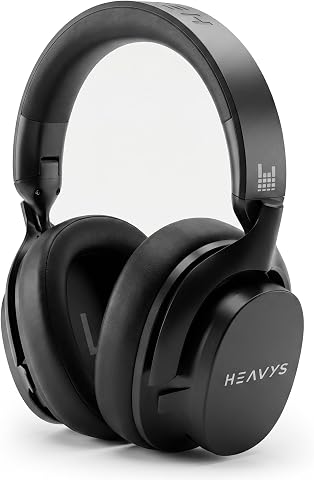
The HEAVYS H1H headphones feature an 8-speaker architecture for immersive sound with detailed layers and minimal fatigue. They offer active noise cancelling, a 50-hour battery life, and both wired and wireless connectivity for versatile listening.
Pros:
- Exceptional sound detail with 8-speaker architecture
- Long-lasting 50-hour battery life
- Comfortable, replaceable ear pads for extended wear
- Seamless switch between wired and wireless modes
Cons:
- Potentially bulky design due to multiple speakers
- Price not specified, may be expensive
Best for: Remote workers and those in noisy environments
Not ideal for: Users requiring wired-only options
Bottom line: Prioritize comfort and noise cancellation for focus.
Portable SSDs
The SanDisk 8TB Extreme Portable SSD offers massive storage capacity in a compact, durable package. Its USB-C interface and USB 3.2 Gen 2 support fast data transfer speeds, making it ideal for backing up large files, running portable applications, or transferring data on the go. When selecting a portable SSD, consider your storage needs, transfer speed requirements, and durability features like water and dust resistance. Avoid models with limited capacity or slow transfer rates, which can hinder your workflow or compromise data safety.
Ensure the device is compatible with your operating system and offers reliable connection stability. The rugged design of this model makes it suitable for frequent travel or outdoor use, providing peace of mind for your important data. A high-capacity, fast, and durable SSD is an investment in your productivity and data security, especially when working remotely or managing large datasets.
What to look for:
- High storage capacity (8TB or more)
- Fast transfer speeds (USB 3.2 Gen 2 or higher)
- Rugged, durable design
- Compatibility with your OS
- Reliable connection stability
SanDisk 8TB Extreme Portable SSD (Old Model) – USB-C, USB 3.2 Gen 2, IP65 Water

The SanDisk 8TB Extreme Portable SSD offers NVMe performance with up to 1050MB/s read speeds in a durable, portable design. It features water and dust resistance, drop protection, and password security, making it ideal for photography, videography, and travel.
Pros:
- High-speed NVMe performance with fast read/write speeds
- Durable design with water, dust, and drop resistance
- Secure password protection with hardware encryption
- Portable with carabiner loop for easy attachment
Cons:
- Performance may vary depending on host device
- Old model may lack some newer features
- Price not specified
Best for: Remote workers and data-intensive tasks
Not ideal for: Casual users with minimal storage needs
Bottom line: Opt for a robust SSD to meet your storage demands.
When building your QA & Development workspace, prioritizing ergonomic, reliable, and high-performance accessories will pay off in increased comfort and productivity. Start with your budget and essential needs, then select items that offer the best value and functionality for your workflow.
Remember, investing in quality accessories today can prevent discomfort and technical issues tomorrow. Happy shopping, and here’s to a more efficient and enjoyable work experience!
Fall Picks
fall essentials
As an affiliate, we earn on qualifying purchases.