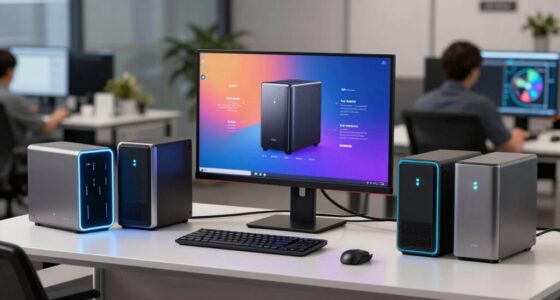

This checklist is for developers, QA professionals, and software teams looking to make focused work more comfortable and easier to organize. Use it to think through which desk and concentration tools fit your work habits before choosing anything.

Get business pricing on monitors, keyboards and dev gear
- Business-only prices and quantity discounts
- Tax-exempt purchasing
- Multiple users, one account, clear invoices
The sections follow practical desk needs: reducing distractions, choosing an input device, lighting, timed work sessions, seating support, and planning. Product picks are included where provided; the Pomodoro timer and whiteboard planner sections offer selection advice instead.
Start with the slot that addresses your biggest daily friction. Check your desk space, device connections, posture, and routines against the points in each section, then use the verdict and fit notes as a quick cross-check.
Noise-Canceling Headphones
Headphones can help create a more focused work environment when nearby conversations or general office activity compete for attention. The listed pick is the Sony WH-1000XM6 Wireless Noise Cancelling Headphones – Midnight Blue. Consider whether headphones suit the way you work: some people need to hear coworkers, calls, or sounds around them, while others prefer a more separated listening setup.
Before choosing, think about your typical sessions and how you will use the headphones across them. Check that the product’s wireless setup works with the devices you use, and consider how you handle switching between a computer and a phone. A common buying mistake is choosing solely for the noise-canceling label without checking everyday comfort, controls, and whether wireless use fits your workflow. Review the product details for the features you need, and consider how the fit feels over a full work block. If you rely on a microphone for meetings, confirm the call setup meets your needs before settling on a pick. Comfort and compatibility matter as much as the category name.
What to look for:
- Confirm wireless compatibility with your work devices.
- Consider fit and comfort during longer sessions.
- Check how the headphones handle your usual meeting setup.
- Think about whether you need to hear nearby people or alerts.
Sony WH-1000XM6 Wireless Noise Cancelling Headphones – Midnight Blue

The Sony WH-1000XM6 wireless headphones feature the HD Noise Canceling Processor QN3 and 12 microphones for superior, real-time noise cancellation and studio-quality sound. Co-created with mastering audio engineers, they deliver high-fidelity audio with a lightweight carbon fiber dome driver and support High-Resolution Audio via LDAC.
Pros:
- Advanced noise cancellation powered by the 7x faster QN3 processor and 12-microphone system
- High-fidelity sound quality co-created with mastering audio engineers and supported by LDAC for High-Resolution Audio
- Excellent call clarity with AI-based beamforming and wind-resistant design
- Comfortable all-day fit with a wider asymmetrical headband and foldable design for portability
Cons:
- Requires an optional USB-PD compatible AC adapter for the fastest 3-minute quick charge feature
- Synthetic leather materials may not appeal to users preferring natural fabrics
Best for: Developers who prefer a wireless listening setup during focused work.
Not ideal for: People who need to stay aware of nearby conversations throughout the day.
Bottom line: Check comfort, device compatibility, and meeting needs before making this your everyday focus tool.
Mechanical Keyboard
A keyboard is one of the most frequently used parts of a developer’s desk, so layout and feel can shape everyday work. The pick here is the Cherry KW X ULP 2.0 MINI Ultra Low Profile Compact Mechanical Keyboard. Its name identifies it as compact and ultra low profile; check the product details to confirm that its layout and connection options match your setup.
Compact keyboards can require adjustment if you are accustomed to a full-size layout, especially when reaching for keys that may be arranged differently or absent. Before buying, compare the keyboard’s layout with the shortcuts and number-entry habits you use in coding, testing, and documentation. Confirm that it works with your computer and preferred operating system, and consider whether its dimensions fit your desk and typing position. A common mistake is treating “compact” as automatically better for every workspace. Check how you will position your mouse and whether the reduced footprint supports your actual routine. Layout familiarity and fit are more useful guides than assumptions based on the product title alone.
What to look for:
- Compare the layout with your everyday shortcuts and number-entry needs.
- Confirm compatibility with your computer and operating system.
- Check keyboard dimensions against your desk space.
- Consider whether the low profile suits your typing position.
- Plan for an adjustment period if moving from a larger layout.
Cherry KW X ULP 2.0 MINI Ultra Low Profile Compact Mechanical Keyboard

This ultra-slim mechanical keyboard features a compact design without a numpad, suitable for multi-device use with Bluetooth, 2.4 GHz wireless, and wired connections. It offers German-made Cherry MX ultra-low profile switches, backlit keys, and compatibility with Windows and Mac systems.
Pros:
- Compact and ultra-slim design ideal for portability
- Multi-device connectivity with secure encryption
- High-quality Cherry MX switches for precise typing
- Backlit keys with RGB lighting
Cons:
- No numeric keypad, may not suit users needing a full-sized keyboard
- Limited to 4 devices, which might be restrictive for some users
Best for: People who want to consider a compact, low-profile mechanical keyboard.
Not ideal for: Those who depend on a familiar full-size layout without relearning key placement.
Bottom line: Match the compact layout to your shortcuts and desk before deciding whether it fits your work.
Monitor Light Bar
Lighting deserves careful consideration when you spend long stretches at a screen. The supplied pick is the LEDINO Red Light Therapy Panel with 204 LEDs, 660nm, 850nm and 940nm. The product name describes a therapy panel, so check its intended use and placement rather than assuming it functions as a monitor light bar. The category and product description do not clearly match.
Before choosing this pick for desk lighting, verify the manufacturer’s product details, including how it is meant to be positioned, what it illuminates, and whether it is suitable for your intended workspace use. A common buying mistake is relying on a section heading or product title without checking the actual item. Consider your monitor arrangement, available desk or mounting space, and how lighting would fit around your screens. If the product is intended for a different use, select a clearly described desk-lighting option instead. Purpose and placement should be settled before considering compatibility with your setup, and do not infer lighting performance or health effects from the listed wavelengths alone.
What to look for:
- Verify that the product is intended for workspace or monitor lighting.
- Check the manufacturer’s placement and setup instructions.
- Compare the item’s form and dimensions with your monitor arrangement.
- Confirm that the listed product matches the intended category.
- Do not infer performance or health effects from the product name alone.
LEDINO Red Light Therapy Panel with 204 LEDs, 660nm, 850nm and 940nm
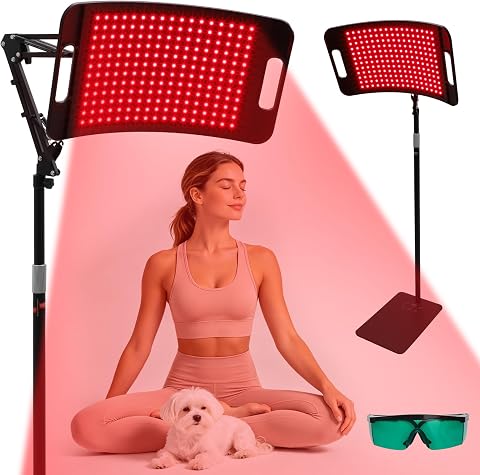
This adjustable red and infrared light therapy panel has 204 three-in-one LED beads combining 660nm, 850nm, and 940nm wavelengths. Its curved panel, adjustable height, five power modes, and timer support targeted or wider-area use at home, while the included goggles and stands provide added convenience.
Pros:
- Combines red and two infrared wavelengths in one panel.
- Adjustable height and 360° panel positioning support use on different body areas.
- Includes a smart controller with five power modes and an auto shut-off timer.
- Comes with protective goggles and both a therapy stand and desktop stand.
Cons:
- The highest power setting can reach 125°F and may cause burns with prolonged direct skin contact.
- Requires regular sessions of 10–30 minutes for the recommended use.
Best for: Readers willing to confirm the panel’s intended use before selecting desk lighting.
Not ideal for: Anyone looking for a clearly identified monitor light bar without further product checks.
Bottom line: Confirm that this therapy panel suits the lighting task before treating it as a monitor light bar.
Pomodoro Timer
A Pomodoro timer can give work sessions a clear beginning and end, helping you make planned breaks part of a coding or QA routine. No product pick is listed for this section, so choose a timer format that fits how you already work. A simple app, a physical timer, or an existing device may be enough if it is easy to start and reset. Focus on low-friction timing rather than adding another complicated workflow.
Consider whether you want fixed intervals or the ability to adjust session and break lengths around meetings, builds, tests, or review cycles. A common mistake is following a timer rigidly when a task needs uninterrupted attention or a test run takes longer than expected. Choose a method that lets you pause or extend a session without losing track of your plan. If you work across multiple devices, consider where the timer will be visible and whether alerts would disrupt calls or concentration. Start with a routine you can maintain, then adjust its timing based on how your work actually unfolds. Flexibility and visibility are useful selection criteria.
What to look for:
- Choose a timer method that is quick to start and reset.
- Set intervals that can accommodate your typical work blocks.
- Check that alerts will not interrupt calls or focused tasks.
- Make it easy to pause or adjust a session when work runs long.
- Place the timer where you can see it without cluttering your workspace.
Desk Footrest
Support at the desk depends on how your whole setup fits together, including your chair, desk height, and leg position. The listed pick is the Adjustable Ergonomic Kneeling Chair with Backrest, Footrest, and Locki. Its title describes a kneeling chair with a footrest, so check the product details closely to understand the design and the meaning of the truncated “Locki” text before treating it as a conventional separate footrest.
Before buying, compare the chair’s adjustment range and dimensions with your desk and sitting position. Consider whether its design suits the way you prefer to sit, and confirm what the backrest and footrest provide in the product description. A common mistake is choosing based on the word “ergonomic” without checking fit or whether the item addresses the support you actually need. Look for clear setup guidance and verify any compatibility or assembly requirements. If you are shopping specifically for a standalone footrest, confirm that this chair is the right type of product for that goal. Fit and intended use should guide the decision.
What to look for:
- Confirm whether the item is a kneeling chair or a standalone footrest.
- Check the dimensions and adjustment range against your desk.
- Review how the chair, backrest, and footrest are configured.
- Clarify the truncated product name and any included features.
- Consider whether the sitting design suits your preferred posture.
Adjustable Ergonomic Kneeling Chair with Backrest, Footrest, and Locking Casters

This kneeling chair has a breathable backrest, a 4-inch-thick cushion, padded knee rests, armrests, and a foot support to provide support while working or studying. Its pneumatic height adjustment and four swivel casters, including two that lock, allow users to customize the chair and keep it in place.
Pros:
- Includes a backrest, padded knee rests, armrests, and foot support.
- Pneumatic adjustment allows the seat height and angle to be customized.
- Four swivel casters support mobility, with two locking casters for stability.
Cons:
- Not suitable for users with severe knee, spine, coccyx, lower-back, or hip conditions.
- Prolonged use may cause discomfort; breaks are recommended every hour.
- Designed for adults 155–185 cm tall.
Best for: Shoppers considering an adjustable kneeling chair with a footrest.
Not ideal for: Anyone seeking a clearly specified standalone desk footrest.
Bottom line: Verify the product type, fit, and adjustments against your desk and seating needs.
Whiteboard Planner
A whiteboard planner can make tasks and priorities visible at a glance, which may help when a development or QA workflow spans multiple stages. No product pick is provided, so choose a format that fits your available wall or desk space and the way your team tracks work. Decide what belongs on the board—such as short-term priorities, test progress, or reminders—and keep the visible plan focused.
Consider whether you need a personal planning surface or one that several people can read and update. Check the writing area, mounting or placement options, and whether the board will be easy to reach during the day. A common mistake is choosing a board that is too small for the information you want to display, or filling it with details that are better kept in a project tracker. For a shared space, agree on simple labels and a routine for clearing completed items. For a personal setup, choose a location that stays in view without competing with your screens. Space and upkeep are practical criteria to settle before choosing a format.
What to look for:
- Measure the available wall or desk area before choosing a board.
- Choose a writing area suited to the amount of information you plan to show.
- Decide whether the planner is personal or shared.
- Check placement and mounting options for your workspace.
- Keep board contents short enough to scan and maintain.
Use a budget-first buying order by addressing the problem with the clearest daily impact before adding more items. Start with a timer or planning method if structure is the main gap, then consider a keyboard, headphones, or workspace support based on your habits. For the lighting and chair picks, verify the product details and intended use before committing. Buy for a specific need and confirm fit with your devices and desk.
You do not need every item on this checklist to build a more workable development setup. Choose one change, give yourself time to see how it fits your routine, and make the next decision from experience. Small, considered adjustments can help make focused work feel more manageable.
Black Friday Picks

Sonos Roam Portable Bluetooth and Wi-Fi Speaker, Black
As an affiliate, we earn on qualifying purchases.