In 2026, I recommend exploring versatile dual bay RAID enclosures like the MAIWO Dual Bay SATA models, which support up to 16TB and feature tool-free design for easy swaps. For performance, options like the TERRAMASTER D4 with Thunderbolt 4 offer blazing speeds up to 40Gbps, perfect for demanding workflows. Hybrid enclosures with M.2 NVMe support and multi-drive setups are also excellent choices. Keep reading to discover the best options tailored to your needs.
Key Takeaways
- Top RAID enclosures support various configurations (RAID 0, 1, JBOD) for SSD performance, redundancy, and flexibility.
- Enclosures offer compatibility with SATA and NVMe SSDs, accommodating different sizes and capacities up to 68TB.
- High-speed interfaces like Thunderbolt 4, USB 3.2, and USB4 ensure fast data transfer rates up to 40Gbps.
- Build quality features such as aluminum cases, active cooling fans, and thermal management extend SSD lifespan during intensive workloads.
- Portability and easy installation are prioritized in models with tool-free design, lightweight materials, and compact form factors.
| MAIWO Dual Bay SATA RAID Enclosure 16TB | 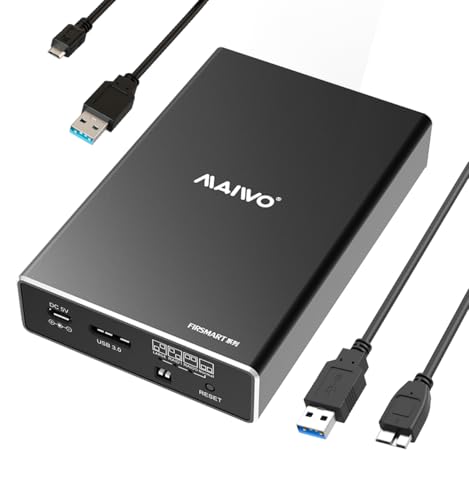 | Versatile RAID Options | Drive Compatibility: 2.5” SATA HDD/SSD (up to 8TB per bay) | RAID Modes: 4 modes (NORMAL, RAID 0, RAID 1, JBOD) | Connectivity Interface: USB 3.0 | VIEW LATEST PRICE | See Our Full Breakdown |
| Dual Bay RAID SSD Enclosure with Clone & RAID Modes |  | User-Friendly Cloning | Drive Compatibility: 2.5” SATA SSD/HDD (up to 8TB each) | RAID Modes: RAID 0, RAID 1, JBOD, Clone | Connectivity Interface: USB-C (USB 3.2 Gen 2) | VIEW LATEST PRICE | See Our Full Breakdown |
| TERRAMASTER D4 SSD NVMe Enclosure (40Gbps 4-Bay) |  | High-Speed Thunderbolt | Drive Compatibility: 4x NVMe M.2 SSDs (up to 8TB each) | RAID Modes: No hardware RAID, software RAID via third-party | Connectivity Interface: Thunderbolt 4/3, USB 4/3.2/3.1/3.0 | VIEW LATEST PRICE | See Our Full Breakdown |
| Hybrid SATA SSD/HDD Enclosure with M.2 NVMe Support |  | Hybrid Storage Power | Drive Compatibility: 2.5/3.5” SATA HDD/SSD (up to 20TB per drive) | RAID Modes: 4 modes (RAID 0, RAID 1, JBOD, Normal) | Connectivity Interface: USB 3.2, Thunderbolt 3/4 | VIEW LATEST PRICE | See Our Full Breakdown |
| MAIWO Dual Bay NVMe PCIe RAID Enclosure |  | Professional Performance | Drive Compatibility: M.2 NVMe PCIe SSDs (up to 8TB each) | RAID Modes: RAID 0, RAID 1, JBOD, PM | Connectivity Interface: USB 3.2 Gen 2×2 (20Gbps) | VIEW LATEST PRICE | See Our Full Breakdown |
| ACASIS Dual-Bay NVMe SSD Enclosure with Cooling | 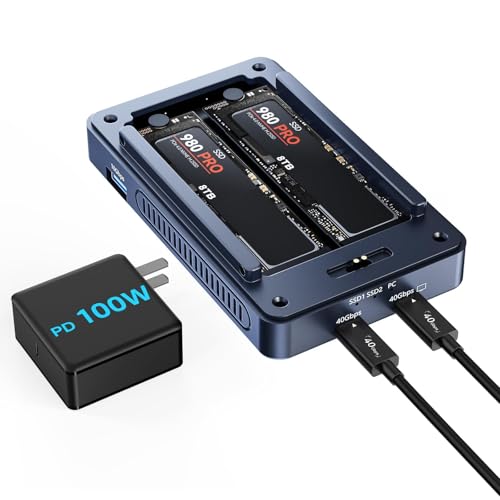 | Multi-Display Support | Drive Compatibility: NVMe M.2 SSDs (up to 8TB each) | RAID Modes: RAID 0, RAID 1, JBOD, Normal | Connectivity Interface: USB 4, USB 3.2, Thunderbolt 3/4 | VIEW LATEST PRICE | See Our Full Breakdown |
| Dual Bay Raid SSD Enclosure with Clone & Raid Modes |  | Quick Install | Drive Compatibility: M.2 NVMe PCIe SSDs (up to 8TB each) | RAID Modes: RAID 0, RAID 1, JBOD, Clone | Connectivity Interface: USB-C (20Gbps), USB-A (10Gbps) | VIEW LATEST PRICE | See Our Full Breakdown |
| ORICO 4-Bay Aluminum RAID Hard Drive Enclosure |  | High Capacity | Drive Compatibility: M.2 NVMe SSDs (up to 8TB each) | RAID Modes: RAID 0, 1, 3, 5, 10, JBOD, Clone | Connectivity Interface: USB 3.2 Gen 2, USB-A, Thunderbolt 3/4 | VIEW LATEST PRICE | See Our Full Breakdown |
| Aluminum Dual Bay RAID Enclosure with Cooling Fan |  | Quiet Operation | Drive Compatibility: 2.5/3.5” SATA HDD/SSD (up to 20TB) | RAID Modes: RAID 0, RAID 1, JBOD, Normal | Connectivity Interface: USB 3.0 | VIEW LATEST PRICE | See Our Full Breakdown |
| Vantec Nexstar GX USB 3.0 Dual SATA SSD/HDD Enclosure |  | Reliable RAID | Drive Compatibility: SATA SSD/HDD (up to 2TB per drive) | RAID Modes: RAID 0, RAID 1, JBOD, Rebuild | Connectivity Interface: USB 3.0, USB Micro-B | VIEW LATEST PRICE | See Our Full Breakdown |
| ORICO MiniTower 2-Bay NVMe RAID Enclosure Docking Station | 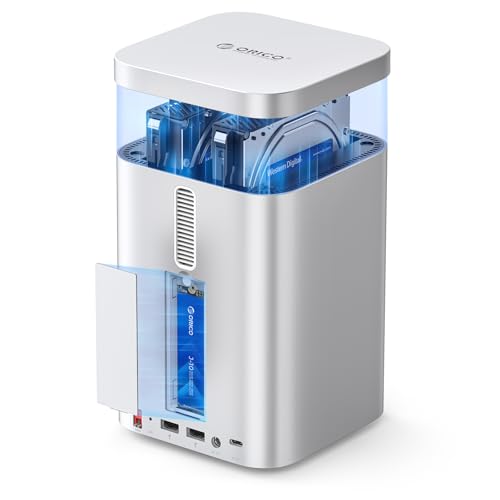 | Compact Design | Drive Compatibility: SATA HDD/SSD (up to 20TB each) | RAID Modes: RAID 0, RAID 1, JBOD, Single | Connectivity Interface: USB 3.1, USB-A, USB-C | VIEW LATEST PRICE | See Our Full Breakdown |
| MAIWO NVMe RAID Enclosure with Cooling and Cables |  | Superior Cooling | Drive Compatibility: M.2 NVMe SSDs (up to 8TB each) | RAID Modes: RAID 0, RAID 1, JBOD, others via software | Connectivity Interface: USB 3.2 Gen 2×2, USB-C, USB-A | VIEW LATEST PRICE | See Our Full Breakdown |
| Sabrent 4-Bay USB 3.0 SATA Docking Station | 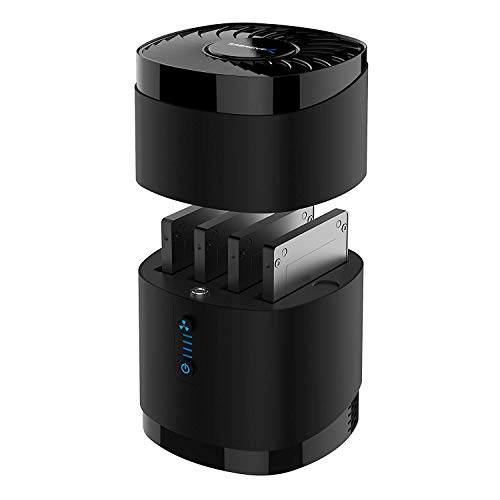 | Easy Drive Access | Drive Compatibility: SATA SSD/HDD (up to 16TB per drive) | RAID Modes: RAID 0, RAID 1, JBOD, Clone | Connectivity Interface: USB 3.0, USB-C | VIEW LATEST PRICE | See Our Full Breakdown |
| OWC Express 4M2 USB4 RAID Storage Enclosure |  | Rugged Durability | Drive Compatibility: M.2 NVMe SSDs (up to 8TB), SATA HDD/SSD | RAID Modes: RAID 0, RAID 1, JBOD, RAID modes via software | Connectivity Interface: USB 3.2, Thunderbolt 3/4, USB-C | VIEW LATEST PRICE | See Our Full Breakdown |
| MAIWO Dual Bay SATA RAID Enclosure with 16TB Capacity | 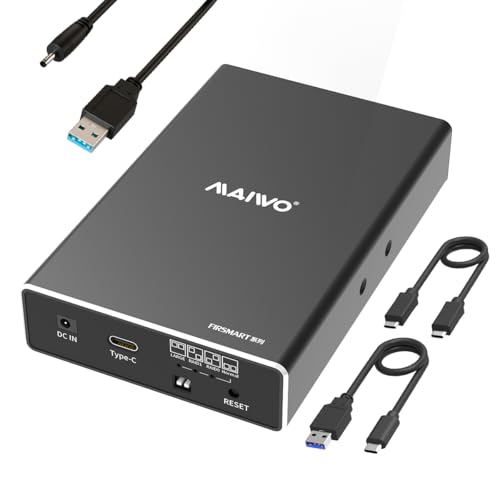 | Multi-Function Expansion | Drive Compatibility: SATA SSD/HDD (up to 8TB each) | RAID Modes: RAID 0, RAID 1, JBOD, Other via software | Connectivity Interface: USB 3.2 Gen 2, USB-C, USB-A | VIEW LATEST PRICE | See Our Full Breakdown |
More Details on Our Top Picks
MAIWO Dual Bay SATA RAID Enclosure 16TB
If you’re looking for a versatile RAID enclosure that offers solid performance and easy setup, the MAIWO Dual Bay SATA RAID Enclosure 16TB is an excellent choice. It supports 2.5-inch SATA HDDs and SSDs, including 7mm and 9.5mm drives, with each bay holding up to 8TB. Thanks to its USB 3.0 interface and JMS561 chip, you can enjoy transfer speeds up to 6Gbps. The enclosure supports hot swapping, plug-and-play, and four RAID modes—RAID 0, 1, LARGE, and NORMAL—giving you flexible data management options. Its durable aluminum case ensures heat dissipation and portability for on-the-go use.
- Drive Compatibility:2.5” SATA HDD/SSD (up to 8TB per bay)
- RAID Modes:4 modes (NORMAL, RAID 0, RAID 1, JBOD)
- Connectivity Interface:USB 3.0
- Maximum Capacity:16TB total (2x8TB)
- Cooling System:Aluminum case, heat dissipation
- Portability / Size:Mini size, portable
- Additional Feature:Tool-free installation design
- Additional Feature:Hot-swapping supported
- Additional Feature:Aluminum alloy case
Dual Bay RAID SSD Enclosure with Clone & RAID Modes
A dual bay RAID SSD enclosure with clone and RAID modes is an ideal choice for professionals and power users who need flexible, high-performance data management solutions. It supports various RAID configurations like RAID 0 for speed, RAID 1 for data protection, JBOD for independent drives, and clone mode for quick disk duplication. The tool-free design makes installation and swapping effortless, while the durable aluminum casing ensures efficient heat dissipation and portability. With transfer speeds up to 20Gbps and an external USB-C power supply option, it handles large files and high-capacity SSDs seamlessly. This enclosure combines versatility, speed, and ease of use for demanding storage needs.
- Drive Compatibility:2.5” SATA SSD/HDD (up to 8TB each)
- RAID Modes:RAID 0, RAID 1, JBOD, Clone
- Connectivity Interface:USB-C (USB 3.2 Gen 2)
- Maximum Capacity:16TB total (2x8TB)
- Cooling System:Aluminum case, heat dissipation
- Portability / Size:Compact, portable
- Additional Feature:Supports clone mode
- Additional Feature:External power port
- Additional Feature:High transfer speeds up to 20Gbps
TERRAMASTER D4 SSD NVMe Enclosure (40Gbps 4-Bay)
The TERRAMASTER D4 SSD NVMe Enclosure stands out for users who demand ultra-fast data transfer speeds and versatile compatibility. It offers blazing speeds up to 40Gbps, supporting Thunderbolt 5/4/3 and USB 4/3.2/3.1 interfaces. With four NVMe SSD slots, it reaches transfer rates over 3,200MB/s, perfect for demanding tasks like 4K editing and large file transfers. Its compact, lightweight design makes it portable and easy to integrate into any workspace. The enclosure features active cooling with quiet fans, ensuring reliable operation under heavy loads. While it lacks built-in RAID, users can configure software-based setups for redundancy or performance, making it highly flexible.
- Drive Compatibility:4x NVMe M.2 SSDs (up to 8TB each)
- RAID Modes:No hardware RAID, software RAID via third-party
- Connectivity Interface:Thunderbolt 4/3, USB 4/3.2/3.1/3.0
- Maximum Capacity:32TB total (4x8TB)
- Cooling System:Active cooling with fans
- Portability / Size:Small, portable
- Additional Feature:Ultra-fast transfer speeds
- Additional Feature:Active cooling system
- Additional Feature:Supports wireless backup via app
Hybrid SATA SSD/HDD Enclosure with M.2 NVMe Support
This hybrid SATA SSD/HDD enclosure with M.2 NVMe support is an excellent choice for users who need versatile storage options in a single device. It supports up to five drives—two SATA HDDs/SSDs and three M.2 NVMe SSDs—with capacities up to 68TB. Compatible with Windows, Mac, and Linux, it offers various interfaces like USB 3.2 Gen 2 and Thunderbolt 4. The enclosure supports four RAID modes, including RAID 0, 1, JBOD, and Normal, with easy configuration. Its aluminum casing and silent fans guarantee proper cooling, while the tool-free design simplifies installation. Manufactured by Cenmate, it promises durability and reliable performance.
- Drive Compatibility:2.5/3.5” SATA HDD/SSD (up to 20TB per drive)
- RAID Modes:4 modes (RAID 0, RAID 1, JBOD, Normal)
- Connectivity Interface:USB 3.2, Thunderbolt 3/4
- Maximum Capacity:32TB total (4x8TB)
- Cooling System:Aluminum alloy, heat dissipation
- Portability / Size:Desktop, larger
- Additional Feature:Supports multiple RAID modes
- Additional Feature:Built-in silent fans
- Additional Feature:Tool-free easy installation
MAIWO Dual Bay NVMe PCIe RAID Enclosure
Designed for professionals and tech enthusiasts who demand high-speed data transfer, the MAIWO Dual Bay NVMe PCIe RAID Enclosure supports dual M.2 NVMe SSDs and offers transfer speeds up to 2000MB/s. Its aluminum alloy case guarantees excellent heat dissipation, while the independent 5V 3A power supply assures stable performance. Compatible with PCIe NVMe M-Key SSDs in various sizes, it supports four RAID modes—RAID 0, 1, PM, and JBOD—for flexible data management. With plug-and-play installation, USB-C and USB-A connectivity, and support across Windows, Mac, and Linux, it’s a versatile choice for anyone needing fast, reliable external storage.
- Drive Compatibility:M.2 NVMe PCIe SSDs (up to 8TB each)
- RAID Modes:RAID 0, RAID 1, JBOD, PM
- Connectivity Interface:USB 3.2 Gen 2×2 (20Gbps)
- Maximum Capacity:16TB total (2x8TB)
- Cooling System:Aluminum case, cooling system
- Portability / Size:Portable, compact
- Additional Feature:Supports PCIe NVMe M.2 SSDs
- Additional Feature:Multiple RAID modes
- Additional Feature:Includes two data cables
ACASIS Dual-Bay NVMe SSD Enclosure with Cooling
For creative professionals and power users seeking high-speed storage expansion, the ACASIS Dual-Bay NVMe SSD Enclosure with Cooling stands out with its support for 40Gbps USB4 connections and RAID configurations. It’s compatible with M1/M2 Macs, Windows, and devices with USB4 ports, making it versatile. Built with a durable aluminum body and JHL7440 chip, it ensures stable performance. With support for up to 8TB SSDs, speeds reach up to 1800-2800 MB/s in RAID 0. The enclosure features built-in fans and thermal slots for effective heat dissipation, maintaining performance during intensive tasks. It’s an excellent choice for expanding storage and connectivity.
- Drive Compatibility:NVMe M.2 SSDs (up to 8TB each)
- RAID Modes:RAID 0, RAID 1, JBOD, Normal
- Connectivity Interface:USB 4, USB 3.2, Thunderbolt 3/4
- Maximum Capacity:32TB total (4x8TB)
- Cooling System:Built-in fans, thermal management
- Portability / Size:Portable, compact
- Additional Feature:HDMI port for display
- Additional Feature:Supports software RAID
- Additional Feature:Built-in cooling fans
Dual Bay Raid SSD Enclosure with Clone & Raid Modes
If you’re looking for a versatile solution to manage multiple SSDs with ease, a dual bay RAID enclosure offering clone and RAID modes is an excellent choice. It supports four RAID configurations: RAID 0 for high speed, RAID 1 for data redundancy, JBOD for independent drives, and offline clone mode for disk duplication. The enclosure features a high data transfer rate of 20Gbps and supports M.2 NVMe PCIe SSDs in sizes 2230 to 2280mm, but not SATA B+M keys. Its durable aluminum and plastic construction guarantee heat dissipation and portability, while tool-free installation makes drive swapping quick and simple. Just remember to back up data before switching RAID modes.
- Drive Compatibility:M.2 NVMe PCIe SSDs (up to 8TB each)
- RAID Modes:RAID 0, RAID 1, JBOD, Clone
- Connectivity Interface:USB-C (20Gbps), USB-A (10Gbps)
- Maximum Capacity:16TB total (2x8TB)
- Cooling System:Aluminum case, cooling fan
- Portability / Size:Small, portable
- Additional Feature:Compact aluminum construction
- Additional Feature:Offline disk clone
- Additional Feature:Supports multiple RAID types
ORICO 4-Bay Aluminum RAID Hard Drive Enclosure
The ORICO 4-Bay Aluminum RAID Hard Drive Enclosure stands out as an ideal choice for mobile professionals who need a durable, high-capacity storage solution that’s easy to carry. Its all-aluminum alloy housing is compact, lightweight, and shock-resistant, making it perfect for on-the-go use. Supporting up to four NVMe SSDs with 8TB each, it offers a total capacity of 32TB. With PCIe-based speeds exceeding 6Gbps, it delivers fast data transfer. The enclosure’s built-in cooling fan and heat dissipation vents ensure stable operation, while RAID modes like 0, 1, 5, and more provide flexible, secure storage options.
- Drive Compatibility:M.2 NVMe SSDs (up to 8TB each)
- RAID Modes:RAID 0, 1, 3, 5, 10, JBOD, Clone
- Connectivity Interface:USB 3.2 Gen 2, USB-A, Thunderbolt 3/4
- Maximum Capacity:32TB total (4x8TB)
- Cooling System:Aluminum shell, cooling fan
- Portability / Size:Portable, compact
- Additional Feature:Supports RAID 0/1/3/5/10
- Additional Feature:All-aluminum alloy housing
- Additional Feature:Built-in cooling fan
Aluminum Dual Bay RAID Enclosure with Cooling Fan
An aluminum dual bay RAID enclosure with a cooling fan is an excellent choice for users who need reliable, high-capacity storage with effective heat management. It supports 2.5/3.5-inch SATA HDDs and SSDs up to 20TB each, making it suitable for personal and business use while saving space. With four RAID modes—RAID 0, RAID 1, JBOD, and Normal—it offers flexible data management, though resetting RAID can cause data loss. The aluminum construction efficiently dissipates heat, and the built-in 2-inch fan keeps temperatures in check, though it produces noise around 40-50 decibels. Connectivity is seamless via USB 3.0, supporting transfer speeds up to 5Gbps.
- Drive Compatibility:2.5/3.5” SATA HDD/SSD (up to 20TB)
- RAID Modes:RAID 0, RAID 1, JBOD, Normal
- Connectivity Interface:USB 3.0
- Maximum Capacity:20TB total (2x10TB)
- Cooling System:Aluminum case, fan included
- Portability / Size:Desktop, larger
- Additional Feature:Includes cooling fan
- Additional Feature:Supports 20TB drives
- Additional Feature:Broad OS compatibility
Vantec Nexstar GX USB 3.0 Dual SATA SSD/HDD Enclosure
For users seeking a versatile and high-speed RAID enclosure, the Vantec Nexstar GX USB 3.0 Dual SATA SSD/HDD Enclosure stands out with its support for dual 2.5-inch drives and RAID 0/1 configurations. It’s compatible with SATA I, II, and III drives, including SSDs, and supports over 2TB per drive. The USB 3.0 interface delivers transfer speeds up to 5Gbps, with UASP for improved performance. Powered via USB or an external adapter, it features LED indicators for status and RAID management. Its aluminum housing guarantees excellent heat dissipation, making it reliable for intensive storage tasks. This enclosure is ideal for fast, secure data access.
- Drive Compatibility:SATA SSD/HDD (up to 2TB per drive)
- RAID Modes:RAID 0, RAID 1, JBOD, Rebuild
- Connectivity Interface:USB 3.0, USB Micro-B
- Maximum Capacity:8TB per drive
- Cooling System:Aluminum housing, heat dissipation
- Portability / Size:Portable, small
- Additional Feature:Supports RAID 0/1
- Additional Feature:External power adapter
- Additional Feature:LED activity indicators
ORICO MiniTower 2-Bay NVMe RAID Enclosure Docking Station
If you’re looking for a compact yet powerful RAID enclosure tailored for high-speed data management, the ORICO MiniTower 2-Bay NVMe RAID Enclosure Docking Station stands out. It offers a maximum storage capacity of 56TB, supporting two SATA drives up to 24TB and one M.2 NVMe SSD up to 8TB. With USB 3.2 Gen 2, it delivers data transfer speeds up to 10Gbps, ideal for editing and heavy file transfers. The enclosure includes multiple expansion ports like USB-A, USB 2.0, and SD card slots, boosting your Mac mini M4’s connectivity. Its aluminum shell and low-noise fan assure efficient cooling and durability during demanding tasks.
- Drive Compatibility:SATA HDD/SSD (up to 20TB each)
- RAID Modes:RAID 0, RAID 1, JBOD, Single
- Connectivity Interface:USB 3.1, USB-A, USB-C
- Maximum Capacity:32TB total (4x8TB)
- Cooling System:Aluminum alloy, cooling fan
- Portability / Size:Compact, portable
- Additional Feature:Multi-port expansion
- Additional Feature:Supports 8TB NVMe SSDs
- Additional Feature:Low-noise cooling fan
MAIWO NVMe RAID Enclosure with Cooling and Cables
The MAIWO NVMe RAID Enclosure with Cooling and Cables stands out as an excellent choice for professionals and power users who need reliable, high-speed storage solutions. It supports M.2 PCIe NVMe SSDs in sizes 2230 to 2280mm and is compatible with USB4, 3.2, 3.1, 3.0, and 2.0, working seamlessly across Windows, macOS, and Linux. Its aluminum shell, thermal pads, and cooling fan ensure ideal heat dissipation during intensive tasks. With a USB 3.2 GEN2x2 interface and speeds up to 20Gbps, plus multiple RAID modes and dual cables, it offers versatile, durable performance for demanding storage needs.
- Drive Compatibility:M.2 NVMe SSDs (up to 8TB each)
- RAID Modes:RAID 0, RAID 1, JBOD, others via software
- Connectivity Interface:USB 3.2 Gen 2×2, USB-C, USB-A
- Maximum Capacity:32TB total (4x8TB)
- Cooling System:Aluminum shell, cooling fan
- Portability / Size:Portable, small
- Additional Feature:Supports UASP and Trim
- Additional Feature:Dual cables included
- Additional Feature:Durable aluminum shell
Sabrent 4-Bay USB 3.0 SATA Docking Station
If you’re seeking a versatile and budget-friendly docking station for multiple SSDs or HDDs, the Sabrent 4-Bay USB 3.0 SATA Docking Station stands out as an excellent option. It supports up to four 2.5” SATA drives, with a maximum thickness of 12.5mm, making it compatible with many high-capacity drives. The tool-free design and magnetic cover enable quick swaps, while the built-in whisper-quiet fan guarantees reliable cooling for continuous use. With USB 3.0 speeds up to 5Gbps and broad OS compatibility, this station offers a simple, efficient way to expand your storage without complex setup or additional drivers.
- Drive Compatibility:SATA SSD/HDD (up to 16TB per drive)
- RAID Modes:RAID 0, RAID 1, JBOD, Clone
- Connectivity Interface:USB 3.0, USB-C
- Maximum Capacity:64TB total (4x16TB)
- Cooling System:No active cooling, passive cooling
- Portability / Size:Small, portable
- Additional Feature:Magnetic drive cover
- Additional Feature:Supports multiple drives
- Additional Feature:Whisper-quiet fan
OWC Express 4M2 USB4 RAID Storage Enclosure
The OWC Express 4M2 USB4 RAID Storage Enclosure stands out for its impressive speed, delivering up to 3200MB/s in real-world transfers, making it ideal for creative professionals and power users who need rapid data access. It’s compatible with USB4, Thunderbolt, and USB-C ports on Macs and PCs, ensuring broad device support. Built from aircraft-grade aluminum, it offers rugged protection and effective heat dissipation for consistent high performance. Its smart, adaptive fans keep noise levels low, even during heavy loads. Supporting various NVMe M.2 SSDs and RAID configurations, it combines flexibility with reliability, backed by a 2-year warranty and included USB-C cable.
- Drive Compatibility:M.2 NVMe SSDs (up to 8TB), SATA HDD/SSD
- RAID Modes:RAID 0, RAID 1, JBOD, RAID modes via software
- Connectivity Interface:USB 3.2, Thunderbolt 3/4, USB-C
- Maximum Capacity:68TB total (2x8TB + 3x8TB)
- Cooling System:Aircraft-grade aluminum, active fans
- Portability / Size:Compact, portable
- Additional Feature:Adaptive smart fans
- Additional Feature:Supports RAID 0/1/4/5/1+0
- Additional Feature:Rugged aircraft-grade aluminum
MAIWO Dual Bay SATA RAID Enclosure with 16TB Capacity
Designed for users who need a reliable, portable external storage solution, the MAIWO Dual Bay SATA RAID Enclosure offers a compact and durable way to expand your SSD or HDD capacity. Supporting two 2.5-inch SATA drives up to 8TB each, it provides a total capacity of 16TB. Made from aluminum and high-strength plastic, it’s built for durability and heat dissipation. With a USB 3.1 Gen 2 interface and ASM1352 chip, it delivers transfer speeds up to 10Gbps in RAID 0 mode. Its tool-free, plug-and-play design, hot-swapping, and multiple RAID modes make it versatile and easy to use wherever you go.
- Drive Compatibility:SATA SSD/HDD (up to 8TB each)
- RAID Modes:RAID 0, RAID 1, JBOD, Other via software
- Connectivity Interface:USB 3.2 Gen 2, USB-C, USB-A
- Maximum Capacity:16TB total (2x8TB)
- Cooling System:Aluminum case, cooling fan
- Portability / Size:Portable, lightweight
- Additional Feature:Supports hot-swapping
- Additional Feature:External independent power
- Additional Feature:Compact lightweight design
Factors to Consider When Choosing RAID Enclosures for SSDs

When choosing a RAID enclosure for SSDs, I focus on compatibility with my drives, supported RAID modes, and transfer speeds to guarantee ideal performance. I also consider build quality and cooling features to keep everything running smoothly, along with power supply requirements for stability. These factors help me select an enclosure that fits my needs and maximizes my SSDs’ potential.
Compatibility With Drives
Selecting a RAID enclosure that supports your specific drives is essential to guarantee compatibility and peak performance. You need to verify the enclosure matches your drive type, whether SATA, NVMe, or PCIe, to avoid issues. Check that it supports the form factor of your drives, like 2.5-inch, 3.5-inch, or M.2, so they fit properly. It’s also important to confirm the maximum capacity per bay and overall to meet your current and future storage needs. Confirm the enclosure supports the drive’s interface protocol, such as SATA III or PCIe NVMe, for maximum speed. Finally, make sure the hardware and firmware are compatible with your operating system, ensuring smooth drive recognition and management without headaches. Compatibility is the foundation for a reliable, high-performing RAID setup.
Supported RAID Modes
Understanding the RAID modes supported by an enclosure is key to tailoring your storage setup to your needs. Different modes like RAID 0, RAID 1, JBOD, or Clone offer varied benefits—speed, redundancy, or independent operation. The available options depend on the enclosure’s firmware and hardware, which may limit or expand your choices. Some enclosures support software-based RAID, giving you more flexibility with advanced configurations through management tools. RAID modes directly influence data security: RAID 1 mirrors drives for redundancy, while RAID 0 prioritizes speed without protecting against drive failure. Keep in mind, switching modes often requires reinitializing drives, risking data loss. Knowing supported RAID modes helps you plan backups and select an enclosure that aligns with your performance and safety priorities.
Transfer Speed Capabilities
The transfer speed of a RAID enclosure largely depends on the interface it uses to connect to your system, such as USB 3.0, USB 3.2, Thunderbolt 3 or 4, or USB4. Higher versions support faster data rates; for example, Thunderbolt 3 and 4 can reach up to 40Gbps, greatly reducing transfer times for large files. USB 3.2 Gen 2×2 offers speeds up to 20Gbps, while USB 3.1 maxes out at 10Gbps. Keep in mind, actual speeds depend on your drives and system compatibility. The internal chipset, like JMS586R or JHL7440, also impacts performance by efficiently managing data flow. Additionally, RAID configurations like RAID 0 can boost transfer speeds through data striping, whereas modes like RAID 1 focus on redundancy.
Build Quality and Cooling
Choosing a RAID enclosure with solid build quality and effective cooling is vital for guaranteeing durability and peak performance. Enclosures made from aluminum or metal not only feel robust but also help dissipate heat efficiently, preventing overheating during intense data transfers. Good ventilation, such as vents or heat conduction slots, encourages airflow and keeps temperatures in check. Some enclosures include active cooling features like temperature-controlled fans, which automatically adjust to maintain ideal conditions. Proper thermal management is key because it extends the lifespan of your SSDs by preventing thermal throttling and damage. A well-designed enclosure with reliable materials and cooling solutions ensures your drives operate smoothly under sustained workloads, reducing the risk of failure and maintaining consistent performance over time.
Power Supply Requirements
Selecting the right power supply for your RAID enclosure is essential because inadequate or unstable power can lead to performance issues or even drive failures. For high-capacity SSDs or multiple drives, an external power supply is crucial to guarantee stable operation. Some enclosures support independent power sources or require a dedicated adapter, which can boost performance compared to USB-only power. Always check the voltage and current specifications to match your SSDs and enclosure, avoiding potential damage or insufficient power. Dual power options, like USB and external ports, offer added flexibility for different environments. Keep in mind that high-speed, multi-drive RAID enclosures often need higher wattage, making a reliable external power supply vital for consistent performance and longevity.
Size and Portability
Size and portability play a significant role when picking out a RAID enclosure for SSDs, especially if you plan to carry it around or use it in different locations. I recommend checking the enclosure’s dimensions and weight to make certain it fits your space and mobility needs. Smaller, lightweight models are perfect for portable use and travel, fitting easily into backpacks or carrying cases. However, larger enclosures often provide more drive bays and expandability, which might suit stationary setups better. It’s also important to contemplate whether the size affects cooling and performance, especially in portable units. Features like tool-free installation and detachable components can make transport and setup more convenient, so look for those if portability is a priority.
Frequently Asked Questions
How Do RAID Enclosures Impact SSD Lifespan and Durability?
RAID enclosures can both protect and challenge SSD lifespan and durability. I’ve found that high-quality enclosures with good cooling help prevent overheating, which extends SSD life. However, some enclosures with poor airflow or aggressive RAID configurations may cause extra wear due to increased workload or heat. Overall, choosing a well-designed enclosure and managing heat effectively are key to maximizing SSD durability in RAID setups.
Are RAID Enclosures Compatible With All SSD Brands and Models?
Sure, RAID enclosures are pretty much the universal adapters of the tech world, right? Not quite. While many are compatible with various SSD brands and models, you should always double-check the specifications. Some enclosures might have limitations, especially with newer or less common SSDs. So, don’t assume it’s a one-size-fits-all — a quick peek at compatibility details can save you headaches later.
What Are the Best Cooling Solutions for High-Performance SSD RAID Enclosures?
The best cooling solutions for high-performance SSD RAID enclosures include built-in heatsinks, active fans, and liquid cooling systems. I recommend enclosures with high-quality fans that promote airflow without excessive noise, as well as models with thermal management features like temperature sensors and automatic fan control. For ultimate cooling, consider liquid cooling options, especially if you’re pushing your SSDs to their limits. Proper cooling boosts performance and extends your SSDs’ lifespan.
Can RAID Enclosures Support Hot-Swapping of SSDS?
Yes, RAID enclosures can support hot-swapping of SSDs, much like swapping tapes in an old stereo. I’ve used enclosures that allow me to replace drives without shutting down, which keeps my workflow smooth and uninterrupted. Just make sure the enclosure specifically states hot-swappable support. This feature is vital for those needing quick upgrades or replacements without risking data loss or downtime.
How Do Different RAID Levels Affect Data Redundancy and Performance?
Different RAID levels impact data redundancy and performance in unique ways. For example, RAID 0 boosts speed by striping data across drives but offers no redundancy. RAID 1 mirrors data for safety but reduces capacity. RAID 5 balances redundancy and performance with parity data, while RAID 10 combines mirroring and striping for both speed and protection. I recommend choosing a level based on your need for speed versus data security.
Conclusion
Choosing the right RAID enclosure is like finding the perfect key to access your data’s full potential. Whether it’s speed, capacity, or versatility, these enclosures are your trusty gateways to seamless storage. So, gear up and pick the one that syncs with your needs—your digital universe deserves a sturdy, reliable spaceship. With the right enclosure, your SSDs will dance in perfect harmony, turning chaos into a streamlined symphony of speed and security.