
Finding the right kids coding robot kit involves balancing ease of use, programmability, and educational value. The Makeblock mBot Arduino Robot Kit stands out as the best overall choice for its versatile programming options and robust build. For younger kids or those new to coding, the Learning Resources Botley the Coding Robot offers a screen-free, intuitive experience. Advanced young coders might prefer the Kyanio STEM Robotics Kit for its 3-in-1 control modes and expandability. As you compare options, consider how much complexity your child can handle versus their interest level and learning goals. Keep reading for a detailed breakdown of each kit and what to watch for when choosing the best fit.

Get business pricing on monitors, keyboards and dev gear
- Business-only prices and quantity discounts
- Tax-exempt purchasing
- Multiple users, one account, clear invoices
Key Takeaways
- The top-ranked kits balance ease of use with advanced coding features, catering to different skill levels.
- Build quality and expandability are key factors that differentiate higher-end kits from entry-level options.
- Screen-free coding options like Botley are ideal for very young or beginner learners, but less customizable.
- More complex kits like the Kyanio provide extensive control options but may require adult supervision during setup.
- Price often correlates with versatility and build quality—consider your child’s current skill and interest before investing in premium options.





| kids coding robot kit | Age Range | Power |
|---|---|---|
| Makeblock mBot Arduino Robot K | 8-12 | — |
| Apitor STEM Coding Robot Toy 6 | 7-12 | 3 AA batteries (not included) |
| Learning Resources Botley the | 5+ | — |
| Learning Resources Botley The | 5+ | — |
| Makeblock mBot STEM Coding Toy | 8-12 | 4 AA batteries (not included) |
| Kyanio STEM Robotics Kits for | — | Type-C rechargeable |
| Sillbird STEM Robot Building K | 8-13 | Rechargeable |
| Sillbird Building Robot Kit wi | 8-12 | Rechargeable |
| Teach Tech Mech-5 STEM Coding | 10+ | — |
| Thames & KOSMOS My Robotic Pet | 8+ | Mechanical, No batteries needed |
More Details on Our Top Picks
Makeblock mBot Arduino Robot Kit with Scratch Coding Box for Kids Ages 8-12
This kit stands out for its seamless transition from block-based coding to Arduino, making it ideal for kids who want to start simple and grow into more advanced programming. Compared with Botley the Coding Robot, the mBot offers a more comprehensive building experience with more customization options, but it requires some basic assembly skill and includes no pre-programmed activities out of the box. The engaging projects, like obstacle avoidance and remote control, foster problem-solving and logical thinking effectively. Its versatility makes it suitable for children eager to experiment with electronics and robotics, ready to explore beyond basic commands. While slightly more complex to assemble than Botley, this kit provides a richer, more flexible learning environment for future STEM enthusiasts.
Pros:- Smooth transition from block coding to Arduino fosters progressive learning
- Includes multiple projects to develop problem-solving skills
- Upgradeable with add-on packs for expanded functionality
Cons:- Requires some assembly, which might challenge very young or less patient kids
- No pre-programmed activities, relying on manual setup and troubleshooting
Best for: Children aged 8-12 who are interested in building and programming their own robots, and are ready to handle some assembly and troubleshooting.
Not ideal for: Parents seeking a very simple, plug-and-play robot for absolute beginners or very young children who might find assembly intimidating.
- Size:9.1 x 9.1 x 6.2 inches
- Weight:1 kg
- Age Range:8-12
- Build Time:Approximately 15 minutes
- Learning Curve:Beginner to intermediate
- Connectivity:Bluetooth and USB
- Compatibility:Scratch and Arduino
Our verdict“This kit makes the most sense for kids who want a versatile, expandable robotics experience and are comfortable with some initial setup.”
Apitor STEM Coding Robot Toy 6-in-1 Building Kit for Boys 8-12 480 Blocks
This 6-in-1 building robot kit excels in fostering creativity and motor skills, offering a variety of models that kids can assemble without tools, unlike the more focused programming experience of Botley the Coding Robot. It allows children to explore movement, from simple forward motions to 360-degree spins, controlled via an intuitive app, which supports learning coding concepts like loops and variables. Compared with the Makeblock mBot, this kit emphasizes hands-on building with colorful blocks and physical control modes, making it ideal for tactile learners. However, its focus on mechanical construction and movement means it provides less in terms of programming complexity or electronics understanding. It’s perfect for kids who love to build and control multiple models, but less suited for those seeking in-depth coding skills.
Pros:- Builds 6 different models for varied play and learning
- No tools or screws needed, simplifying assembly
- Includes app modes for Bluetooth control, gyro, and path following
Cons:- Limited focus on coding beyond basic movements
- Requires 3 AA batteries (not included) and some setup time
Best for: Kids aged 8-12 who enjoy creative construction, physical control, and exploring movement with multiple robot configurations.
Not ideal for: Children wanting a straightforward coding experience with minimal building or who prefer digital programming without physical assembly.
- Number of Blocks:480
- Control Modes:Bluetooth, gyro, path
- Age Range:7-12
- Model Variants:6
- Power:3 AA batteries (not included)
- Size:Variable, depends on model
Our verdict“Best suited for kids who love creative, tactile construction combined with dynamic movement control and simple coding.”
Learning Resources Botley the Coding Robot
This screen-free robot makes early coding concepts accessible for children as young as 5, focusing on sequencing and logic through physical commands, unlike the more complex programming of Makeblock mBot or Apitor. It excels in home and classroom settings, promoting active problem-solving with obstacle courses and line paths. Compared with the more advanced kits, Botley’s simplicity is a major advantage for absolute beginners, but it might limit skill progression for older children ready for text-based coding. Its remote programmer and interactive cards help children develop foundational STEM skills without screens, which is ideal for very young learners or households preferring screen-free play. However, this simplicity also means fewer opportunities for advanced programming or electronics exploration.
Pros:- Screen-free, promotes active play and physical problem-solving
- Includes a remote programmer and multiple obstacle challenges
- Suitable for early learners, building confidence in STEM
Cons:- Limited in programming complexity and customization
- Requires batteries (not included) and some assembly
Best for: Children aged 5-7 who are just starting to explore sequencing, problem-solving, and basic coding skills in a screen-free environment.
Not ideal for: Older kids or those seeking in-depth programming and robotics capabilities beyond basic sequencing.
- Age Range:5+
- Control Type:Remote, physical cards
- Activities:Obstacle courses, line paths
- Number of Steps:Up to 80
- Batteries:2 AAA (not included)
- Dimensions:Not specified
Our verdict“Ideal for young children beginning their STEM journey with active, screen-free coding challenges.”
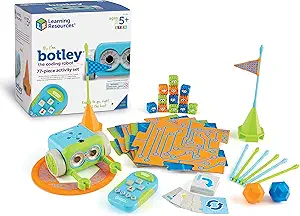
Learning Resources Botley The Coding Robot Activity Set – 77 Pieces
This activity set offers a broad introduction to early STEM skills through screen-free coding, with a focus on active, hands-on play, making it comparable to Botley’s basic package but with more pieces for extended activities. It includes a remote programmer, detachable arms, and 77 pieces to create various obstacle courses and mazes, encouraging critical thinking and problem solving. Unlike the Makeblock mBot, which emphasizes building and electronics, this set prioritizes active play and sequencing. It’s ideal for children who thrive on physical manipulation and collaborative activities, but it may lack the electronics and coding depth that older or more advanced learners seek. It’s a great starter kit for younger kids or classrooms focusing on foundational skills and teamwork.
Pros:- Includes extensive pieces for varied obstacle courses
- Screen-free and promotes active problem solving
- Suitable for group activities and collaborative learning
Cons:- Less focus on electronic or programmable features
- Batteries required for remote (not included)
Best for: Children aged 5+ who benefit from tactile, active play and want a complete set for diverse STEM activities.
Not ideal for: Kids looking for in-depth programming or electronic building elements, or those preferring digital coding.
- Pieces Included:77
- Control:Remote
- Age Range:5+
- Battery Type:3 AAA (not included)
- Activities:Obstacle courses, mazes
- Focus:Active, tactile learning
Our verdict“Perfect for young children or classrooms seeking a versatile, active STEM activity set with no screen time.”
Makeblock mBot STEM Coding Toys Robotics for Kids Ages 8-12
This mBot kit offers an accessible introduction to robotics and programming, with easy-to-follow instructions that enable kids to assemble and control their robot within 15 minutes, similar to Botley’s quick setup but with more focus on electronics and mechanical parts. Compared to Botley, it provides a more tangible understanding of circuitry and robotics, while not requiring assembly skills like Apitor. Its compatibility with Scratch and mBlock software makes it ideal for children eager to start visual programming, but it might be less engaging for those who prefer physical building or more advanced control modes. This kit works well for beginners who want a straightforward, educational robot that can grow with their skills, but it’s less suited for kids seeking complex projects or electronics tinkering from the start.
Pros:- Easy and quick to assemble with clear instructions
- Includes multiple functions like line-follow and obstacle avoidance
- Supports Scratch and mBlock for visual programming
Cons:- Limited advanced electronics features
- Requires 4 AA batteries and a remote control battery (not included)
Best for: Beginners aged 8-12 who want a simple, quick-to-build robot with potential for programming growth.
Not ideal for: Children seeking highly customizable robots or advanced electronics projects beyond basic coding.
- Build Time:15 minutes
- Control Functions:Line-follow, obstacle avoidance
- Age Range:8-12
- Connectivity:Bluetooth
- Software:Scratch, mBlock
- Power:4 AA batteries (not included)
Our verdict“This kit is ideal for young beginners who want a straightforward, programmable robot to explore STEM concepts quickly.”
Kyanio STEM Robotics Kits for Kids Ages 8-12 8-14 Year Old, 3 in 1 Remote/APP Control & Programming Robot Building Set, Toy Coding Science Projects, Birthday Gift Ideas for 8 9 10 11 12+ Boys & Girls
This kit stands out for its multi-faceted approach, combining building, remote control, and app programming into one comprehensive package. Unlike the Teach Tech Mech-5, which focuses more on mechanical actions and basic engineering, the Kyanio offers three different models—ranging from a machine gun robot to a tracked vehicle—prompting a broader range of mechanical and coding skills. The inclusion of 560 durable ABS blocks and a long-range 2.4GHz remote enhances the building experience and playability. However, the complexity of assembling multiple models could be overwhelming for younger kids or beginners, and the extensive parts may require careful organization. This makes it best suited for curious, slightly experienced builders eager for variety and STEM depth, but less ideal for very young children or those seeking simple, quick projects.
Pros:- Offers three different models to maximize creative and mechanical learning
- Includes 560 durable, high-quality ABS blocks for extensive building possibilities
- Supports app and remote control, fostering coding and engineering skills
Cons:- Complex assembly process may be daunting for less experienced kids
- Large number of parts can be overwhelming to organize and manage
Best for: Families seeking a comprehensive, multi-model STEM kit that combines building, coding, and remote control for ages 8-12+.
Not ideal for: Parents of younger children under 8 or kids who prefer quick, simple projects without complex assembly or multiple models.
- Number of Pieces:560
- Control Method:Remote and App Control
- Models Included:Machine gun robot, armored tracked vehicle, cannon tank
- Material:Premium ABS
- Connectivity:2.4GHz Wireless
- Power:Type-C rechargeable
Our verdict“This kit makes the most sense for slightly older kids or advanced beginners who want a versatile, multi-model STEM experience.”
Sillbird STEM Robot Building Kit with Remote Control Gifts for Boys 8-13
This set is designed for kids who enjoy building multiple models, with an emphasis on step-by-step learning, making it ideal for gradual skill development. Compared with the Kyanio, which offers more models and mechanical complexity, the Sillbird focuses on five different builds—robot, dinosaur, car, tank, and custom options—each increasing in difficulty. The inclusion of 488 pieces and clear, colorful instructions makes assembly accessible, especially with its two control modes: Bluetooth app and remote. The main tradeoff is that, while the kit encourages learning through varied projects, it may lack the deep mechanical or coding features found in kits like Makeblock mBot. It’s best suited for kids 8-13 who want a progressive, guided introduction to robotics, but less so for those seeking advanced coding or engineering challenges.
Pros:- Includes five different models, progressively increasing in difficulty
- Clear, colorful instructions support independent building
- Dual control modes for versatile play and learning
Cons:- Limited advanced coding features compared to more tech-centric kits
- Longer assembly time might test patience for some kids
Best for: Parents wanting a step-by-step, multi-robot kit that grows with their child’s skills from ages 8-13.
Not ideal for: Children seeking highly advanced coding features or those preferring simplified, quick assembly projects.
- Number of Pieces:488
- Control Modes:Bluetooth App and Remote
- Models:Robot, Dinosaur, Car, Tank, Custom
- Age Range:8-13
- Power:Rechargeable
- Educational Focus:STEAM, Building, Basic Programming
Our verdict“Ideal for children who enjoy structured, multi-model building that develops skills gradually over time.”
Sillbird Building Robot Kit with Remote Control STEM Gift for Boys Age 8-12
This kit offers a highly flexible building experience with 488 pieces and multiple modes, enabling kids to create and pose five different models—ranging from a robot to a dinosaur—similar to the Sillbird set above but with an even greater emphasis on poseability and customization. The dual-control system via Bluetooth app and remote enhances play and learning, while the detailed, colorful instructions support independent assembly. The main tradeoff is that, although it supports hours of creative rebuilding, it may lack the deeper coding or mechanical engineering features of kits like Teach Tech Mech-5. This product makes the most sense for kids 8-12 who love physical manipulation, posing their models, and experimenting with different configurations, but less for those interested in coding or complex engineering projects.
Pros:- Supports building five different models with poseability
- Includes detailed, colorful instructions for easy assembly
- Dual-control system for flexible play
Cons:- Limited focus on coding features, more on pose and design
- Potentially less challenging for advanced builders
Best for: Kids aged 8-12 who enjoy creative building, posing, and exploring different configurations of their models.
Not ideal for: Children seeking in-depth coding or mechanical engineering challenges beyond assembly and posing.
- Number of Pieces:488
- Control Methods:Bluetooth app and Remote
- Models:Robot, Dinosaur, Car, Tank, Custom
- Age Range:8-12
- Power:Rechargeable
- Build Focus:Poseability, Customization
Our verdict“Best suited for kids who love creative building and experimenting with model poses, but not necessarily those seeking advanced coding features.”
Teach Tech Mech-5 STEM Coding Robot Building Kit for Kids Ages 10+
The Teach Tech Mech-5 is a straightforward, mission-based robot kit that introduces kids to basic engineering by building and coding actions like throwing, lifting, and drawing. Unlike the more extensive Kyanio or Sillbird kits, which emphasize multiple models and creative control, the Mech‑5 focuses on mechanical functions that can be snapped onto a wheel, making it a quicker, more targeted educational experience. Powered by renewable energy sources like water, wind, or sun, it eliminates the need for batteries, fostering eco-conscious thinking. A drawback is that its mechanical coding wheel can be confusing for some kids, and long assembly times may challenge early learners. This kit is best for young aspiring engineers aged 10 and up who want a manageable, hands-on introduction to basic robotics and engineering—less suitable for advanced coders or those seeking a wide variety of models.
Pros:- Encourages engineering skills through mechanical building
- Uses renewable energy sources, promoting eco-awareness
- Includes versatile actions like throwing, lifting, and drawing
Cons:- Long assembly process may test patience
- Mechanical coding wheel can be confusing for beginners
Best for: Parents of children 10+ who want an eco-friendly, mechanically focused introductory robot kit with simple coding.
Not ideal for: Young children under 10 or kids seeking complex programming or multiple model options.
- Brand:Teach Tech
- Age Range:10+
- Subject:STEM
- Energy Source:Water, Wind, Sun
- Actions:Throw, Lift, Kick, Draw
- Set Count:1
Our verdict“Ideal for young, eco-conscious beginners eager to learn fundamental engineering principles through mechanical actions.”
Thames & KOSMOS My Robotic Pet: Coding Chameleon STEM Building & Experiment Kit | Color-Sensing Coding Robot for Boys & Girls Ages 8+
This robotic chameleon offers a distinct experience by combining physical construction with screen-free coding through action cards, making it ideal for young learners who benefit from tactile, unplugged activities. Unlike the Kyanio or Sillbird kits, which use app-based control, the My Robotic Pet emphasizes hands-on programming with color and infrared sensors, allowing children to create sequences that make the chameleon change colors, react to gestures, or camouflage. Its articulated joints and realistic movements enhance the play value, while the 48-page manual guides learners through both assembly and basic robotic principles. The main tradeoff is that, while it excels in unplugged coding and sensory exploration, it may lack the depth of mechanical building or advanced coding found in more comprehensive kits. This pick is best for ages 8+ who want an engaging, screen-free robotics experience, but less suited for kids seeking extensive mechanical engineering or app-based control.
Pros:- Provides unplugged, tactile coding with action cards
- Includes articulated, realistic movements and color-sensing features
- Comprehensive guide encourages exploration and learning
Cons:- Limited mechanical complexity compared to multi-model kits
- Requires manual programming with action cards, which may be less flexible
Best for: Parents of children 8+ interested in tactile, screen-free coding and sensory exploration with a realistic robotic pet.
Not ideal for: Children who prefer digital control or advanced mechanical engineering features over sensory programming.
- Size:15 inches long
- Sensors:Color, Infrared, RGB LEDs
- Play Modes:Coding, Wild, Pet
- Age Range:8+
- Power:Mechanical, No batteries needed
- Learning Focus:Unplugged coding, Sensor integration
Our verdict“Perfect for young children who enjoy physical, unplugged coding and exploring robotic behaviors without screens.”

How We Picked
I evaluated these kids coding robot kits based on multiple criteria that matter to parents and young learners. Performance and ease of use were primary, ensuring each kit offers a smooth introduction to coding while providing room to grow. Build quality and durability were crucial because kids can be rough with their toys, and a robust robot lasts longer. Versatility, such as multi-platform programming or expandability, helped distinguish kits suitable for various skill levels. Finally, value for money was considered, balancing features with price to recommend options that offer the most educational benefit without unnecessary extras. This approach ensures the top picks are genuinely useful for different types of young coders.Factors to Consider When Choosing Kids Coding Robot Kit
Choosing the best kids coding robot kit requires understanding several key factors that influence usability, learning potential, and long-term value. The right kit should match your child’s age, interest level, and familiarity with technology. Pay attention to the complexity of the programming environment and whether it introduces kids to block coding, text coding, or both. Durability and expandability matter if you want the robot to last through multiple projects or grow with your child’s skills. Cost is also a consideration—more expensive kits often offer more features, but that doesn’t always mean better for beginners. Keep these factors in mind to select a kit that provides a meaningful and enjoyable STEM experience.Ease of Use and Programming Interface
For younger children or beginners, a simple, intuitive interface like drag-and-drop block coding makes learning fun and accessible. Kits that incorporate visual programming environments like Scratch are excellent because they lower the barrier to entry and help kids grasp programming logic quickly. More advanced kits that introduce text-based coding or multiple programming platforms are better suited for older kids or those with some experience. Choosing a kit with a clear, user-friendly interface can prevent frustration and keep children engaged longer.
Build Quality and Durability
Kids are often rough with their toys, so durability is a critical factor. Look for kits with sturdy materials, reinforced joints, and reliable electronics. Some kits feature modular components that can be easily replaced or upgraded, extending their lifespan. Cheaper plastic parts or fragile sensors can quickly break, leading to frustration and additional costs. Investing in a well-built robot ensures your child’s learning experience isn’t cut short by hardware failures.
Expandability and Compatibility
Many kits offer optional add-ons or compatibility with other sensors, motors, or control systems. Kits like the Kyanio or Makeblock mBot stand out because they allow for multiple control modes or future upgrades, making them suitable for growing skills. Conversely, closed systems with limited expansion options may be less versatile, potentially limiting learning opportunities over time. Think about whether your child might want to explore more advanced projects later on, and choose a kit that can evolve accordingly.
Price and Value
Price range varies widely, with more comprehensive kits costing more but often providing better educational value and durability. Cheaper options might be appealing for initial experimentation, but they can lack features or robustness. Consider whether a higher investment aligns with your child’s interest level and long-term engagement. Sometimes, spending a bit more upfront on a versatile, high-quality kit can save money and time by avoiding frequent replacements or upgrades.
Age appropriateness and Safety
Ensuring the kit matches your child’s age helps maximize learning and safety. Kits designed for younger children typically feature fewer small parts and simpler controls, reducing choking hazards and frustration. For older kids, more complex kits with numerous sensors and programmable options can provide deeper challenges. Always check the recommended age range and safety features to ensure a positive, safe experience for your child.
Frequently Asked Questions
At what age is a kids coding robot kit appropriate?
The appropriate age depends on the complexity of the kit. For children ages 5-7, screen-free options like Botley are ideal as they focus on basic coding concepts without requiring screens. Kits designed for ages 8-12, like the Makeblock mBot or Kyanio, introduce more advanced programming and building skills suitable for older kids. Always check the manufacturer’s age recommendation to ensure the kit matches your child’s developmental level and safety considerations.
Should I prioritize programming complexity or ease of use?
Balancing programming complexity with ease of use is key. For beginners or younger kids, a simple, visual programming environment ensures they stay engaged and don’t get overwhelmed. As children gain confidence, gradually introducing text-based coding or multi-platform options can foster deeper learning. Avoid choosing a kit that’s too complex for your child’s current skill level, as it can lead to frustration, but also consider future growth to prevent outgrowing the toy too quickly.
Are screen-free coding kits better for young children?
Screen-free coding kits like Botley provide a tactile, intuitive way for young children to grasp foundational programming concepts without the distraction of screens. They are often safer and less intimidating for beginners, making them a popular choice for early learners. However, these kits usually have limited expandability and may not introduce the full range of coding skills available in digital environments. Ultimately, the choice depends on your child’s age, interest, and learning style.
How important is expandability for a kids coding robot kit?
Expandability can significantly enhance a child’s learning experience by allowing new sensors, motors, or control options to be added over time. Kits like the Kyanio or mBot excel in this area, supporting deeper exploration and more complex projects. If you want a toy that can grow with your child’s skills, investing in a more expandable kit makes sense. However, for younger children or casual use, a simpler, non-expandable kit might be sufficient and less overwhelming.
What features should I prioritize for a beginner’s kids coding robot kit?
For beginners, simplicity and safety are the most important features. Look for kits with easy-to-understand programming interfaces, clear instructions, and durable construction. Visual coding environments like Scratch or block-based programming are ideal for early learners. A kit with age-appropriate complexity and minimal small parts reduces frustration and safety concerns, helping build confidence and interest in STEM from the start.
Conclusion
Choosing the right kids coding robot kit depends heavily on your child’s age, skill level, and interest in STEM. For those new to coding or younger children, the Learning Resources Botley offers an engaging, screen-free experience that builds foundational skills. Parents seeking a versatile, expandable option with more programming complexity should consider the Makeblock mBot or Kyanio STEM Kit. The best overall pick is the Makeblock mBot for its balance of usability and advanced features, while the best value might be the Apitor 6-in-1 kit for offering multiple configurations at a reasonable price. For advanced young coders, the Kyanio provides multi-mode control and project versatility. Tailor your choice to your child’s current skills and future learning ambitions for the most rewarding experience.
Fall Picks
fall essentials
As an affiliate, we earn on qualifying purchases.