Bidirectional scan tools let you send commands to supported vehicle systems, not just read codes and view live data. I rank the Innova 5610 as the best overall pick for buyers who want a capable handheld tool, while the XTOOL D7BT stands out for wireless diagnostics and ECU coding, and the TOPDON TopScan Lite offers a compact, phone-based route. The main tradeoffs are handheld versus app-based operation, vehicle-specific function coverage, and how much you need beyond basic active tests. A long list of reset functions does not guarantee that every function works on your vehicle. Read on for the full comparison and help matching a tool to your garage and workflow.

Get business pricing on monitors, keyboards and dev gear
- Business-only prices and quantity discounts
- Tax-exempt purchasing
- Multiple users, one account, clear invoices
Key Takeaways
- Handheld and wireless tools serve different workflows: the Innova 5610 and TOPDON AD900 Lite suit buyers who prefer a dedicated screen, while the TopScan Lite and VDIAGTOOL D200 depend on a phone or tablet.
- The XTOOL D7BT separates itself through broader ambitions: wireless operation and ECU coding make it a stronger fit for advanced users than tools focused mainly on common service resets.
- Reset-count claims do not tell the whole story: the THINKCAR THINKSCAN 662, XTOOL A30M V2.0, and XTOOL A30D advertise numerous service functions, but buyers should check support for their exact vehicle and task.
- Update policies are a real point of difference: models listing lifetime free updates, including the TOPDON AD800BT V2.0 and ANCEL FX6100, may appeal to owners who want to limit ongoing software costs.
- App-based convenience comes with dependencies: Bluetooth options such as the TopScan Lite and VDIAGTOOL D200 can be easier to carry, but rely on a compatible mobile device, app access, and a stable connection.
| THINKCAR THINKSCAN 662 OBD2 Scanner with Bidirectional Control and 12 Reset Functions |  | Best Standalone Handheld | Display: 6.2-inch HD touchscreen | Processor: 4-core 1.8GHz CPU | Memory and storage: 2GB RAM and 32GB ROM | VIEW ON AMAZON | See Our Full Breakdown |
| TOPDON TopScan Lite OBD2 Scanner, Bidirectional Scan Tool with AI Assistance |  | Best for Phone-Based DIY Guidance | Device compatibility: iOS and Android | Diagnostics: Full-system diagnostics | Control: Bidirectional control | VIEW ON AMAZON | See Our Full Breakdown |
| Innova 5610 OBD2 Bidirectional Scan Tool |  | Best for App-Connected Diagnostics | Vehicle compatibility: Most 1996–2023 OBD2 vehicles | Weight: 1.3 pounds | Model number: 5610 | VIEW ON AMAZON | See Our Full Breakdown |
| VDIAGTOOL D100 Bidirectional OBD2 Scanner Bluetooth All System Scan Tool |  | Best for Wireless Reset Coverage | Connectivity: Bluetooth, with a listed range of up to 33 feet | Phone requirements: Android 9.0+ or iOS 10.0+ | Vehicle coverage: 1996-and-newer models; stated coverage includes more than 10,000 vehicles | VIEW ON AMAZON | See Our Full Breakdown |
| TOPDON AD900 Lite OBD2 Scanner, Bidirectional Scan Tool, 8-inch Screen |  | Best Large-Screen Workshop Pick | Display: 8-inch touchscreen | Operating system: Android 11.0 | Battery: 10000mAh; listed for up to 12 hours of operation | VIEW ON AMAZON | See Our Full Breakdown |
| XTOOL D7BT Wireless Bidirectional Scan Tool with ECU Coding and AI Assistance |  | Best for Coding and Guided Diagnosis | VIEW ON AMAZON | See Our Full Breakdown | |||
| Thinkcar AI-Assisted Bidirectional OBD2 Scanner Diagnostic Tool 689BT |  | Best for Large-Screen Guided Diagnostics | VIEW ON AMAZON | See Our Full Breakdown | |||
| TOPDON AD800BT V2.0 Bidirectional OBD2 Scanner with Lifetime Free Updates |  | Best for Workshop Coverage and Long-Term Updates | VIEW ON AMAZON | See Our Full Breakdown | |||
| VDIAGTOOL D200 Bluetooth OBD2 Scanner with Bidirectional for iOS & Android |  | Best for App-Based Everyday Diagnostics | VIEW ON AMAZON | See Our Full Breakdown | |||
| ANCEL FX6100 Bidirectional Scan Tool, All System, Lifetime Free Updates |  | Best for Straightforward Plug-In Diagnostics | VIEW ON AMAZON | See Our Full Breakdown | |||
| THINKCAR AI+ Bidirectional Scan Tool THINKSCAN 689BT with Lifetime WiFi Updates |  | Best for Broad Coverage and Coding | Model: 689BT | Weight: 850 g | Connectivity: WiFi | VIEW ON AMAZON | See Our Full Breakdown |
| XTOOL A30M V2.0 OBD2 Scanner Diagnostic Tool, 26 Resets, All System |  | Best for DIY Maintenance Versatility | Connectivity: Bluetooth 4.0, up to 33 feet | Vehicle coverage: Vehicles from 1996 onward; over 85 brands | Reset functions: 26 | VIEW ON AMAZON | See Our Full Breakdown |
| XTOOL A30D Bidirectional OBD2 Scanner Diagnostic Tool with 19 Reset Functions |  | Best Value for Core Active Tests | Vehicle compatibility: OBD2 vehicles from 1996 onward | Connectivity: Wireless Bluetooth, up to 33 feet | Protocols: OBD2, CAN FD, and FCA AutoAuth | VIEW ON AMAZON | See Our Full Breakdown |
| GEARWRENCH Professional Bi-Directional Diagnostic Scan Tool GWSMARTBT |  | Best for Android-Based Shop Use | Model: GWSMARTBT | Weight: 0.11 kg | Operating system: Android 10.0 | VIEW ON AMAZON | See Our Full Breakdown |
| MUCAR 632 Elite AI-Assisted Bidirectional OBD2 Scanner | 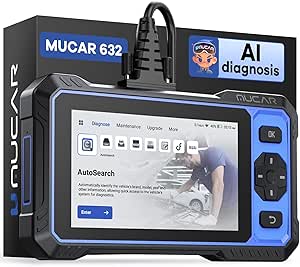 | Best Standalone Screen with AI Guidance | Display: 6.2-inch touchscreen, 1024 × 600 | Storage: 32GB, expandable to 128GB via TF card | Processor: 1.8GHz | VIEW ON AMAZON | See Our Full Breakdown |
| bidirectional scan tool | Vehicle coverage |
|---|---|
| THINKCAR THINKSCAN 662 OBD2 Sc | Vehicles built after 1996; verify specific vehicle compatibility |
| TOPDON TopScan Lite OBD2 Scann | Stated compatibility with more than 10,000 vehicle models |
| Innova 5610 OBD2 Bidirectional | — |
| VDIAGTOOL D100 Bidirectional O | 1996-and-newer models; stated coverage includes more than 10,000 vehicles |
| TOPDON AD900 Lite OBD2 Scanner | 1996–2025 vehicles; stated coverage includes 60+ makes |
| XTOOL D7BT Wireless Bidirectio | — |
| Thinkcar AI-Assisted Bidirecti | — |
| TOPDON AD800BT V2.0 Bidirectio | — |
| VDIAGTOOL D200 Bluetooth OBD2 | — |
| ANCEL FX6100 Bidirectional Sca | — |
| THINKCAR AI+ Bidirectional Sca | 140+ worldwide brands |
| XTOOL A30M V2.0 OBD2 Scanner D | Vehicles from 1996 onward; over 85 brands |
| XTOOL A30D Bidirectional OBD2 | — |
| GEARWRENCH Professional Bi-Dir | 185+ manufacturers |
| MUCAR 632 Elite AI-Assisted Bi | 1996 to latest models |
More Details on Our Top Picks
THINKCAR THINKSCAN 662 OBD2 Scanner with Bidirectional Control and 12 Reset Functions
The THINKSCAN 662 suits buyers who want bidirectional tests on a dedicated touchscreen tool rather than through a phone. Its 6.2-inch display, 2GB of RAM, and 32GB of storage give it a more self-contained feel than the phone-dependent TOPDON TopScan Lite. Twelve reset functions add useful coverage for common service jobs, while support for CAN FD and FCA SGW broadens its reach on newer vehicles. That said, gateway access may require an FCA AutoAuth account, which is not included, and vehicle coverage still needs checking before purchase. Compared with the larger-screen TOPDON AD900 Lite, the 662 is a more compact handheld choice, but its smaller display may be less comfortable for extended data review. Its advanced controls also suit owners willing to learn diagnostic procedures.
Pros:- Dedicated 6.2-inch touchscreen avoids dependence on a phone
- Bidirectional controls support active tests beyond basic code reading
- Twelve reset functions cover common maintenance and repair tasks
- CAN FD and FCA SGW support expand protocol coverage
Cons:- FCA AutoAuth account is not included for applicable gateway access
- Vehicle compatibility should be verified before purchase
- Advanced diagnostic controls may be difficult for inexperienced owners
Best for: DIY owners and independent technicians who want a dedicated touchscreen scanner with bidirectional controls and a broad set of reset functions.
Not ideal for: Buyers who want a phone-based tool, need guaranteed coverage for a specific vehicle without checking compatibility, or expect FCA gateway access without setting up an account.
- Display:6.2-inch HD touchscreen
- Processor:4-core 1.8GHz CPU
- Memory and storage:2GB RAM and 32GB ROM
- Battery:4150mAh
- Vehicle coverage:Vehicles built after 1996; verify specific vehicle compatibility
- Protocols:Includes CAN FD and FCA SGW
- Reset functions:12, including airbag, ABS, oil reset, and TPMS
- Languages and updates:28 languages; lifetime free updates
Our verdict“Choose the THINKSCAN 662 if you want a capable, self-contained bidirectional scanner and prefer its handheld format to the phone-linked TopScan Lite.”
TOPDON TopScan Lite OBD2 Scanner, Bidirectional Scan Tool with AI Assistance
The TopScan Lite is the clearest fit here for DIYers who want a phone to do more than display fault codes. It combines full-system diagnostics and bidirectional control with an AI repair assistant that can help make unfamiliar results easier to interpret. Its iOS and Android compatibility also keeps the setup lighter than a dedicated handheld such as the THINKCAR THINKSCAN 662, though the phone-dependent format means your mobile device is part of the working kit. TOPDON lists compatibility across more than 10,000 vehicle models, but individual functions can still vary by vehicle. The main ownership tradeoff is ongoing access: advanced features require a subscription after the first year, and some functions may call for additional account setup. Compared with the Innova 5610, its AI guidance is a stronger draw for newer DIY users, while the 5610 offers a dedicated scanner body.
Pros:- Bidirectional control and full-system diagnostics in a phone-based tool
- AI repair assistant can help DIYers interpret faults and next steps
- Works with iOS and Android devices
- Broad stated vehicle coverage across more than 10,000 models
Cons:- Advanced features require a subscription after the first year
- Some functions may require additional account setup
- One-year warranty is shorter than the two-year coverage listed for the VDIAGTOOL D100 and TOPDON AD900 Lite
Best for: DIY vehicle owners who already use an iPhone or Android phone and want guided help interpreting diagnostics and repair steps.
Not ideal for: Buyers who want a dedicated screen, prefer to avoid subscriptions for advanced features, or do not want account setup as part of using the tool.
- Device compatibility:iOS and Android
- Diagnostics:Full-system diagnostics
- Control:Bidirectional control
- Repair assistance:AI repair assistant
- Vehicle coverage:Stated compatibility with more than 10,000 vehicle models
- Warranty:1 year
- Model number:Topscan
Our verdict“Pick the TopScan Lite if you want phone-based bidirectional diagnostics with repair guidance and accept subscription access for advanced features.”
Innova 5610 OBD2 Bidirectional Scan Tool
The Innova 5610 makes sense for buyers who want a recognizable handheld scanner paired with wireless access to diagnostic information through the RepairSolutions2 app. Its bidirectional controls and real-time data support more active troubleshooting than a code reader, while coverage for most 1996–2023 OBD2 vehicles gives it a broad stated range. The app connection is the key distinction from the self-contained THINKCAR THINKSCAN 662: it can add a wireless workflow, but app functionality requires internet access. Language support is limited to English, Spanish, and French, and compatibility is not universal, so checking a vehicle’s supported functions matters. Compared with the TOPDON TopScan Lite, the Innova provides a dedicated scanner rather than relying on a phone as the primary interface, but it does not list AI repair guidance.
Pros:- Bidirectional controls and real-time data support active troubleshooting
- Stated coverage includes most 1996–2023 OBD2 vehicles
- RepairSolutions2 app provides a wireless diagnostic option
- Includes multiple languages and accessories
Cons:- Not compatible with every vehicle make and model
- App functionality requires an internet connection
- Some advanced controls call for diagnostic knowledge
Best for: Owners of supported 1996–2023 vehicles who want a dedicated bidirectional scanner with the option to use an app for wireless diagnostics.
Not ideal for: Buyers who need confirmed coverage for an uncommon vehicle, need app functions without internet, or want broad language options beyond English, Spanish, and French.
- Vehicle compatibility:Most 1996–2023 OBD2 vehicles
- Weight:1.3 pounds
- Model number:5610
- Supported languages:English, Spanish, and French
- App:RepairSolutions2
- Connectivity:Wireless diagnostics through the app
- Functions:Bidirectional controls, real-time data, and reset functions
Our verdict“Choose the Innova 5610 if you want a dedicated bidirectional scanner with optional app-connected diagnostics and your vehicle is confirmed compatible.”
VDIAGTOOL D100 Bidirectional OBD2 Scanner Bluetooth All System Scan Tool
The D100 stands out for buyers who want a compact Bluetooth interface with an unusually broad stated menu of maintenance functions. It supports active tests, all-system diagnostics, and more than 17 reset functions, giving it wider service coverage on paper than the THINKCAR THINKSCAN 662 and its 12 resets. A listed 33-foot Bluetooth range can make it easier to view readings away from the driver’s seat, but the scanner depends on a compatible Android or iOS phone and offers no wired alternative. That phone-based design is less self-contained than the Innova 5610, which has a dedicated handheld format. Vehicle coverage includes 1996-and-newer models, though support for particular tests can vary. Some advanced functions may require upgrades or subscriptions, so the extensive function count does not mean every feature is immediately available.
Pros:- More than 17 reset functions cover a wide range of maintenance tasks
- Bidirectional active tests and all-system diagnostics support deeper troubleshooting
- Bluetooth range is listed at up to 33 feet
- Two-year warranty
Cons:- Requires Android 9.0+ or iOS 10.0+
- Bluetooth is the only listed connection method
- Some advanced functions may require separate upgrades or subscriptions
Best for: DIYers and mobile technicians who want Bluetooth active tests and many reset options, and who have a supported smartphone.
Not ideal for: Drivers without a compatible smartphone, buyers who want a wired connection or dedicated screen, and owners who need advanced features without possible upgrades or subscriptions.
- Connectivity:Bluetooth, with a listed range of up to 33 feet
- Phone requirements:Android 9.0+ or iOS 10.0+
- Vehicle coverage:1996-and-newer models; stated coverage includes more than 10,000 vehicles
- Diagnostics:All-system scans and all 10 OBDII modes
- Active testing:Bidirectional active tests
- Reset functions:More than 17
- Dimensions and weight:3.5 x 1.93 x 1.02 inches; 8.4 ounces
- Warranty:2 years
Our verdict“Choose the D100 if a smartphone-based workflow and broad reset coverage matter more to you than a dedicated screen or wired connection.”
TOPDON AD900 Lite OBD2 Scanner, Bidirectional Scan Tool, 8-inch Screen
The AD900 Lite is the strongest fit in this group for buyers who want a tablet-style interface for longer diagnostic sessions. Its 8-inch touchscreen gives live data and menus more room than the 6.2-inch THINKSCAN 662, which may make navigating functions easier when working through several systems. It also pairs Bluetooth 5.0 with VCI cables, offering more connection flexibility than the Bluetooth-only VDIAGTOOL D100. Full-system diagnostics and bidirectional active testing support workshop-style troubleshooting, while the 10,000mAh battery is listed for up to 12 hours of operation. The tradeoff is size: at 4.8 pounds, it is far less portable than a phone-linked tool such as the TopScan Lite. Its advanced feature set may also be excessive for owners who only need occasional code checks, and update frequency is not specified.
Pros:- Large 8-inch touchscreen provides more room for menus and data
- Bidirectional control and full-system diagnostics support active troubleshooting
- Bluetooth 5.0 and VCI cables offer more connection options than Bluetooth-only tools
- 10,000mAh battery is listed for up to 12 hours of operation
Cons:- At 4.8 pounds, it is heavy compared with phone-based options
- Its workshop-oriented feature set may exceed casual owners’ needs
- Software update frequency is not specified
Best for: DIY specialists and small-shop technicians who spend time reviewing live data and want a large screen, broad diagnostics, and multiple connection options.
Not ideal for: Casual owners seeking a compact code reader, or mobile users who want a lightweight scanner that fits easily in a pocket or small tool bag.
- Display:8-inch touchscreen
- Operating system:Android 11.0
- Battery:10000mAh; listed for up to 12 hours of operation
- Connectivity:Bluetooth 5.0 and VCI cables
- Vehicle coverage:1996–2025 vehicles; stated coverage includes 60+ makes
- Functions:Bidirectional control, full-system diagnostics, and multiple reset services
- Weight:4.8 pounds
- Warranty:2 years
Our verdict“Choose the AD900 Lite if you value a large, readable screen and flexible connections more than low weight and compact storage.”
XTOOL D7BT Wireless Bidirectional Scan Tool with ECU Coding and AI Assistance
The XTOOL D7BT pairs wireless active tests with ECU coding and an AI diagnostic assistant, making it a stronger fit for repair work that goes beyond reading codes. Its 64GB storage and support for functions such as VIN writing, throttle relearn, and AdBlue reset give it more scope than the ANCEL FX6100, which focuses on diagnostics and resets rather than ECU programming. Wireless operation also lets a technician move around the vehicle during tests, though the listed 33–66-foot range can depend on the working environment. The tradeoff is a steeper commitment: some functions vary by vehicle, AI assistance needs internet access, and casual owners may not use enough of its coding capability to justify choosing it over a simpler tool.
Pros:- Combines bidirectional control with ECU coding and full-system diagnostics.
- AI diagnostic assistance can help organize fault analysis and repair planning.
- Wireless connection supports movement around the vehicle during diagnosis.
- Supports a broad set of service functions, including VIN writing and AdBlue reset.
Cons:- AI features require an active internet connection.
- Availability of specific functions varies by vehicle.
- Its coding-focused capabilities may be excessive for casual DIY maintenance.
Best for: Independent technicians and experienced DIYers who need wireless active tests plus ECU coding and broad service functions.
Not ideal for: Occasional home users who mainly want code reading and basic maintenance resets, or anyone who needs AI assistance while offline.
Our verdict“Choose the D7BT if ECU coding and wireless active tests matter more than keeping a scan tool simple.”
Thinkcar AI-Assisted Bidirectional OBD2 Scanner Diagnostic Tool 689BT
The Thinkcar 689BT puts its emphasis on making active tests and fault diagnosis easier to follow, with an 8-inch HD touchscreen, Android 10, and AI-assisted step-by-step guidance. That larger display is a practical advantage over the VDIAGTOOL D200, which uses a phone app: the 689BT keeps diagnostic information on a dedicated screen rather than tying the workflow to a mobile device. It also offers full-system diagnostics and more than 34 reset and maintenance functions, giving DIYers and shops room to handle more than engine codes. The compromise is portability; at 3.69 pounds, it is heavier than a compact Bluetooth setup. Software upgrades require WiFi, and the listing notes the device may be used or resold, so buyers should confirm its condition and included support before choosing it.
Pros:- Large 8-inch display gives diagnostic information and menus more room.
- AI guidance supports step-by-step fault analysis.
- Bidirectional control and full-system diagnostics support active troubleshooting.
- More than 34 reset and maintenance functions cover a broad range of service tasks.
Cons:- At 3.69 pounds, it is relatively heavy for frequent mobile use.
- Software upgrades require a WiFi connection.
- The listing allows for a used or resold unit, making device condition a point to verify.
Best for: DIYers and technicians who prefer a dedicated large touchscreen and guided help while running active tests.
Not ideal for: Mobile mechanics prioritizing a lightweight tool, or buyers who want to avoid uncertainty about a potentially used or resold device.
Our verdict“Pick the 689BT if a large dedicated screen and guided diagnostics matter more than a lightweight setup.”
TOPDON AD800BT V2.0 Bidirectional OBD2 Scanner with Lifetime Free Updates
The TOPDON AD800BT V2.0 makes a strong case for buyers who want a broad workshop tool without a recurring software-update fee: it pairs lifetime free updates with bidirectional control, AutoVIN, and more than 28 diagnostic and reset functions. Its listed coverage spans over 10,000 models, and the rugged casing suits regular shop or field use better than a phone-dependent setup such as the VDIAGTOOL D200. The AD800BT also offers 18 languages, a useful detail for shared workspaces. Its tradeoffs are a more involved interface for newer DIYers and reliance on WiFi for updates. AutoVIN is not universal, either, so users may sometimes need to identify the vehicle manually. This is a coverage-and-maintenance pick, not the simplest route to an occasional active test.
Pros:- Bidirectional control and 28-plus functions support diagnosis and service work.
- Lifetime free updates via WiFi avoid a recurring update charge.
- Rugged casing and portable wireless design suit workshop or field use.
- AutoVIN, 18 languages, and broad listed model coverage support varied vehicle work.
Cons:- Some DIY users may need time to learn its more complex functions.
- WiFi is required for updates.
- AutoVIN does not work on every vehicle.
Best for: Independent shops and serious DIYers who want broad vehicle coverage, active tests, and ongoing software updates.
Not ideal for: Beginners seeking the simplest interface, or buyers without convenient WiFi access for software updates.
Our verdict“Choose the AD800BT V2.0 for broad shop-oriented capability and free ongoing updates, provided its learning curve is acceptable.”
VDIAGTOOL D200 Bluetooth OBD2 Scanner with Bidirectional for iOS & Android
The VDIAGTOOL D200 is the most phone-centered option here: Bluetooth 5.2 links its full-system diagnostics and active tests to a dedicated iOS or Android app. That suits owners who would rather use a familiar mobile screen than carry a separate tablet, unlike the Thinkcar 689BT with its built-in 8-inch display. It includes 26 free reset and relearn functions, lifetime free software updates, and support for protocols including CAN FD and FCA AutoAuth. The key limitation is how its function set is divided: additional reset functions and lifetime unlocks require paid upgrades. Coverage also excludes pure electric vehicles and heavy-duty trucks, and buyers need to check compatibility for their specific vehicle before purchase. It makes the most sense for app-oriented owners with supported gasoline or hybrid vehicles.
Pros:- Bluetooth 5.2 app connection works with iOS and Android.
- Bidirectional control and full-system diagnostics cover multiple vehicle modules.
- Includes 26 reset and relearn functions with lifetime free software updates.
- Supports CAN FD and FCA AutoAuth protocols.
Cons:- Some additional resets and lifetime feature access require paid upgrades.
- Does not support pure electric vehicles or heavy-duty trucks.
- Vehicle compatibility should be checked before purchase.
Best for: Car owners comfortable using a phone app who want Bluetooth active tests and everyday service functions for a supported gasoline or hybrid vehicle.
Not ideal for: Pure-EV or heavy-duty truck owners, and buyers who want every advanced reset function included without upgrades.
Our verdict“Pick the D200 if you want app-based active testing for a supported gasoline or hybrid vehicle and can work within its included function set.”
ANCEL FX6100 Bidirectional Scan Tool, All System, Lifetime Free Updates
The ANCEL FX6100 keeps the bidirectional workflow comparatively straightforward: it has a built-in 6.2-inch screen, automatic VIN reading, full-system diagnostics, and more than 20 reset functions. Its plug-and-play design suits owners who want a dedicated handheld scanner rather than the phone-based VDIAGTOOL D200, while lifetime free updates help keep the tool current without a recurring update charge. The tradeoff is clear for buyers comparing bidirectional tools: the FX6100 supports active tests and resets, but it does not support ECU flashing or programming. It also needs a firmware update on first use to unlock all features, despite the simple operating pitch. Choose it for routine diagnosis and service functions, not for coding-heavy repairs or deeper module programming.
Pros:- Bidirectional active tests work alongside full-system diagnostics.
- More than 20 reset functions support routine maintenance tasks.
- Lifetime free updates help keep vehicle coverage current.
- Automatic VIN reading and a built-in screen support a standalone workflow.
Cons:- Does not support ECU flashing or programming.
- A firmware update is required on first use to unlock all features.
- Its capabilities are focused on diagnostics and resets rather than coding-heavy repairs.
Best for: DIY vehicle owners and small repair shops seeking a dedicated handheld for full-system diagnostics, active tests, and common resets.
Not ideal for: Technicians who need ECU flashing, programming, or coding as part of their bidirectional scan workflow.
Our verdict“Choose the FX6100 for accessible handheld diagnostics and active tests, but skip it if ECU programming is part of the job.”
THINKCAR AI+ Bidirectional Scan Tool THINKSCAN 689BT with Lifetime WiFi Updates
The THINKSCAN 689BT is the most feature-rich choice in this group for buyers who want bidirectional tests alongside ECU coding and wide system access. Its CAN FD and DoIP support helps it address newer vehicle networks, while the included F-chassis adaptor and gateway accessory kit add practical reach for supported vehicles. Compared with the more maintenance-focused XTOOL A30D, this THINKCAR offers a broader toolkit for deeper diagnostic work and AI-assisted troubleshooting. The tradeoff is a more involved setup: some functions require registration or membership, and availability can differ by model year. Its 850 g weight also makes it less pocketable than Bluetooth dongle-style options. I’d choose it for varied repair work, not just occasional reset tasks.
Pros:- Combines bidirectional controls, active tests, and ECU coding
- Supports CAN FD and DoIP for newer vehicle networks
- Includes F-chassis adaptor and gateway accessory kit
- AI-assisted diagnosis and WiFi updates support ongoing troubleshooting
Cons:- Some functions require registration or membership
- Advanced feature availability varies by vehicle model and year
- Heavier and more involved than Bluetooth phone-based scanners
Best for: DIY diagnosticians and independent repairers who work across multiple makes and want active tests, coding, and newer-protocol support in one scanner.
Not ideal for: Drivers who only need routine maintenance resets or want a simple phone-based tool; registration and membership requirements add setup and access friction.
- Model:689BT
- Weight:850 g
- Connectivity:WiFi
- Vehicle coverage:140+ worldwide brands
- Protocols:CAN FD and DoIP
- Languages:28
- Diagnostic functions:Bidirectional control, ECU coding, active tests, real-time data, and report saving
- Included components:Charger, carrying case, F-chassis adaptor, and gateway accessory kit
Our verdict“Choose the THINKSCAN 689BT if broad diagnostics and coding matter more than a simple setup or compact form.”
XTOOL A30M V2.0 OBD2 Scanner Diagnostic Tool, 26 Resets, All System
The XTOOL A30M V2.0 pairs all-system diagnostics and active tests with a long list of reset and relearn functions, making it a practical fit for home mechanics who want more than code reading. Its Bluetooth connection works with a phone or tablet up to 33 feet away, and support for up to eight live-data streams helps users watch several readings without a dedicated handheld screen. Compared with the XTOOL A30D, the A30M highlights 26 reset functions, giving routine service tasks more room in its feature set. That breadth still depends on vehicle compatibility, and FCA AutoAuth access may require registration and payment. The phone-dependent interface is convenient for some buyers but less appealing to anyone who wants a standalone scanner.
Pros:- Combines full-system diagnostics with active tests
- Lists 26 reset and relearn functions
- Bluetooth connection supports use up to 33 feet away
- Lifetime free software updates and two-year warranty
Cons:- Requires a smartphone or tablet to operate
- Service-function availability varies by vehicle
- Some FCA AutoAuth functions require registration and payment
Best for: Home mechanics who already use an Android or iOS phone or tablet and want active tests plus a broad range of maintenance resets.
Not ideal for: Buyers seeking a self-contained handheld scanner, or owners who need guaranteed access to every service function on a specific vehicle.
- Connectivity:Bluetooth 4.0, up to 33 feet
- Vehicle coverage:Vehicles from 1996 onward; over 85 brands
- Reset functions:26
- Live data:Up to 8 streams
- Protocols and access:CAN FD support and FCA AutoAuth
- Languages:22
- Updates:Lifetime free software updates
- Warranty:2 years
Our verdict“Pick the A30M V2.0 if you want a phone-based scanner with active tests and broad maintenance coverage.”
XTOOL A30D Bidirectional OBD2 Scanner Diagnostic Tool with 19 Reset Functions
The XTOOL A30D focuses on the core appeal of a bidirectional scan tool: running active tests, monitoring vehicle systems, and handling common service resets through a phone or tablet. Its 19 reset functions cover jobs such as EPB, TPMS, oil, and throttle relearn, so a home garage can tackle more than basic fault-code checks. Compared with the XTOOL A30M V2.0, it presents a more defined 19-function package rather than the A30M’s broader stated reset count; buyers should compare the exact services supported for their vehicle before choosing. Bluetooth operation and lifetime updates keep the setup flexible, but there’s no standalone display, and advanced functions can take practice. FCA AutoAuth also adds a separate access requirement for some vehicles.
Pros:- Bidirectional control enables active component testing
- Includes 19 listed reset and relearn functions
- Bluetooth connection supports operation up to 33 feet away
- Lifetime free updates and a two-year warranty
Cons:- Requires an Android or iOS device for operation
- Compatibility should be confirmed before purchase
- Some FCA AutoAuth access requires an active subscription
Best for: DIY owners and small garages that want wireless active testing and a clearly listed set of common service functions on a supported vehicle.
Not ideal for: Beginners who want guided, self-contained operation, or owners who have not checked support for their make, model, and year.
- Vehicle compatibility:OBD2 vehicles from 1996 onward
- Connectivity:Wireless Bluetooth, up to 33 feet
- Protocols:OBD2, CAN FD, and FCA AutoAuth
- Reset functions:19, including EPB, TPMS, ABS, oil reset, SAS, and BMS
- Languages:22
- Device compatibility:Android 9.0+ and iOS 10.0+
- Updates:Lifetime free software updates
- Warranty:2 years
Our verdict“The A30D suits phone-equipped DIYers who want core active tests and routine service functions without a dedicated scanner screen.”
GEARWRENCH Professional Bi-Directional Diagnostic Scan Tool GWSMARTBT
The GEARWRENCH GWSMARTBT is a straightforward professional-oriented pick for technicians who prefer running diagnostics from an Android device. It combines bidirectional control and live data with support for more than 23 reset or relearn functions, while stated coverage spans over 185 manufacturers. Free software updates without subscription fees make its ongoing software model simpler than tools that gate some functions behind memberships. Compared with the more feature-heavy THINKSCAN 689BT, the GWSMARTBT is a lighter, less ambitious option: its listed feature set does not emphasize ECU coding or AI-assisted diagnosis. Android exclusivity is its clearest limitation, and users must supply a phone or tablet. It fits buyers who value broad make coverage and a simpler workflow over a dedicated screen or deeper coding functions.
Pros:- Supports bidirectional control and live data
- Covers over 185 manufacturers
- Includes more than 23 reset and relearn functions
- Free software updates with no subscription fees
Cons:- Limited to Android devices
- Requires a smartphone or tablet for operation
- Feature set is more basic than advanced scanners such as the THINKSCAN 689BT
Best for: Technicians and experienced DIYers who already use Android devices and want wireless active tests, live data, and multi-make coverage.
Not ideal for: iPhone-only users or buyers seeking a standalone scanner with advanced coding and a more extensive high-end feature set.
- Model:GWSMARTBT
- Weight:0.11 kg
- Operating system:Android 10.0
- Vehicle coverage:185+ manufacturers
- Functions:Bidirectional control, live data, and 23+ reset/relearn functions
- Updates:Free software updates
- Warranty:2 years
- Power source:Battery powered
Our verdict“Choose the GWSMARTBT if you want broad vehicle coverage and active diagnostics through an Android device without update fees.”
MUCAR 632 Elite AI-Assisted Bidirectional OBD2 Scanner
The MUCAR 632 Elite takes a different route from the phone-dependent XTOOL A30D: it has its own 6.2-inch touchscreen, so diagnosis does not depend on a separate mobile device. Bidirectional control, AI-assisted fault analysis, auto VIN scanning, and remote assistance give it a guided workflow, while its stated reset services cover common systems including ABS, airbag, EGR, and throttle. The 32GB of storage and expandable capacity also suit users who want a dedicated tool for ongoing shop or garage use. Its AI features need an internet connection, and the product data lists diagnostics across four ECUs, so buyers needing broader system coverage should verify support for their vehicle. FCA AutoAuth registration is a separate hurdle.
Pros:- Dedicated 6.2-inch touchscreen avoids phone dependence
- Combines bidirectional control with AI-assisted fault analysis
- Auto VIN scanning and remote assistance support diagnosis
- Lifetime free updates and expandable storage
Cons:- AI features require an internet connection
- Listed diagnostic coverage is four ECUs, so vehicle fit needs checking
- FCA AutoAuth registration is required separately
Best for: DIYers and small-shop operators who want a dedicated touchscreen scanner with active tests, AI-assisted fault analysis, and common reset services.
Not ideal for: Buyers who need offline AI features, have vehicles requiring broader ECU coverage than the listed four ECUs, or want to avoid separate AutoAuth registration.
- Display:6.2-inch touchscreen, 1024 × 600
- Storage:32GB, expandable to 128GB via TF card
- Processor:1.8GHz
- Operating system:Android 8.1
- Connectivity:WiFi and auto VIN scanning
- Protocols:FCA SGW and CAN FD
- Vehicle coverage:1996 to latest models
- Functions:Bidirectional control; 15+ reset services; diagnostics for 4 ECUs
- Updates:Lifetime free updates
Our verdict“The MUCAR 632 Elite is a strong fit for buyers who want a dedicated touchscreen and guided diagnostics rather than a Bluetooth phone adapter.”

How We Picked
I compared these 15 tools on the parts of bidirectional diagnostics that affect actual buying decisions: whether the tool supports active tests, how broadly it scans vehicle systems, what service functions and advanced capabilities it offers, and how clearly its form factor fits home or shop use. I also weighed screen and connection choices, update policies, and practical setup demands. A large advertised function count mattered less than a tool’s overall balance and the need to confirm compatibility for a specific make, model, year, and system.
The ranking favors tools that appear to offer a useful mix of active control, diagnostic breadth, and approachable operation, rather than a single headline feature. The Innova 5610 leads as a broadly appealing handheld choice; the XTOOL D7BT ranks highly for buyers seeking wireless work and ECU coding. Phone-dependent scanners, specialist-oriented models, and tools emphasizing reset menus rank according to their narrower strengths and tradeoffs—not because one format or brand is right for every vehicle owner.
Factors to Consider When Choosing Bidirectional Scan Tools
Before choosing a scanner, match its capabilities to the jobs you actually plan to do. Bidirectional control can vary sharply by vehicle, module, and test, so the label alone does not prove that a particular command will be available on your car. These factors can help separate useful coverage from feature-list overload.
Confirm Support for Your Exact Vehicle and Test
Compatibility is more specific than a make-and-model match: functions can differ by model year, engine, trim, and control module. Start with the active test you want to run, such as commanding a fan or operating a window, then check whether the tool supports that test on your exact vehicle. Ask the manufacturer or check its coverage information before buying, especially if you need access to an uncommon module. A scanner may read a system’s codes without being able to command its components. Avoid treating “all system” or a high reset count as proof of full bidirectional coverage.
Separate Active Tests From Service Resets
Active tests send commands to vehicle components; service functions handle maintenance tasks such as resetting a reminder or carrying out a relearn. Some scanners offer many resets but fewer useful active controls, while others pair broad system scans with deeper testing. Decide which problem you need to solve before comparing feature counts. For routine maintenance, reset coverage may be the priority; for troubleshooting, component control and live data can matter more. A tool that excels at one job may not replace a broader diagnostic platform.
Choose a Screen and Connection That Fit Your Work
A dedicated handheld display keeps the scanner independent of your phone and can be easier to operate while moving around a vehicle. Bluetooth adapters are smaller and often convenient for storing in a glove box, but they rely on a compatible phone or tablet, app setup, and a working connection. Think about whether you will use the scanner outdoors, share it with other drivers, or leave it in a workshop. Mobile tools can also compete with other demands on your phone during a repair. Choose the interface you will be comfortable using when a diagnostic task takes longer than expected.
Look Beyond Update Claims
Updates can add vehicle coverage, improve functions, or maintain software compatibility, so the update policy matters for a tool you plan to keep. “Lifetime free updates” is useful only if the manufacturer continues to support the product and the update process suits your setup. Check whether updates require Wi-Fi, a computer, or an app, and whether any features or services carry separate conditions. Buyers who work on newer vehicles may place more weight on update access than someone diagnosing one older car. Do not assume that an update promise guarantees every future vehicle or function will be supported.
Pay for Advanced Functions Only When You Need Them
ECU coding and other advanced functions can make a scanner more valuable for experienced users, but they add complexity and still depend on vehicle-specific support. If you mainly need fault-code checks, live data, and occasional service resets, a simpler tool may be easier to learn and maintain. Before paying for coding capability, identify a real task you expect to perform and verify the supported module and procedure. Beginners can gain more from clear menus and dependable coverage than a long list of rarely used features. Advanced capability is most useful when it matches both your vehicle and your skill level.
Check the Real Cost of Ownership
The purchase is only part of ownership: consider update terms, app requirements, device compatibility, and whether the scanner can serve more than one vehicle. A phone-based tool may be compact but leave you dependent on a particular mobile platform or account. A handheld model may be easier to share, though its screen and storage add bulk. For household use, broader make coverage and accessible menus may justify choosing a less specialized model. For regular repair work, reliable updates and the ability to reach the systems you service can matter more than a long advertised feature list.
Frequently Asked Questions
Will every bidirectional scanner run active tests on my car?
No. Bidirectional capability does not mean every scanner can command every component on every vehicle. Access can vary by make, model year, trim, module, and the specific test, even when a tool can read codes from that system. Check support for the exact active test you need before buying, and ask the manufacturer if coverage details are unclear. Treat broad compatibility labels as a starting point, not a guarantee.
Is a phone-based Bluetooth tool as capable as a handheld scanner?
It can offer useful diagnostics and active tests, but the connection style alone does not define capability. Compare the supported systems, active tests, and service functions rather than assuming that a handheld is always more capable or that an app-based tool is equivalent. A Bluetooth scanner also depends on a compatible mobile device, app, and connection. If you share the tool or prefer a dedicated display, a handheld may fit better; if portability matters most, a phone-based option can make sense.
Should I prioritize the number of reset functions or ECU coding?
Choose based on the work you expect to do. A long reset list may help with routine maintenance, but it does not establish how well the scanner handles active tests or deeper fault diagnosis. ECU coding is a more specialized capability and should be purchased only after confirming support for your vehicle and intended task. For many DIY owners, reliable access to the relevant modules and clear operation will be more useful than either headline feature in isolation.
Are lifetime free updates enough reason to choose one scanner?
They can be a meaningful advantage, particularly if you expect to keep the scanner or diagnose newer vehicles over time. Still, an update policy does not prove that a tool covers every future model or the function you need today. Check how updates are installed, which features they affect, and whether any services have separate requirements. Compare update terms alongside vehicle coverage, interface, and active-test support rather than letting one policy decide the purchase.
What should I buy if I only need to diagnose one vehicle?
Start by listing the systems and tests you want to access on that specific vehicle, then verify coverage for its year and configuration. A modestly featured scanner with confirmed support may suit you better than a more advanced model with capabilities you will not use. If you expect to handle repairs beyond basic code reading, prioritize active tests and access to the relevant modules. Also think about whether you want a dedicated handheld screen or are happy to work through a phone app.
Conclusion
For most buyers, I recommend the Innova 5610 as the best overall choice in this group, with the XTOOL D7BT as the better fit for users who specifically want wireless diagnostics and ECU coding. For value-conscious shoppers, compare the TOPDON TopScan Lite and XTOOL A30D against the exact functions their vehicle needs; their phone-based or focused feature sets may be a better match than paying for advanced capabilities. For beginners, a straightforward handheld such as the TOPDON AD900 Lite is a sensible place to start, provided its coverage checks out. For buyers who prize ongoing updates, look closely at the TOPDON AD800BT V2.0 and ANCEL FX6100. Choose the VDIAGTOOL D200 or TopScan Lite when compact, phone-led use is the priority, and consider the XTOOL D7BT when coding and a broader diagnostic workflow are central to the job. Before ordering, confirm support for your vehicle and the specific active test you plan to run.
Fall Picks
fall essentials
As an affiliate, we earn on qualifying purchases.