Choosing a keyboard for software development is less about gaming effects and more about the working details you repeat all day: comfortable key access, a layout that suits your coding and data-entry habits, and controls that fit your setup. My strongest general-purpose pick is the RedThunder K75 Pro, which combines a space-saving 75% layout with three connection modes and hot-swappable switches. If a number pad matters, the RedThunder K95 S keeps one in a smaller-than-full-size design; if your work involves meetings and dictated notes, the Virtusx Phronesis adds voice and transcription tools.

Get business pricing on monitors, keyboards and dev gear
- Business-only prices and quantity discounts
- Tax-exempt purchasing
- Multiple users, one account, clear invoices
These keyboards solve different problems, so there is no single best choice for every developer. A compact board leaves more room for a mouse but removes keys some workflows need. Wireless options keep a desk flexible, while software-dependent features can add limits around operating system, internet access, or setup. I also include the Doohoeek 25-Key Macro Keypad as a workflow companion rather than a replacement for a full typing keyboard: its programmable shortcuts may help with repetitive commands, but its Windows-only setup makes it a narrower pick.
Key Takeaways
- RedThunder K75 Pro is my most balanced standalone pick for developers who want a compact layout, tri-mode connectivity, a knob, and switch customization without a full-size footprint.
- RedThunder K95 S is the better fit for spreadsheet-heavy work or frequent number entry because it retains a numeric keypad while using a 90% layout.
- Virtusx Phronesis stands apart for developers who want voice typing and meeting transcription, but those tools depend on its app, internet access, and plan limits.
- Doohoeek 25-Key Macro Keypad is an add-on for Windows users with repeatable shortcuts or text snippets, not a practical primary keyboard.
- Before choosing, weigh layout against your daily tasks: compactness saves desk space, while a number pad and dedicated keys can reduce friction in data-heavy work.
| RedThunder K75 Pro 75% Tri-Mode Wireless Mechanical Gaming Keyboard |  | Best Overall: a flexible compact main keyboard | Layout: 75% ANSI, 81 keys | Connectivity: Bluetooth 5.0, 2.4 GHz wireless, USB-C wired | Display and controls: TFT color screen and multifunction knob | VIEW LATEST PRICE | See Our Full Breakdown |
| RedThunder K95 S Wireless Mechanical Gaming Keyboard |  | Best for Number-Heavy Work: a compact board with a keypad | Layout: 90% QWERTY with numeric keypad | Connectivity: 2.4 GHz wireless, Bluetooth 5.0, wired | Switches: Pre-lubricated linear; hot-swappable 3-pin and 5-pin support | VIEW LATEST PRICE | See Our Full Breakdown |
| Virtusx Phronesis Wireless AI Keyboard with Voice Typing and Meeting Notes |  | Best for Meeting-Heavy Work: voice and transcription features built in | Layout: Tenkeyless | Connectivity: 2.4 GHz wireless or USB-C wired | Compatibility: Windows and macOS | VIEW LATEST PRICE | See Our Full Breakdown |
| Doohoeek 25-Key Programmable Macro Keypad | 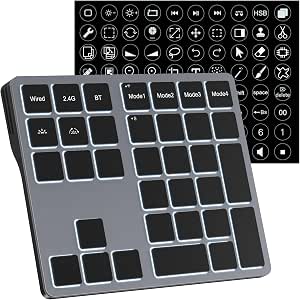 | Best Workflow Add-On: programmable shortcuts for Windows users | Keys: 25 programmable keys | Connectivity: Bluetooth 5.0, 2.4 GHz wireless, or wired; 2.4 GHz dongle included | Compatibility: Windows 11 or later listed | VIEW LATEST PRICE | See Our Full Breakdown |
| software developer keyboard | Connectivity | Layout | Compatibility | Battery |
|---|---|---|---|---|
| RedThunder K75 Pro 75% Tri-Mod | Bluetooth 5.0, 2.4 GHz wireless, USB-C wired | 75% ANSI, 81 keys | Windows 7/8/10/11, macOS, PC, tablets, PS, and Xbox | 5000 mAh; stated up to 18 hours with default RGB or 90 hours with lighting off |
| RedThunder K95 S Wireless Mech | 2.4 GHz wireless, Bluetooth 5.0, wired | 90% QWERTY with numeric keypad | — | Rechargeable 8000 mAh |
| Virtusx Phronesis Wireless AI | 2.4 GHz wireless or USB-C wired | Tenkeyless | Windows and macOS | — |
| Doohoeek 25-Key Programmable M | Bluetooth 5.0, 2.4 GHz wireless, or wired; 2.4 GHz dongle included | — | Windows 11 or later listed | — |
More Details on Our Top Picks
RedThunder K75 Pro 75% Tri-Mode Wireless Mechanical Gaming Keyboard
The RedThunder K75 Pro is my best overall pick because it balances compactness with the controls a developer can use throughout a workday. Its 75% ANSI layout has 81 keys, keeping arrow keys and a useful spread of navigation keys while giving up a full-size number pad. That makes it a better everyday coding board than the Doohoeek keypad, which cannot replace a primary keyboard, and a more space-conscious choice than the K95 S for people who rarely enter long strings of numbers.
Its hot-swappable 3-pin and 5-pin switch support gives buyers room to change switches without soldering. That is practical if a user wants to tune the board’s mechanical feel over time, though the listed information does not specify what alternative switches are included. The gasket mount and side-printed PBT keycaps add further customization and a distinctive look, but they should not be mistaken for proof that every developer will prefer its typing feel. Developers who want a quieter, low-profile, or conventional office keyboard may find this style a mismatch.
Three connection modes make the K75 Pro unusually adaptable among these picks: it can run over USB-C, Bluetooth, or 2.4 GHz wireless. That lets a buyer choose a wired desk setup or pair wireless devices, and it compares favorably with the Phronesis, which lists 2.4 GHz and USB-C but not Bluetooth. A TFT screen and multifunction knob provide quick access to status and media or settings controls. Those are convenience extras rather than coding necessities; custom screen images and GIFs require the Windows driver and a wired connection, which narrows the appeal for macOS users who want to personalize the display.
The 5000 mAh battery is listed for up to 18 hours with default RGB lighting or up to 90 hours with lighting off. Those figures make lighting choice relevant for anyone who expects to work away from a cable, but they are stated runtimes, not a guarantee for every setup. The biggest practical omission is the number pad: the product description advises against using it for numerical work, so developers who routinely handle spreadsheets, financial data, or number-heavy testing should favor the K95 S. For a compact, customizable general-purpose board, though, the K75 Pro offers the broadest balance in this group.
Pros:- 75% layout retains arrow and navigation keys while reducing desk footprint.
- Bluetooth, 2.4 GHz, and USB-C connections offer flexible device and desk setups.
- Hot-swappable support for 3-pin and 5-pin switches allows solder-free changes.
- TFT screen, multifunction knob, and a stated battery runtime of up to 90 hours with lighting off.
Cons:- No full-size number pad, and the supplied description advises against numerical work.
- Custom screen images and GIFs require Windows software and a wired connection.
- The display and RGB features may add little value to developers who prefer a plain work keyboard.
Best for: Developers who want a compact primary keyboard with three connection modes, switch customization, and dedicated navigation keys.
Not ideal for: People who regularly use a numeric keypad, want a minimal office design, or need to customize the TFT screen without a Windows PC and wired connection.
- Layout:75% ANSI, 81 keys
- Connectivity:Bluetooth 5.0, 2.4 GHz wireless, USB-C wired
- Display and controls:TFT color screen and multifunction knob
- Switch compatibility:Hot-swappable 3-pin and 5-pin switches
- Mount and keycaps:Gasket mount; side-printed PBT
- Battery:5000 mAh; stated up to 18 hours with default RGB or 90 hours with lighting off
- Compatibility:Windows 7/8/10/11, macOS, PC, tablets, PS, and Xbox
Our verdict“I’d choose the K75 Pro as the most adaptable main keyboard here, unless number-pad access is part of your daily work.”
RedThunder K95 S Wireless Mechanical Gaming Keyboard
For developers who use a numeric keypad often, the RedThunder K95 S solves the main compromise of compact keyboards: it keeps number entry available without taking the shape of a conventional full-size board. Its 90% QWERTY layout includes a numeric keypad and arrow keys, making it a stronger fit than the K75 Pro for spreadsheet work, test data, or repeated number entry. The tradeoff is that the K95 S occupies more space than a 75% keyboard, so it is not the obvious choice for a small desk or a developer who wants maximum mouse room.
The K95 S matches the K75 Pro on tri-mode connectivity, with Bluetooth 5.0, 2.4 GHz wireless, and a wired option. It also supports hot-swappable 3-pin and 5-pin switches, so the buyer can change compatible switches without soldering. Its pre-lubricated linear switches establish the supplied configuration, but the product details do not describe alternate switch options or a typing sound profile. I would choose this for its layout rather than assume its linear switches are the right feel for every programmer.
A rechargeable 8000 mAh battery and RGB lighting add flexibility, but no battery runtime is specified, so I would not compare its wireless endurance directly with the K75 Pro’s stated figures. Side-engraved PBT keycaps are another point of difference: their markings may be less immediately visible to a beginner than conventional top-printed legends. That is a manageable preference for some users, but it matters if you often glance down while learning a new layout or switching between keyboards.
The clearest limitation is software customization: it is listed for wired or 2.4 GHz mode on Windows. That makes the K95 S less straightforward for macOS developers who want to configure features in software, even though the product information lists broad device compatibility. Compared with the Phronesis, it does not add voice transcription; compared with the K75 Pro, it gives up the TFT display in favor of a number pad. I rank it second because its more specialized layout is a real advantage for data-heavy development, but not the best fit for every coding desk.
Pros:- 90% layout retains a numeric keypad and arrow keys.
- Offers wired, Bluetooth, and 2.4 GHz connections.
- Hot-swappable support accommodates 3-pin and 5-pin switches.
- Rechargeable 8000 mAh battery and side-engraved PBT keycaps.
Cons:- Software customization is limited to wired or 2.4 GHz use on Windows.
- Side-engraved legends may be harder for new users to read at a glance.
- No stated battery runtime makes wireless endurance harder to compare with the K75 Pro.
Best for: Developers who regularly enter numbers or work with spreadsheets and want a numeric keypad in a compact mechanical layout.
Not ideal for: Mac users who need software customization, beginners who prefer clearly visible top-printed legends, or anyone prioritizing the smallest footprint.
- Layout:90% QWERTY with numeric keypad
- Connectivity:2.4 GHz wireless, Bluetooth 5.0, wired
- Switches:Pre-lubricated linear; hot-swappable 3-pin and 5-pin support
- Keycaps:Side-engraved PBT
- Backlighting:RGB
- Battery:Rechargeable 8000 mAh
- Software limitation:Customization via wired or 2.4 GHz connection on Windows
- Dimensions and compatibility:16 × 5.5 × 1.6 inches; laptop, PC, smartphone, tablet, PS, Xbox; Windows listed
Our verdict“I’d pick the K95 S over the K75 Pro when number entry matters more than saving desk space.”
Virtusx Phronesis Wireless AI Keyboard with Voice Typing and Meeting Notes
The Virtusx Phronesis is the most specialized main keyboard in this lineup. Its pitch is not a more compact layout or a number pad; it is direct access to voice typing, meeting recording, transcription, summaries, and AI chat through the Virtusx app. For a developer who spends substantial time writing notes, capturing discussions, or dictating text, dedicated keyboard keys may put those tools closer at hand than a separate app workflow. If coding is the main task and meetings are occasional, the K75 Pro offers a more general-purpose feature set without making AI software central to the purchase.
The Phronesis uses a tenkeyless layout, which removes the number pad while preserving a conventional typing area. That makes it a reasonable middle ground for someone who wants more room than a full-size board but does not need the smallest layout in the group. Its pre-lubed RK Misty Rain linear switches are hot-swappable, and its dye-sublimated PBT keycaps add a customization path. The supplied switch details include a 40 gf actuation force, a 2.0 mm actuation point, and 3.4 mm total travel; those figures describe the switch but cannot establish whether its feel will suit a particular typist.
Wireless operation is available through 2.4 GHz, with USB-C wired use as an alternative. Unlike either RedThunder board, the listed connectivity does not include Bluetooth, which may matter to people who want to pair directly with multiple Bluetooth devices. The lighting offers 12 built-in RGB modes, though lighting is secondary to the productivity features that define this pick. Three months of Virtusx Pro are included, but buyers should look beyond the included period: the free plan is limited to 1,000 voice-typing words per week and 120 minutes of meeting recording per month.
The main tradeoff is app and internet dependence. The AI features require the Virtusx app and an internet connection, so this is less appealing to developers who work offline, avoid cloud-based tools, or prefer not to add another software service to their workflow. Windows and macOS are listed, which is broader than the Windows-only Doohoeek programming setup, but the product remains a poor match for someone who simply wants a straightforward mechanical keyboard. I rank it third because its meeting tools can be valuable for a distinct kind of workday, but they do not improve the basic coding layout for everyone.
Pros:- Dedicated keys provide access to voice typing and meeting tools through the Virtusx app.
- Tenkeyless layout keeps a familiar main typing area while dropping the number pad.
- Hot-swappable linear switches and dye-sublimated PBT keycaps allow some customization.
- Includes 2.4 GHz wireless and USB-C wired connection options.
Cons:- Voice and AI features require the Virtusx app and an internet connection.
- The free plan limits voice typing to 1,000 words weekly and meeting recording to 120 minutes monthly.
- Bluetooth connectivity is not listed.
Best for: Developers who regularly attend meetings, dictate notes, or want keyboard-accessible transcription and summaries on Windows or macOS.
Not ideal for: Developers who work offline, do not want app-dependent AI features, need Bluetooth, or rely on a numeric keypad.
- Layout:Tenkeyless
- Connectivity:2.4 GHz wireless or USB-C wired
- Compatibility:Windows and macOS
- Switches:Pre-lubed RK Misty Rain linear, hot-swappable
- Switch measurements:40 gf actuation force; 2.0 mm actuation point; 3.4 mm total travel
- Keycaps and lighting:Dye-sublimated PBT; 12 built-in RGB modes
- Included subscription:Three months of Virtusx Pro
- Free plan limits:1,000 voice-typing words per week; 120 minutes of meeting recording per month
Our verdict“I’d choose the Phronesis for a meeting-heavy workflow, not for its AI features alone if my main need is a coding keyboard.”
Doohoeek 25-Key Programmable Macro Keypad
The Doohoeek 25-Key Programmable Macro Keypad is not a like-for-like alternative to the K75 Pro, K95 S, or Phronesis. Its 25 keys are intended for macros, text snippets, and shortcuts, so I see it as a companion to a full keyboard rather than a primary typing board. A developer with repetitive commands, boilerplate, or frequently used text may find dedicated programmable keys useful. Someone looking for a complete keyboard should skip it and choose one of the other three.
Its standout feature is four programmable layouts stored in onboard memory. That gives the device a way to retain separate key arrangements for different tasks, which could suit a workflow that switches between projects or tool sets. Programming, however, requires a wired connection. After configuration, it offers Bluetooth, 2.4 GHz wireless, and wired connectivity, but that flexibility does not remove the setup limitation. The listed operating system support is Windows 11 and later; developers using macOS or another environment should not assume the keypad can be programmed or used as they expect.
Seven-color backlighting with adjustable brightness can make the keys easier to distinguish in a dim workspace, and the included shortcut stickers may help identify assignments. Those extras are less significant than the Windows-only compatibility and the need to configure keys while wired. Compared with the Phronesis, the Doohoeek does not offer voice transcription or meeting tools; compared with the RedThunder models, it has no full typing layout, switch details, or equivalent role as a central workstation keyboard. Its appeal is narrower but clear: fast access to specific actions without sacrificing the main board already on the desk.
I rank it fourth because it addresses a secondary workflow rather than the core choice of a developer keyboard. That does not make it a poor fit for the right buyer; it means the buyer should already have a primary keyboard and a Windows-based reason to use programmable keys. I would check that the intended software and shortcuts work with its programming method before relying on it for critical commands. If the requirement is a versatile standalone keyboard, the K75 Pro is the better starting point; if it is a small shortcut panel alongside an existing board, this is the focused option.
Pros:- 25 programmable keys can hold macros, shortcuts, and text snippets.
- Four layouts can be stored in onboard memory for different tasks.
- Bluetooth, 2.4 GHz, and wired connections are listed.
- Seven-color backlighting, adjustable brightness, and shortcut stickers aid key identification.
Cons:- Designed for Windows, with Windows 11 listed as the minimum system version.
- Key programming requires a wired connection.
- A macro pad cannot replace a full keyboard for everyday coding and general typing.
Best for: Windows 11 or later users who already have a main keyboard and want programmable shortcut, macro, or text-snippet keys.
Not ideal for: Buyers seeking a primary typing keyboard, macOS users, or people who need to change key assignments wirelessly.
- Keys:25 programmable keys
- Connectivity:Bluetooth 5.0, 2.4 GHz wireless, or wired; 2.4 GHz dongle included
- Compatibility:Windows 11 or later listed
- Programmable layouts:Four
- Memory:Onboard memory
- Programming method:Wired connection required
- Backlighting:Seven colors with adjustable brightness
- Included accessories:Shortcut stickers
Our verdict“I’d add the Doohoeek to a Windows desk for repeatable shortcuts, but I would not buy it as my only developer keyboard.”

How We Picked
I ranked these options around what matters in a developer’s daily workspace rather than treating gaming lighting or novelty features as automatic advantages. I compared each product’s layout and key access, its connection options, and how easily a buyer can adapt it to an existing computer setup. I also looked at whether its special features solve a recurring work problem or add requirements that could get in the way.
The K75 Pro ranks first because its 75% layout, hot-swappable switches, and wired, Bluetooth, and 2.4 GHz modes make it a flexible main board for varied setups. The K95 S follows for developers who need a number pad but can accept a Windows-focused software experience. I placed the Phronesis third because voice and meeting tools may save time for a particular work style, yet rely on the Virtusx app and internet access. The Doohoeek ranks fourth as a focused companion: its programmable keys and onboard layouts may help with repetitive actions, but its 25-key format and Windows-only programming limit its role.
I used the supplied product information for the feature comparisons and avoided assuming a particular typing feel, durability record, or software behavior beyond what is stated. I treat battery figures as manufacturer-stated claims, not independent measurements. Where a detail is missing—such as a battery runtime, programming flexibility, or compatibility with a particular developer tool—I do not infer it. This ranking rewards useful daily fit, not the longest feature list.
| software developer keyboard | Compatibility | Switches | Backlighting |
|---|---|---|---|
| RedThunder K75 Pro 75% Tri-Mod | Windows 7/8/10/11, macOS, PC, tablets, PS, and Xbox | — | — |
| RedThunder K95 S Wireless Mech | — | Pre-lubricated linear; hot-swappable 3-pin and 5-pin support | RGB |
| Virtusx Phronesis Wireless AI | Windows and macOS | Pre-lubed RK Misty Rain linear, hot-swappable | — |
| Doohoeek 25-Key Programmable M | Windows 11 or later listed | — | Seven colors with adjustable brightness |
Factors to Consider When Choosing Software Developer Keyboards
I would start with the work pattern, not the feature list. A developer who writes code, reviews documents, and switches between devices has different needs from someone who enters figures all day or attends meetings that need careful notes. These four picks cover those distinct cases, but their layouts and software requirements matter more than their shared mechanical-keyboard styling.Choose a layout around the keys you use
Layout is the most immediate choice because it changes what stays under your hands and how much room the keyboard takes. The K75 Pro’s 75% layout keeps arrow and navigation keys while omitting a number pad. It suits a coding desk where mouse room matters and long numerical entry is uncommon. The Phronesis TKL also drops the number pad, with a tenkeyless format that keeps the main typing area but takes a different approach to compactness.
The K95 S is the clear choice for developers who use a numeric keypad regularly. It retains one within a 90% layout, so it may reduce the inconvenience of entering values without going to a full-size arrangement. That convenience comes with a larger footprint than the K75 Pro. The Doohoeek is a different category altogether: its 25 keys are for shortcuts and macros, not full-time typing. If you are uncertain, list the keys you reach for during a normal work session before choosing the smallest layout.
Decide whether wireless flexibility is useful
All three full keyboards provide a wired option, which is useful for a fixed workstation or when a buyer wants to avoid relying on wireless connections. The K75 Pro and K95 S both add Bluetooth and 2.4 GHz wireless. The Phronesis lists 2.4 GHz and USB-C but not Bluetooth, so it may be less convenient for buyers who need Bluetooth pairing. The Doohoeek includes Bluetooth, 2.4 GHz, and wired modes, but its programming step remains wired-only.
Multi-mode connectivity is most useful if you actually move between computers or want the same keyboard available for more than one device. It is not a substitute for checking operating system support. For instance, the K95 S limits software customization to wired or 2.4 GHz use on Windows, and the Doohoeek is intended for Windows 11 or later. A macOS user should review those limits before treating the connection list as full feature support.
Treat customization as a work preference, not a requirement
Hot-swappable switches on the K75 Pro, K95 S, and Phronesis let buyers replace compatible switches without soldering. This is useful for someone who wants to explore a different mechanical feel or maintain a board with replaceable parts. It does not mean each option will feel identical, and the supplied details do not establish an ideal switch for long coding sessions. The Phronesis lists linear switch measurements, while the K95 S specifies pre-lubricated linear switches; buyers who care about feel should compare those known details with their own preferences.
The Doohoeek’s customization serves another purpose: assigning commands to individual keys. Its four onboard layouts and memory make it a task-specific shortcut tool, but configuration requires a wired connection. The K75 Pro’s screen and knob are convenient controls, yet screen image and GIF changes require Windows software and a wired connection. Before buying for customization, distinguish between changing a keyboard’s physical switches, remapping commands, and changing visual effects; these products do not offer the same kind of flexibility.
Check software, internet, and operating-system limits
Software-dependent features can change a keyboard from a simple peripheral into a small ecosystem. The Phronesis’s voice typing, meeting recording, transcription, summaries, and AI chat require the Virtusx app and internet access. Its included three-month Pro period does not remove the listed free-plan limits: 1,000 voice-typing words weekly and 120 minutes of recording monthly. Developers considering it should decide whether those tools match an ongoing workflow and account for the plan limits after the included period.
For the K75 Pro, the Windows driver is needed for custom screen images and GIFs. The K95 S has Windows limits for software customization, while the Doohoeek lists Windows 11 as its minimum system version. Basic typing compatibility and customization support are not the same thing. Check the specific operating system, connection mode, and feature you intend to use rather than relying on a broad device-compatibility line.
Compare practical extras with the core typing job
Displays, knobs, RGB lighting, and macro keys can improve a desk setup, but none automatically makes a board better for coding. The K75 Pro’s TFT display and multifunction knob suit buyers who want visible status or media and settings controls. The K95 S puts more emphasis on a keypad and large stated battery capacity. The Phronesis concentrates on meeting support. The Doohoeek is built around programmable shortcuts. Each feature is useful only if it solves a repeated task.
Battery details also vary. The K75 Pro lists up to 18 hours with default lighting and up to 90 hours with lights off; the K95 S lists an 8000 mAh battery but no runtime. I would not compare capacity alone as a promise of longer use. If a keyboard stays at a desk, wired operation may matter more than battery claims. If it moves between work locations, connection modes, charging habits, and whether lighting is enabled deserve closer attention.
Choose a primary keyboard or a companion keypad
Three options here are full typing keyboards; the Doohoeek is not. That distinction should come before comparing its switches or lighting with the others. A macro keypad can supplement an existing keyboard by putting repeated actions on dedicated keys, but it cannot offer the ordinary letter, number, and punctuation layout needed for daily programming. The Doohoeek makes sense as an add-on when a Windows user has a known set of shortcuts and is willing to program them while wired.
If you need one keyboard for coding and general computer use, compare the K75 Pro, K95 S, and Phronesis instead. Choose the K75 Pro for a compact, adaptable all-rounder; the K95 S for its retained number pad; and the Phronesis when meeting capture and voice tools are a genuine part of the workday. This role-based approach is more useful than choosing whichever board has the most visible extras.
Frequently Asked Questions
Which of these keyboards is the best general-purpose choice for software development?
I rank the RedThunder K75 Pro first for general use because it combines a compact 75% layout, arrow and navigation keys, hot-swappable switches, and wired, Bluetooth, and 2.4 GHz connections. It is the most balanced standalone option here. I would choose the K95 S instead if I regularly needed a number pad, or the Phronesis if voice typing and meeting notes mattered more than broad keyboard flexibility.
Which option should I choose if I frequently enter numbers?
The RedThunder K95 S is the best match for frequent number entry because its 90% layout retains a numeric keypad. The K75 Pro and Virtusx Phronesis both omit that keypad, and the product description for the K75 Pro advises against numerical work. The K95 S does take more desk space than the K75 Pro, so its advantage is most meaningful when the number pad is part of your daily routine.
Can the Doohoeek keypad replace a regular keyboard?
No. The Doohoeek has 25 programmable keys intended for macros, shortcuts, and text snippets, so it is best treated as a companion to a full keyboard. It can make repeated commands easier to trigger once configured, but it does not provide a complete typing layout for coding and general use. Its programming also requires a wired connection, and Windows 11 or later is the listed system requirement.
Which keyboard is best for meeting notes and voice typing?
The Virtusx Phronesis is the only pick in this group with dedicated access to voice typing, meeting recording, transcription, summaries, and AI chat through its app. Those features require an internet connection, and the free plan lists weekly voice-typing and monthly recording limits. I would pick it when those meeting tools are part of regular work; for a mostly offline coding routine, the K75 Pro or K95 S is a more straightforward choice.
Do all four options work equally well with Windows and macOS?
No. The Phronesis lists Windows and macOS, and the K75 Pro also lists macOS among its compatible systems, though custom screen images and GIFs require a Windows driver and wired connection. The K95 S lists Windows for its operating system and limits software customization to wired or 2.4 GHz mode on Windows. The Doohoeek is designed for Windows, with Windows 11 as the listed minimum. Check the support for the specific features you need, not just basic connection compatibility.
Conclusion
For most developers choosing one main keyboard from this group, I recommend the RedThunder K75 Pro: it offers the strongest balance of compact layout, connection flexibility, and switch customization. Choose the RedThunder K95 S if a number pad is essential for spreadsheets or number-heavy tasks, and accept the larger footprint and Windows-focused software customization. The Virtusx Phronesis is my pick for developers whose workday includes frequent meetings, dictated notes, and transcription, provided app and internet requirements fit their workflow. Finally, choose the Doohoeek 25-Key Macro Keypad as a Windows shortcut companion—not as a primary keyboard—if repetitive commands are the problem you want to solve.
The clearest decision is the one tied to your daily work: compact all-round use, number entry, meeting tools, or programmable shortcuts. Once you know which of those matters most, the tradeoffs between these four become easier to judge.
Halloween Picks
halloween
As an affiliate, we earn on qualifying purchases.