
Choosing the right VR headset for PC gaming requires balancing visual fidelity, tracking reliability, and hardware demands. The HTC Vive Focus Vision stands out as the best overall pick for its seamless mixed-reality passthrough and robust SteamVR compatibility, making it ideal for serious simulators. For those prioritizing raw resolution, the Pimax Crystal Super offers unmatched clarity with its 3840×3840 per-eye panels, though it demands a powerful GPU. Budget-conscious gamers will find the Meta Quest 3S to be the most accessible entry point, offering solid performance without the high cost of standalone premium units. The main tradeoff in this category is between standalone versatility and native PC VR optimization. Continue reading to see how these headsets stack up against each other in real-world gaming scenarios.

Get business pricing on monitors, keyboards and dev gear
- Business-only prices and quantity discounts
- Tax-exempt purchasing
- Multiple users, one account, clear invoices
Complete the kit

Key Takeaways
- Standalone headsets like the Meta Quest 3S offer the best value for entry-level PC VR but suffer from compression artifacts when tethered.
- Native PC VR headsets such as the HTC Vive Focus Vision provide superior tracking stability for fast-paced shooters compared to inside-out standalone trackers.
- High-resolution displays like the Pimax Crystal Super require significantly more GPU power than 1080p-per-eye headsets, potentially halving your frame rates.
- Inside-out tracking has largely replaced base stations, but external sensors like those on the Valve Index still offer lower latency for competitive play.
- The Oculus Rift S is a legacy device with limited software support, making it a poor choice for new buyers despite its low price.
| DPVR E4 PC VR Headset, Virtual Reality Headset for PC, SteamVR, 120Hz |  | Best for Lightweight PC Gaming | Display resolution: 3664 × 1920 | Refresh rate: 72Hz, 90Hz, or 120Hz | Field of view: 116° | VIEW ON AMAZON | See Our Full Breakdown |
| Oculus Rift S PC-Powered VR Gaming Headset |  | Best for Established PC VR Libraries | Platform: PC | Display resolution: 2560 × 1440 | Display type: LCD | VIEW ON AMAZON | See Our Full Breakdown |
| HTC Vive Focus Vision — Mixed Reality and PC VR Headset with Controllers |  | Best for Mixed Reality and Feature-Rich Play | Display resolution: 2448 × 2448 pixels per eye | Display type: LCD | Field of view: 120° | VIEW ON AMAZON | See Our Full Breakdown |
| Pimax Crystal Super VR Headset, 3840×3840 per Eye, Ultrawide, 140° FOV, Eye-Tracking, PC Compatible |  | Best for High-Detail Simulation Gaming | Resolution: 3840 × 3840 per eye | Display technology: QLED and Mini-LED | Field of view: 140° | VIEW ON AMAZON | See Our Full Breakdown |
| Meta Quest 3S 256GB Virtual Reality Headset with Batman: Arkham Shadow and 16FT Link Cable Bundle |  | Best for Flexible Standalone and PC Gaming | Storage capacity: 256GB | Display resolution: 1920 × 1080 | Display type: OLED | VIEW ON AMAZON | See Our Full Breakdown |
| HTC Vive XR Elite with Deluxe Pack | 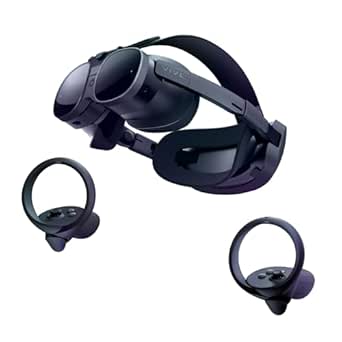 | Best for Hybrid Use (Standalone & PC) | Resolution: 3840 x 1920 combined | Refresh Rate: 90Hz | Field of View: 110 degrees | VIEW ON AMAZON | See Our Full Breakdown |
| Meta Quest 2 – 256 GB (Renewed) |  | Best Budget Entry Point | Resolution: 1832 x 1920 per eye | Refresh Rate: 90Hz | Storage: 256 GB | VIEW ON AMAZON | See Our Full Breakdown |
| Pimax Crystal Light VR Headset |  | Best Visual Fidelity | Resolution: 2880×2880 per eye | Display Tech: QLED with Local Dimming | Refresh Rate: 120Hz | VIEW ON AMAZON | See Our Full Breakdown |
| Valve Index VR Headset (Renewed) |  | Best for Motion Smoothness | Resolution: 1440 x 1600 per eye | Display Type: OLED | Refresh Rate: 120Hz (up to 144Hz) | VIEW ON AMAZON | See Our Full Breakdown |
| Meta Quest 3 512GB VR Headset |  | Best Modern All-Rounder | Resolution: 4128×2208 combined | Refresh Rate: 120Hz | Storage: 512 GB | VIEW ON AMAZON | See Our Full Breakdown |
| Oculus Quest 2 128GB VR Gaming Headset – White |  | Best Entry-Level Hybrid | Display Resolution: 1832 x 1920 pixels per eye | Storage Capacity: 128GB | Color: White | VIEW ON AMAZON | See Our Full Breakdown |
| vr headsets for pc gaming | Refresh rate | Field of view | Tracking | Connectivity |
|---|---|---|---|---|
| DPVR E4 PC VR Headset | 72Hz, 90Hz, or 120Hz | 116° | 6DoF inside-out | DisplayPort 1.2+ and USB 3.0 |
| Oculus Rift S PC-Powered VR Ga | — | 110° | Inside-out Oculus Insight | USB 3.0 and Bluetooth |
| HTC Vive Focus Vision | 90Hz | 120° | — | DisplayPort, USB, and Wi-Fi |
| Pimax Crystal Super VR Headset | 90Hz and beyond | 140° | Inside-out; eye tracking | DisplayPort |
| Meta Quest 3S 256GB Virtual Re | 90Hz | 110° | — | USB; includes 16-foot Link cable |
| HTC Vive XR Elite with Deluxe | 90Hz | 110 degrees | Inside-out optical | USB / Wi-Fi |
| Meta Quest 2 | 90Hz | 90 degrees | Inside-out | — |
| Pimax Crystal Light VR Headset | 120Hz | — | Inside-Out Camera | — |
| Valve Index VR Headset | 120Hz (up to 144Hz) | — | External Base Stations | — |
| Meta Quest 3 512GB VR Headset | 120Hz | — | — | — |
| Oculus Quest 2 128GB VR Gaming | — | — | — | USB-C Link Cable Support |
More Details on Our Top Picks
DPVR E4 PC VR Headset, Virtual Reality Headset for PC, SteamVR, 120Hz
The DPVR E4 suits PC gamers who want a headset built around SteamVR rather than standalone play. Its 3664 × 1920 resolution and refresh options up to 120Hz pair sharp visuals with the potential for smoother motion, provided your PC can keep up. At a listed 285g, it is lighter than the more feature-packed HTC Vive Focus Vision, and its flip-up design makes quick breaks or real-world adjustments easier.
The tradeoff is a narrower use case: this headset requires DisplayPort and USB connections, a capable Windows PC, and does not offer the Focus Vision’s standalone mode or eye and hand tracking. I’d choose the DPVR E4 for PC-first gaming and lighter wear, but skip it if you want one headset for both PC and untethered VR.
Pros:- 3664 × 1920 resolution supports detailed PC VR visuals
- Refresh-rate options up to 120Hz can make supported games feel smoother
- Listed 285g weight and flip-up design suit frequent breaks
- 116° field of view gives a broad view in games
Cons:- Requires a capable PC plus DisplayPort and USB 3.0 connections
- Limited to PC and SteamVR rather than standalone use
- Does not list eye or hand tracking features like the HTC Vive Focus Vision
Best for: PC gamers with a capable Windows desktop who want a light SteamVR headset and a flip-up visor for quick breaks.
Not ideal for: Buyers seeking standalone play, broad platform flexibility, or a headset that will run demanding games on modest PC hardware.
- Display resolution:3664 × 1920
- Refresh rate:72Hz, 90Hz, or 120Hz
- Field of view:116°
- Weight:285g
- Tracking:6DoF inside-out
- Compatibility:SteamVR; Windows 10/11
- Connectivity:DisplayPort 1.2+ and USB 3.0
Our verdict“Choose the DPVR E4 for lightweight, high-refresh SteamVR gaming if your PC meets its connection and performance needs.”
Oculus Rift S PC-Powered VR Gaming Headset
The Oculus Rift S is a straightforward choice for buyers focused on seated or room-scale PC VR, with inside-out tracking that avoids external sensor placement. Its 2560 × 1440 LCD display and Touch controllers cover the basics for games that rely on hand movement, while the halo-style headband aims to spread weight around the head. Compared with the DPVR E4, it has a lower listed resolution and no 120Hz mode, so it is less appealing to buyers chasing sharper or faster visuals.
Its case is familiarity, not flexibility: the Rift S is PC-only, and the provided product details list a Facebook account login requirement. The HTC Vive Focus Vision adds standalone and mixed-reality functions, but also more complexity. I’d pick the Rift S for a simpler PC setup only if its account and platform requirements fit your plans.
Pros:- Inside-out tracking avoids setting up external sensors
- Touch controllers support hand-based interaction in compatible games
- 2560 × 1440 LCD display provides a defined image for PC VR
- Halo-style headband is designed for a secure fit
Cons:- Lower listed resolution than the DPVR E4
- PC-only, unlike the standalone-capable HTC Vive Focus Vision and Meta Quest 3S
- Product details list a Facebook account login requirement
Best for: PC VR newcomers who want inside-out tracking, Touch controllers, and access to a PC-focused game library.
Not ideal for: Buyers who want standalone play, higher refresh rates, or who do not want the listed Facebook account login requirement.
- Platform:PC
- Display resolution:2560 × 1440
- Display type:LCD
- Field of view:110°
- Tracking:Inside-out Oculus Insight
- Controllers:Oculus Touch
- Connectivity:USB 3.0 and Bluetooth
Our verdict“Pick the Rift S if you want a relatively direct PC VR setup and accept its PC-only platform and account requirements.”
HTC Vive Focus Vision — Mixed Reality and PC VR Headset with Controllers
The HTC Vive Focus Vision is the most versatile pick here for buyers who want PC VR alongside standalone and mixed-reality features. Its 2448 × 2448 pixels per eye, 120° field of view, and 90Hz refresh rate support a detailed, expansive view, while built-in eye and hand tracking can add interaction options beyond the DPVR E4’s more PC-focused feature set. A detachable hot-swappable battery also helps when a session outlasts a single charge.
That flexibility comes with extra setup and weight: its magnesium frame and multiple connectivity options are less appealing for buyers seeking the lightest, simplest PC headset. The Pimax Crystal Super prioritizes much higher per-eye resolution and a 140° field of view, but lacks the Focus Vision’s stated standalone versatility. I’d choose HTC for feature range, not for a minimal PC-only setup.
Pros:- 2448 × 2448 resolution per eye and 120° field of view
- Built-in eye and hand tracking add interaction options
- Detachable, hot-swappable battery supports longer sessions
- Offers DisplayPort, USB, and Wi-Fi connectivity
Cons:- Setup can be more involved than the PC-focused DPVR E4
- Magnesium frame may feel heavy during extended sessions
- 90Hz refresh rate is lower than the DPVR E4’s maximum 120Hz
Best for: VR buyers who want one Windows-compatible headset for PC gaming, standalone use, mixed reality, and eye or hand tracking.
Not ideal for: PC gamers who prioritize a light headset, simple setup, or the highest listed per-eye resolution for simulation visuals.
- Display resolution:2448 × 2448 pixels per eye
- Display type:LCD
- Field of view:120°
- Refresh rate:90Hz
- Storage:128GB; expandable to 2TB via MicroSD
- Connectivity:DisplayPort, USB, and Wi-Fi
- Tracking and features:Built-in eye and hand tracking; passthrough camera
- Battery:Detachable, hot-swappable with reserve battery
Our verdict“Choose the Vive Focus Vision if you value mixed-reality and tracking features more than a light, uncomplicated PC-only headset.”
Pimax Crystal Super VR Headset, 3840×3840 per Eye, Ultrawide, 140° FOV, Eye-Tracking, PC Compatible
The Pimax Crystal Super is the visual-first option in this group. Its 3840 × 3840 resolution per eye, QLED and Mini-LED display technology, and 140° field of view are aimed at players who want fine detail and more peripheral view, especially in simulation games. Eye tracking adds another layer of interaction, while DisplayPort connectivity keeps the focus firmly on PC use. Against the DPVR E4, the Pimax offers far more listed pixels per eye and a wider view, but gives up the E4’s stated 120Hz maximum.
Those visuals demand a capable gaming PC, and the setup may take more adjustment than a simpler headset. It also lacks the standalone flexibility of the Meta Quest 3S. I’d put the Crystal Super ahead for high-detail PC play, but not for casual buyers who value easy setup or untethered gaming over image specifications.
Pros:- 3840 × 3840 resolution per eye targets fine image detail
- 140° field of view is wider than the DPVR E4’s listed 116°
- QLED and Mini-LED display technology
- Eye tracking and inside-out tracking are included
Cons:- High resolution may call for a powerful PC to drive demanding games
- PC-only DisplayPort connection rules out standalone play
- Setup may require adjustment to get performance and fit right
Best for: Simulation and visual-detail enthusiasts with a powerful PC who want a very high-resolution, wide-field PC VR display.
Not ideal for: Casual players with midrange PCs, buyers seeking standalone VR, or anyone prioritizing quick setup over visual specifications.
- Resolution:3840 × 3840 per eye
- Display technology:QLED and Mini-LED
- Field of view:140°
- Refresh rate:90Hz and beyond
- Tracking:Inside-out; eye tracking
- Connectivity:DisplayPort
- Compatibility:PC
- Audio:3D spatial audio with noise-canceling microphone
Our verdict“Choose the Crystal Super for high-detail PC simulations if your hardware can drive its demanding display.”
Meta Quest 3S 256GB Virtual Reality Headset with Batman: Arkham Shadow and 16FT Link Cable Bundle
The Meta Quest 3S bundle is the most flexible starting point for buyers who want standalone VR and a path to PC gaming. The included 16-foot Link cable can connect it to a PC, while 256GB of storage and the Batman: Arkham Shadow game give the bundle a clear standalone use as well. Compared with the Oculus Rift S, the Quest 3S is not confined to PC play; compared with the DPVR E4, it offers less detail in the listed resolution and a lower 90Hz refresh rate.
The tradeoff is that PC connectivity requires setup, and the supplied specifications provide limited detail about weight and comfort. The listed 1920 × 1080 resolution also makes it a less suitable choice than the Pimax Crystal Super for fine-detail simulation gaming. I’d choose it when cable-free play matters as much as access to PC VR.
Pros:- Supports both standalone VR and PC VR
- Includes a 16-foot Link cable for PC connection
- 256GB storage and Batman: Arkham Shadow are included in the bundle
- Motion-sensing controllers support active VR games
Cons:- Listed 1920 × 1080 resolution is below the DPVR E4 and Pimax Crystal Super specifications
- PC play requires a wired Link connection and setup
- Provided data does not specify weight or detailed comfort adjustments
Best for: New VR buyers who want standalone games, 256GB of storage, and the option to connect to PC VR with the included long Link cable.
Not ideal for: PC-only enthusiasts seeking the highest listed resolution, a refresh rate above 90Hz, or detailed fit information before buying.
- Storage capacity:256GB
- Display resolution:1920 × 1080
- Display type:OLED
- Field of view:110°
- Refresh rate:90Hz
- Platforms:Meta Quest standalone VR and PC VR
- Connectivity:USB; includes 16-foot Link cable
- Controllers:Motion-sensing controllers
Our verdict“Choose the Quest 3S bundle if you want standalone gaming first and PC VR as an additional wired option.”
HTC Vive XR Elite with Deluxe Pack
This headset stands out for its versatile design, allowing you to switch between standalone VR and high-fidelity PC gaming without changing devices. Compared to the Meta Quest 3, which leans heavily into the standalone ecosystem, the Vive XR Elite offers a more professional-grade mixed reality experience with color passthrough that feels less grainy. The adjustable diopters are a significant convenience for users who wear glasses, eliminating the need for lens inserts. However, this versatility comes at a cost: the 2-hour battery life is restrictive for long PC sessions unless you keep it plugged in, which negates some of the wireless freedom. It is a powerful tool, but the higher price point and slightly heavier form factor make it a niche choice for gamers who need mixed reality capabilities more than pure immersion.
Pros:- Hybrid design supports both standalone and PC tethered modes
- Built-in diopter adjustment removes need for glasses or inserts
- High-quality color passthrough for mixed reality applications
Cons:- Short battery life limits untethered playtime
- Higher cost compared to dedicated PC VR headsets
- Slightly heavier than entry-level standalone options
Best for: Users who want a single device for both standalone gaming and high-end PC VR with superior mixed reality passthrough.
Not ideal for: Budget-conscious gamers or those who prioritize lightweight comfort over mixed reality features.
- Resolution:3840 x 1920 combined
- Refresh Rate:90Hz
- Field of View:110 degrees
- Battery Life:2 hours
- Storage:128 GB
- Tracking:Inside-out optical
- Connectivity:USB / Wi-Fi
- Included Extras:Deluxe Strap & Gaskets
Our verdict“Choose this if you need a premium hybrid headset that excels at mixed reality and doesn’t mind paying for versatility.”
Meta Quest 2 – 256 GB (Renewed)
As a renewed unit, this headset offers an accessible entry into PC VR via Link cable, though it lacks the advanced features of newer models. When compared to the Valve Index, the resolution is lower and the refresh rate is capped at 90Hz, but the inside-out tracking means you don’t need to install base stations, saving you space and setup time. The 256GB storage is ample for standalone games, but PC gamers will mostly use it for streaming content. The main tradeoff is the limited warranty typical of renewed products and the 1.8-pound weight, which can cause neck strain during long sessions. It is a solid starter kit, but those seeking high-end visual fidelity should look toward the Pimax Crystal Light.
Pros:- Affordable entry point for PC VR via Link cable
- No external base stations required for tracking
- Large 256GB storage for standalone content
Cons:- Renewed status may limit long-term support options
- Lower resolution and 90Hz cap compared to premium headsets
- Comfort issues may arise during extended sessions
Best for: Beginners wanting to try PC VR without investing in base stations or expensive new hardware.
Not ideal for: Competitive gamers needing high refresh rates or users concerned about long-term hardware reliability.
- Resolution:1832 x 1920 per eye
- Refresh Rate:90Hz
- Storage:256 GB
- Weight:1.8 lbs
- Field of View:90 degrees
- Tracking:Inside-out
- Warranty:90 days (Renewed)
Our verdict“This is the smart choice for first-time PC VR users who want to avoid the complexity of external sensors.”
Pimax Crystal Light VR Headset
This headset is engineered for those who prioritize visual clarity above all else. With a 2880×2880 per eye QLED display and local dimming, it delivers contrast and sharpness that the Meta Quest 3 simply cannot match. The 120Hz refresh rate ensures smooth motion, making it ideal for simulation games where detail matters. However, the 815-gram weight is noticeable, and the requirement for a powerful PC means this is not a casual purchase. Unlike the Valve Index, which has a mature ecosystem, Pimax software can sometimes be less polished, requiring more technical tinkering. It is a specialist tool for enthusiasts who demand the sharpest image possible and have the hardware to support it.
Pros:- Exceptional 2880×2880 per eye QLED resolution
- Local dimming provides superior contrast ratios
- Supports 120Hz for smooth motion clarity
Cons:- Requires a high-end GPU to maintain frame rates
- Heavier than average for a PC-focused headset
- Software setup can be less intuitive than competitors
Best for: Sim racers and flight simulator enthusiasts who demand maximum resolution and contrast.
Not ideal for: Casual gamers or those with mid-range PCs who cannot drive the high pixel density.
- Resolution:2880×2880 per eye
- Display Tech:QLED with Local Dimming
- Refresh Rate:120Hz
- Weight:815 grams
- Tracking:Inside-Out Camera
- Compatibility:SteamVR
- HDR:Supported
Our verdict“Buy this if visual fidelity is your absolute priority and you have the PC power to back it up.”
Valve Index VR Headset (Renewed)
The Valve Index remains a benchmark for motion smoothness thanks to its 144Hz capable refresh rate and OLED panels. Compared to the Meta Quest 2, the Index offers significantly lower latency and less screen-door effect, creating a more convincing presence. The knuckle controllers are widely considered the most ergonomic in the industry, tracking finger positions accurately. However, the 4-pound weight is substantial, and the 4-pound headset requires a sturdy neck. The renewed condition makes this a more accessible entry into high-end PC VR, but you must ensure your PC can handle the 120Hz+ demands. It lacks the mixed reality passthrough of the HTC Vive XR Elite, focusing purely on immersive gaming.
Pros:- Industry-leading 120Hz+ refresh rate for smooth motion
- OLED panels provide deep blacks and good color
- Ergonomic knuckle controllers with finger tracking
Cons:- Heavy 4-pound weight causes fatigue over time
- Requires external base stations for tracking
- Renewed units may have variable cosmetic condition
Best for: Competitive VR gamers who prioritize low latency and high refresh rates for fast-paced titles.
Not ideal for: Users sensitive to neck strain or those looking for a lightweight, portable solution.
- Resolution:1440 x 1600 per eye
- Display Type:OLED
- Refresh Rate:120Hz (up to 144Hz)
- Weight:4 lbs
- Tracking:External Base Stations
- Platform:PC / SteamVR
- Warranty:1 Year (Renewed)
Our verdict“This is the choice for serious gamers who value fluid motion and controller ergonomics over weight.”
Meta Quest 3 512GB VR Headset
The Meta Quest 3 represents the current standard for high-resolution standalone and PC VR. Its 4128×2208 resolution offers a sharper image than the Meta Quest 2, significantly reducing pixelation. The inclusion of color passthrough makes it a true mixed reality device, unlike the older Oculus Quest 2. While the 2.2-hour battery life is modest, the ability to play wirelessly on PC via Air Link is a major convenience. The 512GB storage and bundled games add value, but the fixed focus lenses may cause eye strain for some users compared to the adjustable optics of the HTC Vive XR Elite. It is a balanced choice for most modern VR gamers.
Pros:- High-resolution 4K+ display for crisp visuals
- Full-color passthrough enables mixed reality experiences
- Wireless PC streaming via Air Link or Link Cable
Cons:- Battery life is short for extended untethered sessions
- Fixed focus lenses may not suit all eye shapes
- Weight distribution can feel front-heavy
Best for: Gamers who want a modern, high-resolution headset with easy wireless PC streaming and mixed reality features.
Not ideal for: Users who require built-in diopter adjustments or strictly tethered, low-latency competitive play.
- Resolution:4128×2208 combined
- Refresh Rate:120Hz
- Storage:512 GB
- Battery Life:2.2 hours
- Processor:Snapdragon XR2 Gen 2
- Passthrough:Full Color
- Bundle:Gorilla Tag + Horizon+
Our verdict“This is the most versatile modern headset for users who want high resolution and mixed reality flexibility.”
Oculus Quest 2 128GB VR Gaming Headset – White
This headset stands out as a versatile entry point for PC VR gaming. It bridges the gap between standalone convenience and PC power via a link cable. Compared to the Oculus Rift S, it eliminates the need for external sensors, offering a cleaner setup. The 1832 x 1920 pixels per eye display delivers sharp visuals, though it falls short of the Pimax Crystal Super‘s ultra-high resolution. Its main advantage is flexibility; you can play without a PC when desired. However, the 128GB storage fills up quickly with modern titles. While comfortable, the default strap is less robust than the deluxe options found on the HTC Vive XR Elite. It requires batteries for controllers, adding maintenance overhead.
Pros:- Hybrid functionality allows both standalone and PC VR use
- High-resolution display provides clear, immersive visuals
- Adjustable straps and grip covers enhance long-session comfort
Cons:- 128GB storage is insufficient for multiple large PC VR titles
- Controllers require AA batteries rather than internal rechargeables
- Link cable setup can be less seamless than dedicated PC headsets
Best for: Gamers who want the option to switch between standalone play and PC VR without buying two separate devices.
Not ideal for: Enthusiasts seeking maximum visual fidelity or those who dislike managing controller batteries.
- Display Resolution:1832 x 1920 pixels per eye
- Storage Capacity:128GB
- Color:White
- Tracking Type:Inside-Out
- Connectivity:USB-C Link Cable Support
- Included Accessories:Silicone grip covers, adjustable knuckle straps
Our verdict“This pick makes the most sense for beginners who value the flexibility of switching between PC gaming and standalone experiences.”

How We Picked
I evaluated these headsets based on three core pillars: visual clarity, tracking precision, and PC compatibility. Visual clarity was judged by pixel density, lens distortion, and field of view, as these factors directly impact immersion and text readability in flight sims or strategy games. Tracking precision was assessed by how well the headset handles rapid head movements and occlusion, with a preference for systems that maintain lock-on even when hands are out of view. PC compatibility went beyond just ‘works with SteamVR’; I looked for native drivers, low-latency tethering options, and support for advanced features like eye tracking or foveated rendering.
Rankings prioritize the balance between performance and practicality. A headset with incredible specs that requires a $3,000 PC to run smoothly ranks lower than a slightly less powerful unit that delivers a consistent 90fps on mainstream hardware. I also weighed the long-term viability of each ecosystem, favoring devices with active software support and a growing library of PC-exclusive titles over those reliant solely on standalone content.
Factors to Consider When Choosing Vr Headsets For Pc Gaming
Before you buy, understand that PC VR is not a one-size-fits-all experience. Your choice depends heavily on your existing hardware and the types of games you play most often.
Resolution vs. Performance Tradeoffs
Higher resolution does not automatically mean a better experience if your graphics card cannot sustain high frame rates. Headsets like the Pimax Crystal Super demand top-tier GPUs to avoid stuttering, which can break immersion and cause motion sickness. Gamers with mid-range PCs should prioritize 120Hz refresh rates and stable tracking over 4K-per-eye panels. A smooth 90fps experience at 1440p is far more comfortable than a choppy 45fps at 4K. Always check the recommended GPU specs for your chosen headset before purchasing.
Inside-Out vs. Outside-In Tracking
Modern headsets mostly use inside-out tracking with cameras built into the headset, eliminating the need for external base stations. This setup is convenient for smaller spaces and easier setup. However, outside-in tracking using external sensors, as seen with the Valve Index, offers lower latency and more precise hand tracking in large play areas. If you play competitive shooters or flight sims where millisecond precision matters, outside-in systems still hold an advantage. For casual RPGs or puzzles, inside-out convenience is usually worth the slight latency tradeoff.
Standalone vs. Native PC VR
Standalone headsets like the Meta Quest 3S offer flexibility by running games without a PC, but their PC VR mode relies on compression, which can introduce visual artifacts. Native PC VR headsets, such as the HTC Vive Focus Vision, are designed specifically for tethered use, offering cleaner image quality and more reliable connections. If you primarily play PC-native titles like Half-Life: Alyx or Microsoft Flight Simulator, a dedicated PC VR headset is the better investment. If you want to play standalone games when your PC is off, a hybrid device is the only logical choice.
Comfort and Fit for Long Sessions
Weight distribution matters more than total weight. Front-heavy headsets like the Oculus Rift S can cause neck strain after an hour, while headsets with balanced battery placement or counterweights, like the HTC Vive XR Elite, stay comfortable for longer periods. Check for adjustable straps and facial interface materials; foam absorbs sweat but degrades quickly, while silicone is easier to clean but can trap heat. If you wear glasses, ensure the headset has adequate eye relief or supports prescription lens inserts to avoid scratching your lenses.
Ecosystem Lock-In and Software Support
Buying a headset from a major platform like Meta or Valve often locks you into their store and update cycle. Meta headsets, for instance, require a Facebook account and may push updates that change features you rely on. Valve’s ecosystem is more open, supporting a wide range of hardware and software. Consider whether you want the convenience of a closed ecosystem with frequent game sales or the freedom of an open platform. Check the manufacturer’s recent update history to gauge how actively they support their current lineup.
Frequently Asked Questions
Can I use a Meta Quest 3S for PC gaming without a high-end PC?
Yes, but with significant compromises. The Quest 3S uses video compression to stream PC VR content wirelessly or via cable, which requires a decent GPU but not necessarily a top-tier one. However, the compression can introduce visual artifacts and input lag, making it less ideal for fast-paced competitive games. For a smoother experience, I recommend using a wired connection with a USB-C link cable rather than Wi-Fi. If your PC is older, you may need to lower settings significantly to maintain a playable frame rate.
Is the Valve Index still worth buying in 2027?
The Valve Index remains a strong contender for competitive gamers due to its 144Hz refresh rate and precise base-station tracking. However, its display resolution is dated compared to modern 4K-per-eye headsets, and the setup requires installing external sensors. It is best suited for players who prioritize low latency and high refresh rates over visual sharpness. If you already have the base stations, upgrading to the Index is a logical step. For new users without existing Valve hardware, the setup complexity and lack of mixed-reality features make it less appealing than newer alternatives.
Do I need eye tracking in a VR headset for PC gaming?
Eye tracking is currently a premium feature found in devices like the Pimax Crystal Super and HTC Vive Focus Vision. Its primary benefit for PC gaming is foveated rendering, which renders only where you are looking in high detail, allowing you to achieve higher frame rates on the same hardware. It also enables natural avatar movement in social VR. However, game support for foveated rendering is still limited. If you do not play supported titles or care about social avatars, you can save money by skipping this feature.
Why is the Oculus Rift S not recommended for new buyers?
The Oculus Rift S is a legacy device that has been discontinued and lacks modern features like inside-out tracking or high-resolution passthrough. Its software support is waning, with fewer new titles being optimized for it compared to newer Meta or SteamVR devices. While it may be cheap on the used market, the setup requires external sensors that are bulky and prone to line-of-sight issues. Newer headsets offer better comfort, easier setup, and superior visuals, making the Rift S a poor value proposition for new users in 2027.
What is the difference between the Pimax Crystal Super and the Crystal Light?
The Pimax Crystal Super features higher resolution (3840×3840 per eye), eye tracking, and a wider field of view, making it the premium option for enthusiasts with powerful GPUs. The Pimax Crystal Light offers a lower resolution (2880×2880 per eye) and lacks eye tracking, but it is more affordable and less demanding on hardware. The Light is better suited for gamers with mid-range PCs who still want high-quality visuals without the extreme cost or GPU requirements of the Super. If you have the budget and hardware, the Super provides a more immersive experience.
Conclusion
Choosing the right VR headset for PC gaming comes down to your hardware capabilities and primary use case. For the best overall experience, the HTC Vive Focus Vision offers the perfect blend of mixed-reality passthrough, native PC VR optimization, and comfort. If you are seeking best value and entry-level accessibility, the Meta Quest 3S is the most practical choice, provided you accept the limitations of compressed tethered VR. For premium enthusiasts with high-end rigs, the Pimax Crystal Super delivers unparalleled visual clarity and eye-tracking capabilities that redefine immersion. Beginners should start with the Meta Quest 3S to learn the ropes before investing in specialized hardware. Those focused on competitive shooters might still consider the Valve Index for its low-latency tracking, despite its aging display. Ultimately, match the headset to your GPU’s power and your game library to avoid regret.