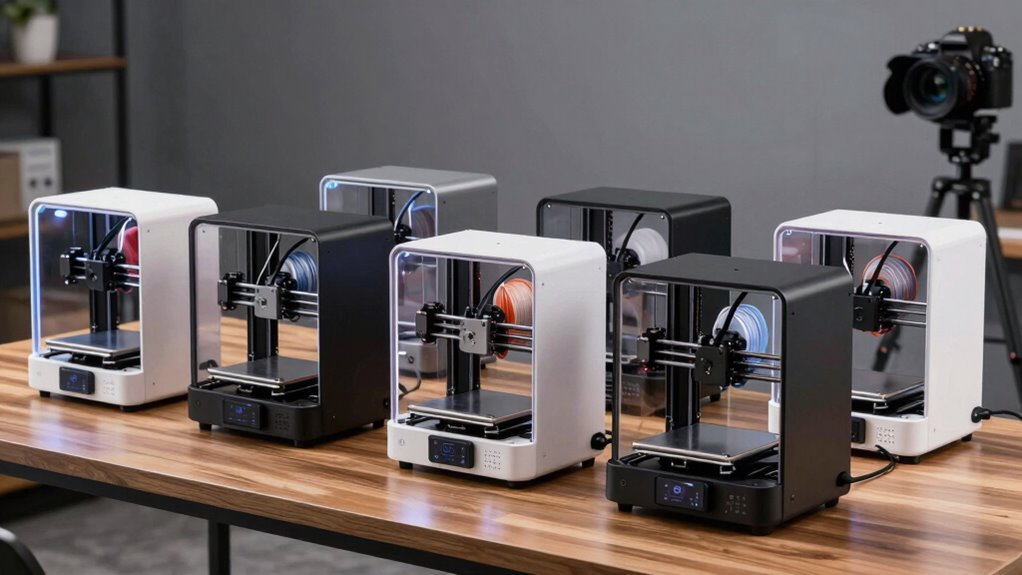
The best 3D printers for beginners make setup and routine printing easier without forcing you to learn every machine setting at once. I’d choose the Bambu Lab A1 Mini as the best overall pick for its approachable ready-to-use format, while the Creality Ender 3 V3 SE is a simpler value-minded route and the Bambu Lab P1S Combo suits buyers who want an enclosed machine and multicolor capability. The main tradeoffs are ease versus hands-on tinkering, compact size versus room for larger prints, and basic single-color printing versus the added complexity of multicolor systems. Your choice should match both the objects you plan to make and how much setup you want to handle. Read on for the full comparison and guidance on choosing a first printer.

Get business pricing on monitors, keyboards and dev gear
- Business-only prices and quantity discounts
- Tax-exempt purchasing
- Multiple users, one account, clear invoices
Complete the kit


Key Takeaways
- The A1 Mini is the roundup’s best overall fit for many first-time owners: its ready-to-use positioning favors a shorter path from unboxing to printing, though its compact format is less suited to large projects.
- The Ender 3 V3 SE and the enclosed or multicolor machines serve different kinds of value: the Creality is the pick for buyers who want a more direct entry point, while feature-rich models make more sense when their added capabilities will actually be used.
- Speed is not the same as beginner-friendliness: the Adventurer 5M and AD5X advertise high-speed printing, but a new owner should also weigh workflow clarity, upkeep, and whether fast output matters for their projects.
- Multicolor printing adds capability and complexity: the Anycubic Kobra X, Bambu Lab P1S Combo, FlashForge AD5X, and ELEGOO Centauri 2 Combo appeal to buyers who value color changes enough to accept a more involved setup and filament workflow.
- The Tina2C listings target a different need from full-size machines: the Hephi3d and Entina versions emphasize compact, ready-to-use home or STEM use, making them more suitable for small projects than buyers planning to print larger parts.





| 3d printers for beginner | Dimensions |
|---|---|
| Bambu Lab A1 Mini 3D Printer + | 15.21 x 16.77 x 17.94 inches |
| Creality Ender 3 V3 SE Beginne | 15 x 19.6 x 15 inches |
| FLASHFORGE Adventurer 5M 3D Pr | 14.29 x 15.83 x 17.64 inches |
| Bambu Lab P1S 3D Printer | 15.31 x 18.03 x 15.31 inches |
| Anycubic Kobra X Multicolor 3D | — |
| Bambu Lab P1S Combo 3D Printer | — |
| FlashForge AD5X Multi-Color 3D | 16 x 14 x 18 inches |
| Hephi3d TINA2C 3D Printer | — |
| FlashForge Adventurer 5M 3D Pr | 15.83 x 14.29 x 17.64 inches |
| ELEGOO Centauri 2 Combo 3D Pri | — |
| Entina Tina2C 3D Printer for B | — |
More Details on Our Top Picks
Bambu Lab A1 Mini 3D Printer + LED Lamp Kit, Ready-to-Use for Beginners
I’d put the Bambu Lab A1 Mini near the top of a beginner’s shortlist when the goal is to start making useful, decorative objects without turning setup into the main project. Automatic calibration reduces the bed-adjustment work that can frustrate a first-time owner, while the included LED Lamp Kit gives new users a clear project to try right away. Access to MakerWorld and the Bambu Handy app also makes finding and managing models more approachable. Compared with the Creality Ender 3 V3 SE, this package puts more emphasis on guided creativity than on a stated range of filament types or high-speed specifications. Its tradeoff is a smaller physical footprint for projects and limited published technical detail in the supplied product information. I’d choose it for home décor and gifts, not for buyers who need a clearly documented build volume or broad material guidance.
Pros:- Automatic calibration cuts down on manual setup for new owners.
- Includes an LED Lamp Kit for an accessible first creative project.
- Quiet operation is better suited to shared living or studio spaces.
- MakerWorld model access and the Bambu Handy app support model discovery and printer management.
Cons:- Detailed technical specifications are limited in the provided product information.
- Its compact format may not suit buyers planning larger prints.
- New users still need to learn basic slicer and print-preparation skills.
Best for: First-time makers who want guided setup and a ready-to-try decorative project for home décor or personalized gifts.
Not ideal for: Buyers planning large prints or comparing printers by detailed speed, build-volume, and material specifications, which are not provided here.
- Dimensions:15.21 x 16.77 x 17.94 inches
- Weight:12.1 pounds
- Calibration:Automatic
- Included accessory:LED Lamp Kit
- Model library:MakerWorld
- App:Bambu Handy
- Model number:PF002-M-EU
Our verdict“Choose the A1 Mini if you want an approachable first printer with a creative lamp project, and skip it if you need detailed capacity information before buying.”
Creality Ender 3 V3 SE Beginner-Friendly 3D Printer with Auto Leveling
The Creality Ender 3 V3 SE suits beginners who want an approachable machine but also expect to try more than one common filament. Its CR Touch auto-leveling and automatic Z-offset calibration reduce first-layer guesswork, while the direct-drive Sprite extruder supports PLA, PETG, and TPU. That range gives a learner room to explore flexible parts as skills grow. Compared with the Bambu Lab A1 Mini, the Ender’s supplied details make its material support and printing speed clearer, but it is heavier and takes up more space. Its 250 mm/s maximum speed is useful for shortening jobs, though beginners may still need to learn how print settings affect quality. The flexible spring-steel plate helps with part removal; the tradeoff is a relatively large footprint for a home worktable.
Pros:- CR Touch leveling and automatic Z-offset calibration simplify first-layer setup.
- Direct-drive Sprite extruder supports PLA, PETG, and TPU.
- Flexible spring-steel build plate makes finished parts easier to remove.
- Silent 32-bit mainboard supports quieter operation.
Cons:- Its 19.8-pound weight and listed dimensions make it less convenient to move or fit on a small desk.
- The 250 mm/s maximum speed is lower than the listed 600 mm/s speeds of the Adventurer 5M and Kobra X.
- Beginners still need to tune settings for different filament types.
Best for: Beginners with a dedicated work surface who want to learn using PLA, PETG, and TPU without giving up automatic leveling.
Not ideal for: Apartment dwellers or students with a small desk who need a lightweight printer that is easy to relocate.
- Dimensions:15 x 19.6 x 15 inches
- Weight:19.8 pounds
- Maximum print speed:250 mm/s
- Acceleration:2500 mm/s²
- Leveling:CR Touch auto-leveling with automatic Z-offset calibration
- Extruder:Sprite direct drive
- Supported materials:PLA, PETG, TPU
- Build plate:Flexible spring-steel
- Model number:Ender 3 V3 SE
Our verdict“Pick the Ender 3 V3 SE if you want to learn several common materials on a straightforward auto-leveling printer and have room to keep it set up.”
FLASHFORGE Adventurer 5M 3D Printer, 600mm/s High-Speed, Fully Auto Leveling, Upgraded Direct Extruder, 280°C Nozzle, Dual-Sided PEI Coating Plate, 220x220x220mm Print Size
The FLASHFORGE Adventurer 5M is a good fit for beginners who want a defined, full-sized build area and less waiting between attempts. Its 220 x 220 x 220 mm print volume accommodates more substantial objects than the supplied details for the A1 Mini make clear, and one-click bed leveling removes a common early setup task. The advertised 600 mm/s speed, quick-detachable nozzle, and fast heating are aimed at keeping print jobs moving; beginners should still learn that maximum speed does not automatically mean the best result for every model. Compared with the Creality Ender 3 V3 SE, the 5M offers a higher stated speed and a larger documented print volume, but weighs more and has a higher-temperature nozzle. Filament run-out detection and power-loss recovery help protect longer jobs, though the feature set may take more time to understand.
Pros:- One-click automatic bed leveling reduces manual setup.
- 220 x 220 x 220 mm build volume supports larger parts than a compact first printer.
- Quick-detachable nozzle and direct extruder simplify some maintenance tasks.
- Filament run-out detection and power-loss recovery can help preserve longer jobs.
Cons:- At 23.8 pounds, it is heavier than the A1 Mini and less convenient to move.
- Its feature set may require more learning than a basic entry-level printer.
- The listed 600 mm/s maximum speed may require careful settings to prioritize print quality.
Best for: New makers who have space for a larger printer and want a documented 220 mm build volume for household parts, organizers, and prototypes.
Not ideal for: Buyers seeking the simplest possible first machine or a lightweight printer for a cramped desk.
- Dimensions:14.29 x 15.83 x 17.64 inches
- Weight:23.8 pounds
- Print size:220 x 220 x 220 mm
- Maximum print speed:600 mm/s
- Acceleration:20000 mm/s²
- Maximum nozzle temperature:280°C
- Heating time:35 seconds
- Build leveling:Fully automatic, one-click
- Recovery features:Filament run-out detection and power-loss recovery
Our verdict“Choose the Adventurer 5M if a larger documented build area and fast print workflow matter more than keeping your first printer compact and simple.”
Bambu Lab P1S 3D Printer, Ready-to-Use FDM 3D Printer
I’d recommend the Bambu Lab P1S to a beginner who already knows they want an enclosed machine and expects to grow into more varied projects. The enclosure and automatic bed leveling reduce some setup friction, while the stated 500 mm/s speed and multi-material capability leave room for more ambitious prints. That makes it a more upgrade-oriented choice than the A1 Mini, which is lighter and comes with a focused lamp project. The P1S’s main tradeoff for a new owner is that its multi-color workflow requires a separate Bambu Lab AMS; the printer alone does not provide that capability. At 38.9 pounds, it is also the heaviest option in this group, so it suits a permanent workstation better than a shared desk. I’d choose it for enclosure and expansion potential, not for the simplest or lightest start.
Pros:- Enclosed design supports a more contained printing setup.
- Automatic bed leveling reduces manual setup work.
- Listed print speed reaches 500 mm/s.
- Multi-color and multi-material capability offers an upgrade path with a compatible AMS.
Cons:- A separate Bambu Lab AMS is required for multi-color printing.
- At 38.9 pounds, it is difficult to move frequently.
- It does not support carbon- or glass-fiber-reinforced polymers.
Best for: Beginners with a permanent workspace who want an enclosed printer and plan to explore multi-color or multi-material printing with a compatible AMS.
Not ideal for: First-time buyers who need a lightweight, low-complexity setup or expect multicolor printing to work without buying a separate AMS.
- Dimensions:15.31 x 18.03 x 15.31 inches
- Weight:38.9 pounds
- Model number:P1S
- Maximum print speed:500 mm/s
- Bed leveling:Automatic
- Design:Fully enclosed
- Multi-color printing:Requires a compatible Bambu Lab AMS
- Material limitation:Does not support carbon- or glass-fiber-reinforced polymers
Our verdict“Choose the P1S if you want an enclosed printer to grow into and can accept the added AMS requirement and heavy, stationary setup.”
Anycubic Kobra X Multicolor 3D Printer, Easy Setup, Native 4-Color
The Anycubic Kobra X makes the most sense for beginners whose main goal is multicolor printing, rather than for someone who simply wants the easiest first machine. Its native four-color capability gives it a clear distinction from the Ender 3 V3 SE, which is presented here as a more conventional single-material learning option. The Kobra X also lists a 260 mm cubed print area, a 300°C nozzle, and support for several materials, so it can cover projects beyond small decorative models. Its speed reaches a stated 600 mm/s, but the supplied description warns that setup may require some technical knowledge. Expansion to as many as 19 colors uses multiple units, adding complexity rather than making that a beginner’s default workflow. I’d choose it for color-focused makers willing to learn the system; buyers seeking a simpler start may prefer the A1 Mini.
Pros:- Native four-color printing is suited to multicolor models without making color an afterthought.
- 260 x 260 x 260 mm print size accommodates larger projects.
- LeviQ 3.0 auto bed leveling helps simplify first-layer setup.
- Lists Wi-Fi and LAN connectivity, app control, and AI monitoring features.
Cons:- Setup may require more technical knowledge than the A1 Mini’s beginner-oriented package.
- Filament spools are not included.
- It is incompatible with ACE 2 Pro and ACE Pro units, limiting those expansion options.
Best for: Color-focused beginners, educators, and home makers willing to learn a more involved setup for multicolor projects and a larger build area.
Not ideal for: First-time users who want a basic plug-in-and-print workflow, or buyers who want to expand using ACE 2 Pro or ACE Pro units.
- Print size:260 x 260 x 260 mm
- Weight:20.9 pounds
- Maximum nozzle temperature:300°C
- Maximum speed:600 mm/s
- Color capability:Native four-color; expandable up to 19 colors with multiple units
- Bed leveling:LeviQ 3.0 auto bed leveling
- Connectivity:Wi-Fi (2.4G/5G), LAN
- Sound level:45 dB
- Supported materials:PLA, PETG, TPU, PVA, ASA
Our verdict“Pick the Kobra X if multicolor output and a larger build area are your priorities and you are prepared for a more involved setup.”
Bambu Lab P1S Combo 3D Printer with AMS, Multi-Color
The P1S Combo suits beginners who want room to grow into colorful, more involved projects without starting with a bare-bones machine. Its automatic bed leveling and listed 15-minute setup remove some early setup friction, while the enclosed design is a useful distinction from the open-frame Bambu Lab A1 Mini. The included AMS enables multi-color and multi-material printing, with support for as many as 16 colors; that capability comes with extra system complexity compared with the single-color FlashForge Adventurer 5M. Its advertised 500 mm/s speed can shorten waits, though speed alone does not remove the need to learn filament and print settings. The main limitation is material choice: reinforced carbon- and glass-fiber filaments are not recommended. I’d pick this over a simpler starter printer for a beginner who specifically wants enclosure and color options.
Pros:- AMS enables multi-color and multi-material printing, with up to 16 colors listed.
- Fully enclosed build distinguishes it from open-frame beginner options.
- Automatic bed leveling reduces initial setup work.
- Supports common starter materials including PLA and PETG.
Cons:- Multi-color printing requires connection to the AMS.
- Carbon- and glass-fiber-reinforced filaments are not recommended.
- The combination of AMS and advanced printing options may be more involved than a basic single-color starter.
Best for: New makers who want an enclosed printer, automatic leveling, and multi-color projects without giving up support for common filaments such as PLA and PETG.
Not ideal for: Beginners who want the fewest parts and settings to manage, or users planning to print carbon- or glass-fiber-reinforced filament.
- Maximum colors:16
- Printing speed:500 mm/s
- Acceleration:20,000 mm/s²
- Enclosure:Fully enclosed
- Auto bed leveling:Yes
- Setup time:15 minutes
- Supported filaments:PLA, PETG, TPU, PVA, PET, ABS, ASA; capable of PA and PC
- Reinforced filaments:Carbon- and glass-fiber-reinforced polymer not recommended
Our verdict“Choose the P1S Combo if enclosure and multi-color capability matter more to you than the simplicity of a single-color beginner printer.”
FlashForge AD5X Multi-Color 3D Printer, CoreXY, 600mm/s High-Speed, 1-Click Auto Leveling, 300°C Direct Drive Extruder, 220x220x220mm Build Volume
The FlashForge AD5X is the speed-and-adjustability pick for beginners who already know they want to experiment with multi-color prints. It offers up to four colors at once, a 300°C direct-drive extruder, and interchangeable nozzle sizes from 0.25 mm to 0.8 mm. That nozzle range gives a newcomer a practical choice between finer detail and quicker, broader prints, unlike the more straightforward single-color Adventurer 5M. Its advertised 600 mm/s speed and auto leveling are appealing, but the AD5X’s many options make it a less simple first printer than the compact TINA2C. It is also a sizable, 24.2-pound machine, so a dedicated work surface is sensible. I’d rank it for beginners drawn to color and customization, not those seeking the smallest learning curve.
Pros:- Supports up to four colors simultaneously.
- Automatic leveling helps reduce bed setup work.
- Nozzle options from 0.25 mm to 0.8 mm suit different detail and speed needs.
- 300°C direct-drive extruder offers flexibility across printing tasks.
Cons:- Its feature set may take more learning than a simpler beginner printer.
- At 24.2 pounds and 16 x 14 x 18 inches, it needs a stable, roomy spot.
- The listed 600 mm/s maximum speed does not make setup or print tuning automatic.
Best for: New makers with a dedicated workspace who want to learn multi-color printing and adjust nozzle size for either detail or faster prints.
Not ideal for: First-time users who want a compact, minimal-settings machine, or households without room for a larger printer.
- Build volume:220 x 220 x 220 mm
- Print speed:Up to 600 mm/s
- Extruder temperature:300°C
- Nozzle sizes:0.25 mm to 0.8 mm
- Multi-color printing:Up to four colors simultaneously
- Leveling:1-click automatic leveling
- Item weight:24.2 pounds
- Dimensions:16 x 14 x 18 inches
Our verdict“Pick the AD5X if you want a multi-color starter with room to adjust print detail and pace, and are comfortable learning a more feature-rich machine.”
Hephi3d TINA2C 3D Printer – Beginner Friendly, Fully Assembled, Auto Leveling, Ready to Print in 5 Minutes
The Hephi3d TINA2C prioritizes a gentle start over speed, build capacity, or advanced material options. It arrives fully assembled, includes auto leveling, and is described as ready to print in five minutes, which makes it a more approachable first step than the feature-heavy FlashForge AD5X. Wi-Fi app control and an online model library also give beginners a path to finding and starting simple projects. The tradeoff is scale: its 8.27 x 6.7 x 9.84-inch body is compact, but the supplied information gives no build-volume figure, and the product is positioned for home and beginner use rather than demanding projects. Connectivity problems are also mentioned in customer feedback, so app-based control may not be seamless for everyone. I’d choose it for convenience and a small footprint, not for growing into large or complex prints.
Pros:- Fully assembled, with a stated five-minute ready-to-print setup.
- Auto leveling and print-resume support reduce some beginner setup concerns.
- Compact dimensions and 5.46-pound weight suit limited work surfaces.
- Wi-Fi app control and an online model library offer an accessible starting point.
Cons:- Small build volume limits the size of projects compared with the 220 mm-class FlashForge printers.
- The beginner and home focus may not suit advanced or demanding work.
- Customer feedback cited in the product information mentions occasional connectivity issues.
Best for: First-time home users, families, or learners who want a small, assembled printer with app access and minimal initial setup.
Not ideal for: Makers planning larger models, advanced materials, or complex production workflows; its beginner-focused design and unspecified build volume may be limiting.
- Product dimensions:8.27 x 6.7 x 9.84 inches
- Item weight:5.46 pounds
- Assembly:Fully assembled
- Setup claim:Ready to print in 5 minutes
- Auto leveling:Yes
- Connectivity:Wi-Fi app control
- Additional features:Print resume and online model library
- Warranty:Product warranty available
Our verdict“Choose the TINA2C for a compact, ready-assembled introduction to printing, but skip it if you expect to make larger models or need advanced control.”
FlashForge Adventurer 5M 3D Printer with Auto Leveling and High-Speed Printing
The Adventurer 5M makes more sense for a beginner who wants fast, straightforward single-color printing than for someone focused on multi-color output. Its automatic bed leveling and quick-change detachable nozzle reduce two common setup and maintenance hurdles, while the 220 x 220 x 220 mm print area gives room for everyday models. Compared with the FlashForge AD5X, it forgoes the listed four-color capability and 300°C extruder in favor of a simpler feature set; its own extruder reaches 280°C. The advertised 600 mm/s maximum speed is shared with the AD5X, but speed is only one part of the learning experience. This model’s 22-pound weight and desktop-sized footprint make it less portable than the TINA2C, and warranty details are limited in the supplied information. I’d pick it when ease of routine setup matters more than color effects.
Pros:- Automatic bed leveling eases initial setup.
- Quick-change detachable nozzle can simplify nozzle swaps.
- 220 x 220 x 220 mm print volume accommodates a broad range of beginner projects.
- App monitoring adds a way to check prints remotely.
Cons:- Does not list the multi-color capability offered by the AD5X or P1S Combo.
- At 22 pounds, it is less convenient to move than a compact starter model.
- Warranty coverage details are limited in the product information.
Best for: Beginners who want a full-size 220 mm-class printer for single-color projects, with auto leveling and a nozzle that can be changed quickly.
Not ideal for: Buyers whose main goal is multi-color printing, or anyone who needs a lightweight machine that can be moved frequently.
- Print size:220 x 220 x 220 mm
- Maximum speed:600 mm/s
- Extruder temperature:280°C
- Nozzle:3S detachable nozzle
- Structure:CoreXY, all-metal
- Bed leveling:Automatic
- Item weight:22 pounds
- Dimensions:15.83 x 14.29 x 17.64 inches
Our verdict“Choose the Adventurer 5M if you want a full-size, auto-leveling single-color printer and value straightforward nozzle changes over multi-color printing.”
ELEGOO Centauri 2 Combo 3D Printer, Beginner-Friendly Multicolor Printing
The ELEGOO Centauri 2 Combo is aimed at beginners who want multi-color projects with several built-in aids rather than a basic, single-filament start. Its four-color printing, auto calibration, intelligent sensors, touchscreen, and app control create multiple ways to manage prints. Against the Bambu Lab P1S Combo, it is listed for four colors rather than up to 16, but its 350°C maximum nozzle temperature is higher than the P1S’s supplied specifications. That temperature figure is not, by itself, a guarantee of material compatibility; buyers should check filament requirements before choosing materials. The CoreXY system is rated up to 500 mm/s, while the 33-pound weight and roughly 20-by-19-by-23-inch dimensions make this the bulkiest option here. I’d favor it for a workspace-based beginner who values guided controls and four-color output over portability.
Pros:- Supports four-color multi-material printing.
- Auto calibration and intelligent sensors provide setup assistance.
- Touchscreen and app control offer different ways to manage prints.
- CoreXY system is rated for speeds up to 500 mm/s.
Cons:- At 33 pounds and nearly 20 x 19 x 24 inches, it takes substantial space and is difficult to move often.
- Multi-color and sensor features may add learning steps for a first-time user.
- The supplied specifications do not state build volume or supported filament types.
Best for: Beginners with a permanent work area who want four-color printing, auto calibration, and app or touchscreen controls in one machine.
Not ideal for: Users who need a lightweight or compact printer, or beginners who would rather learn on a simpler single-color machine before adding color workflows.
- Model:Centauri 2 Combo
- Product dimensions:19.69 x 18.9 x 23.23 inches
- Item weight:33 pounds
- Maximum nozzle temperature:350°C
- Print speed:Up to 500 mm/s
- Multi-color printing:Four colors
- Calibration:Auto calibration
- Controls:Touchscreen and remote app control
Our verdict“Choose the Centauri 2 Combo if four-color printing and guided controls are your priorities and you have room for a large, heavier printer.”
Entina Tina2C 3D Printer for Beginners
The Entina Tina2C is the most space-conscious choice here: at 8 x 6.5 x 10 inches and 5.28 pounds, it is easier to place on a desk or move between home and a classroom than larger machines such as the Creality Ender 3 V3 SE. Its fully assembled setup, auto-leveling, and app-based access to a large model library reduce the number of early decisions a new user must make. WiFi and TF-card printing also give buyers a fallback if they prefer not to send jobs through the app. The tradeoff is its 3.9-inch-cubed print area: it suits small learning models and household projects, not larger functional parts. Compared with the Bambu Lab A1 Mini, the Tina2C prioritizes a tiny footprint and straightforward starter use over room to grow. App setup may also take patience, and warranty details are not specified.
Pros:- Fully assembled design lowers the setup burden for first-time users.
- Compact, lightweight body fits small desks and is easy to move.
- Auto-leveling and a self-cleaning nozzle reduce routine setup and maintenance work.
- WiFi and TF-card support offer app-based and offline printing options.
Cons:- The 3.9 x 3.9 x 3.9-inch print volume restricts project size.
- App setup may be confusing for users who prefer a more direct workflow.
- Warranty information is not specified in the supplied product details.
Best for: Beginners, families, or STEM educators who need a lightweight printer for small projects and have limited desk space.
Not ideal for: Makers planning to print larger parts or users who want to avoid app configuration; its build area is small and app setup may add friction.
- Product dimensions:8 x 6.5 x 10 inches
- Item weight:5.28 pounds
- Print volume:3.9 x 3.9 x 3.9 inches
- Connectivity:WiFi and TF card
- Auto-leveling:Yes
- Nozzle feature:Self-cleaning nozzle
- Compatible software:Cura, Simplify3D
- Warranty:Not specified
Our verdict“Choose the Tina2C for small, beginner-friendly prints in a tight space, but pick a larger model if you expect your projects to grow.”

How We Picked
I ranked these 3D printers for beginners by how well their stated features support a first-time owner: setup demands, automatic leveling, ready-to-use positioning, and the clarity of the printing workflow. I also compared build size, enclosure or multicolor features, advertised speed, and the likely value of those capabilities for common home, learning, and hobby projects. A printer that reduces early setup friction earned priority over one whose appeal depends mainly on advanced features.
The ranking favors accessible everyday use first, then separates value-oriented, compact, high-speed, enclosed, and multicolor choices by the buyers they suit. I treated advertised speed and feature counts as useful only when they answer a real need; they do not automatically make a printer easier to own. Several entries share a product family or similar name, so I distinguish them by the supplied configuration and intended role rather than treating duplicate-style listings as wholly different designs.
Factors to Consider When Choosing 3d Printers For Beginners
Before choosing a model, I’d match the printer to the way you expect to learn and use it. A beginner machine is not automatically the one with the most automation or features; the right fit depends on your available space, project size, tolerance for setup, and interest in experimenting.
Choose Your Learning Curve, Not Just the Feature List
Automation can remove repetitive setup tasks, but it does not remove the need to learn how prints work. Auto leveling helps with bed preparation, while a clear software workflow and practical instructions shape how easily you can diagnose a failed print. A common mistake is assuming that a feature-rich machine will teach you more quickly; several new systems can create more choices before you understand the basics. If you want to focus on making objects, favor a ready-to-use workflow. If troubleshooting is part of the appeal, a more hands-on machine may suit you better. Think about how much time you want to spend tuning versus designing and printing.
Match Build Volume to Real Projects
Build volume determines the largest single object you can print, but a bigger machine also takes more room and can invite projects you may not need. Before buying, measure the printer’s intended location and the space needed to access its build plate, cables, and filament. Small decorative parts, classroom activities, and prototypes often work well on compact machines. Larger functional pieces may need a roomier build area or may have to be split into sections on a smaller printer. New owners often overestimate the size of their first projects, so base the decision on a few likely objects rather than a hypothetical future build. A compact printer can be the more practical choice if it will be easier to keep set up and ready.
Decide Whether Multicolor Printing Is Worth the Added Workflow
Multicolor printing is appealing for signs, toys, models, and projects where color is part of the design rather than an afterthought. It also means managing more filament, planning color changes, and accepting a workflow that can be more involved than a single-color print. Buyers sometimes pay for multicolor capability before knowing whether their regular projects need it. If most of your prints are brackets, organizers, or prototypes, one color may be enough while you learn. If appearance is central to your projects, a multicolor setup can save manual color changes and finishing work. Consider the recurring effort of loading and storing several filaments, not only the initial feature set.
Treat Speed as a Tradeoff, Not a Beginner Shortcut
High advertised print speeds can shorten some jobs, but they do not guarantee a better first experience or a finished part that meets your needs. The result also depends on the model, material, settings, and the printer’s ability to maintain quality at the chosen speed. Beginners may benefit more from a reliable, understandable workflow than from pushing every print quickly. A fast printer is a stronger fit when you expect frequent use, repeated prototypes, or time-sensitive projects. For occasional home projects, speed may matter less than simple setup and straightforward maintenance. Start with the kind of parts you plan to make and decide whether faster output would change your routine.
Account for Space, Noise, and Supervision
A printer’s footprint is only part of its home fit: you also need access for changing filament, removing prints, and routine cleaning. An enclosure can be attractive for some home setups, but it adds a different physical form and does not mean the machine can be ignored while printing. Compact models may suit a desk or learning space better, although their smaller build area can limit projects. Think about where the machine will run, who else uses that room, and whether you can supervise prints. A common buying error is choosing based on a product photo without planning for the full operating space. Measure the location before ordering and leave room for the tasks you will repeat.
Plan for Materials and Routine Upkeep
The printer itself is only one part of the ongoing workflow: filament storage, nozzle care, build-plate cleaning, and occasional troubleshooting also affect ownership. A beginner can reduce frustration by starting with a material suited to common practice prints and following the machine’s recommended settings. Avoid assuming that a printer’s advertised temperature or extruder features mean every material will be equally simple to use. More capable hardware can expand what you can try, but it can also add decisions about settings and maintenance. Check whether replacement parts and instructions are easy to find before committing to a model. The best first printer is one whose routine care feels manageable enough that you will keep using it.
Frequently Asked Questions
Should I start with a single-color printer or buy a multicolor model?
I’d start with single-color printing if your main goal is learning basic modeling, making functional parts, or trying occasional home projects. Multicolor models make more sense when color is central to the objects you plan to print and you expect to use that capability often. Their extra workflow can add filament handling and planning that is not necessary for every beginner. You can also learn the core process before deciding whether multicolor printing solves a problem you actually have. Choose based on the projects you can name now, rather than a feature you might use someday.
Is a compact mini printer enough for a first 3D printer?
A compact printer can be a good first machine if your projects are small and you value a unit that fits a limited home or learning space. It may also lower the barrier to getting started when a ready-to-use format matters more than printing large objects. The tradeoff is that larger models may need to be divided into smaller pieces or may not fit at all. Before choosing a mini printer, identify the largest object you expect to make and compare it with the stated build area. If that size is already close to your typical project, a roomier machine may save frustration later.
Does auto leveling mean I will not need to calibrate or maintain the printer?
No. Auto leveling can simplify bed preparation, but it does not remove every setup check or maintenance task. You may still need to keep the build surface clean, confirm that filament feeds properly, and address problems with a print or its settings. The feature is most helpful as a way to reduce one recurring source of setup friction, not as a promise of completely hands-off printing. Beginners should still follow the model’s setup guidance and learn the basic signs of a poor first layer. That modest knowledge makes automated features more useful rather than less.
Should I pay more for an enclosed printer as a beginner?
An enclosure is worth prioritizing when its added design and printing capabilities match the materials and projects you plan to use. For a beginner mainly printing common practice objects and household pieces, an enclosure may not be the feature that makes the biggest difference to day-to-day use. It can also make the machine larger, so check that it fits your workspace and is convenient to access. Compare the enclosure’s practical role with other needs, such as build size or a simpler setup. If you are unsure, begin with the projects and materials you expect to use most rather than treating an enclosure as a universal upgrade.
How much should print speed influence my first-printer choice?
Speed should matter most when you expect to print often or need repeated prototypes on a short schedule. For occasional projects, ease of setup and a workflow you can understand may save more time than a high advertised speed. Actual print time and results depend on the part, material, and settings, so a headline speed does not describe every job. Beginners also benefit from learning at settings that produce predictable results before trying to shorten print times. Pick a fast model when faster output addresses a real use case, not simply because the number looks impressive.
Conclusion
For most first-time owners, I’d choose the Bambu Lab A1 Mini as the best overall option because its ready-to-use positioning puts accessibility ahead of a long feature checklist. The Creality Ender 3 V3 SE is my value-minded choice for buyers who want a straightforward entry point, while the Bambu Lab P1S or P1S Combo fits buyers ready to prioritize an enclosed setup or multicolor printing. For the easiest compact home or STEM route, compare the Hephi3d Tina2C and Entina Tina2C; for multicolor projects, look at the Kobra X, AD5X, or Centauri 2 Combo. Choose the Adventurer 5M if its high-speed focus suits your workflow, but do not make speed the deciding factor if you print only now and then. The best beginner printer is the one whose size, setup, and extra features match the projects you will actually make.
Halloween Picks

Vexalify 11-Inch Halloween Pumpkin Fog Machine with 12-Color Lights

HOPOCO Halloween Pumpkin Fog Machine with 12 LED Colors and 4 Light Modes

MGparty 14.5 ft Halloween Inflatable Walk-In Pumpkin House with LED Lights
As an affiliate, we earn on qualifying purchases.