Choosing among wireless programming mice comes down to how you work: many shortcuts, multiple computers, long documents, or a comfortable daily driver. I put the Logitech MX Master 4 first for its programmable controls, Actions Ring, haptic feedback, and dual Bluetooth or USB-C dongle connectivity. The Logitech MX Master 3S is a more restrained productivity pick with quiet clicks and a fast scroll wheel, while the Redragon M913 suits buyers who want a dense bank of physical buttons for macros.

Get business pricing on monitors, keyboards and dev gear
- Business-only prices and quantity discounts
- Tax-exempt purchasing
- Multiple users, one account, clear invoices
Those strengths come with different compromises. The Redragon models favor numerous programmable inputs over a conventional office shape, and both are right-handed. Logitech’s MX mice have fewer buttons, but prioritize scrolling, comfort, and multi-device workflows; their advanced customization depends on software. The Logitech M720 Triathlon is the practical choice for switching among three devices, while the Redragon M810 PRO provides a simpler macro-oriented layout. I rank these for programming tasks, not gaming performance alone.
Key Takeaways
- MX Master 4 is the broadest productivity pick here: it combines Actions Ring shortcuts, programmable controls, haptics, and Bluetooth or a USB-C dongle.
- Redragon M913 has the largest button bank, with 16 programmable buttons including 12 side buttons, but its MMO layout is more specialized than the Logitech designs.
- MX Master 3S favors quiet operation and fast, precise scrolling; unlike the MX Master 4, its listed package has no receiver or charging cable.
- M720 Triathlon is the lineup’s straightforward multi-computer option, switching between three devices and offering Bluetooth or a USB receiver.
- M810 PRO provides eight programmable buttons and a 1,000 Hz polling rate, but its listed compatibility and Windows-focused software details call for a closer check.
| Logitech MX Master 4 Ergonomic Wireless Mouse with Haptic Feedback, Graphite |  | Best Overall | Connectivity: Bluetooth, radio frequency, USB via included USB-C dongle | Buttons: 7 | Maximum sensitivity: 8,000 DPI | VIEW LATEST PRICE | See Our Full Breakdown |
| Logitech MX Master 3S Bluetooth Wireless Mouse, Graphite |  | Best for Quiet, Scroll-Heavy Work | Connectivity: Bluetooth | Buttons: 7 | Maximum sensitivity: 8,000 DPI | VIEW LATEST PRICE | See Our Full Breakdown |
| Redragon M913 Wireless/Wired RGB MMO Gaming Mouse, 16,000 DPI |  | Best for Programmers Who Want Many Physical Shortcuts | Connectivity: 2.4 GHz wireless, USB-C wired | Buttons: 16 programmable, including 12 side buttons | Sensor: Pixart 3335 optical | VIEW LATEST PRICE | See Our Full Breakdown |
| Logitech M720 Triathlon Multi-Device Wireless Mouse, Black | 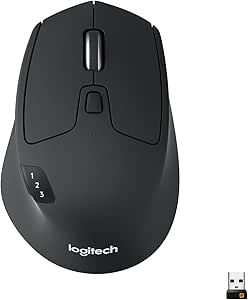 | Best for Multi-Computer Value and Simplicity | Connectivity: Bluetooth, USB receiver | Device switching: Up to 3 devices | Buttons: 6 customizable | VIEW LATEST PRICE | See Our Full Breakdown |
| Redragon M810 PRO Wireless RGB Gaming Mouse |  | Best Entry-Level Macro Layout | Connectivity: 2.4 GHz wireless, USB-C | Buttons: 8 programmable | Sensor: Pixart PAW3325 optical | VIEW LATEST PRICE | See Our Full Breakdown |
| wireless programming mice | Connectivity | Buttons | Battery life | Maximum sensitivity |
|---|---|---|---|---|
| Logitech MX Master 4 Ergonomic | Bluetooth, radio frequency, USB via included USB-C dongle | 7 | Up to 70 days | 8,000 DPI |
| Logitech MX Master 3S Bluetoot | Bluetooth | 7 | Up to 70 days | 8,000 DPI |
| Redragon M913 Wireless/Wired R | 2.4 GHz wireless, USB-C wired | 16 programmable, including 12 side buttons | Up to 45 hours with backlighting; up to 80 hours in eco mode | — |
| Logitech M720 Triathlon Multi- | Bluetooth, USB receiver | 6 customizable | Up to 24 months | 1,000 DPI |
| Redragon M810 PRO Wireless RGB | 2.4 GHz wireless, USB-C | 8 programmable | Up to 45 hours in eco mode | 12,000 DPI |
More Details on Our Top Picks
Logitech MX Master 4 Ergonomic Wireless Mouse with Haptic Feedback, Graphite
The MX Master 4 takes the top spot because it combines several useful programming-work features rather than relying on one headline spec. Its seven buttons are programmable, the Actions Ring offers app shortcuts, and customizable haptic feedback adds another way to interact with supported workflows. The MagSpeed wheel can move quickly through long files or scroll with pixel-level precision, making it more directly useful for code navigation than a high DPI figure by itself.
Its 8,000 DPI sensor tracks on varied surfaces, including glass, and the shape is designed for a right-handed grip. It connects over Bluetooth or through the included USB-C dongle, giving it more connection flexibility than the Bluetooth-only MX Master 3S listing. The stated battery life is up to 70 days, and a one-minute charge is listed as providing up to three hours of use. That can reduce the disruption of a forgotten charge, though the charging cable is not included.
Compared with the Redragon M913, the MX Master 4 has far fewer buttons, so it is not the pick for someone who wants a separate physical input for a large macro library. Its advantage is a more balanced productivity layout with specialized scrolling and shortcuts. Compared with the M720, it adds the MagSpeed wheel, higher stated sensitivity, and haptic features, but the M720’s six-button setup may be easier to approach if you want basic device switching without a feature-rich customization layer. Advanced controls require Logi Options+, and I would skip this model if you prefer a left-handed or symmetrical mouse, or want every accessory included in the box.
Pros:- Actions Ring and programmable buttons support shortcut-focused workflows.
- MagSpeed scroll wheel offers both fast and pixel-precise scrolling.
- Bluetooth and included USB-C dongle provide two wireless connection routes.
- Listed battery life is up to 70 days, with a short-charge use claim.
Cons:- Right-handed shape does not suit left-handed users.
- Advanced customization requires the Logi Options+ app.
- Charging cable is not included.
Best for: Right-handed programmers who want configurable app shortcuts, refined scrolling, and both Bluetooth and USB-C dongle connectivity.
Not ideal for: Left-handed users, buyers who want many dedicated macro buttons, or anyone who requires a charging cable in the package.
- Connectivity:Bluetooth, radio frequency, USB via included USB-C dongle
- Buttons:7
- Maximum sensitivity:8,000 DPI
- Scrolling:MagSpeed wheel; fast or pixel-precise scrolling
- Battery life:Up to 70 days
- Hand orientation:Right-handed
- Compatibility:Android, Chrome OS, Linux, Windows, iPadOS, macOS
- Customization:Programmable buttons, Actions Ring, customizable haptic feedback
Our verdict“I recommend the MX Master 4 as the most versatile programming pick when app shortcuts and scrolling matter more than a large bank of physical macro keys.”
Logitech MX Master 3S Bluetooth Wireless Mouse, Graphite
The MX Master 3S is a focused productivity mouse for programmers who spend as much time reading and reviewing code as entering it. Its MagSpeed wheel supports rapid movement through long documents as well as precise scrolling, while quiet clicks can be welcome in shared offices or late-night work. The 8,000 DPI sensor is listed to track on many surfaces, including glass, giving it flexibility for desks where a conventional mouse pad is not practical.
Seven buttons, thumb controls, and an ergonomic right-handed design make this more specialized than the basic M720. The MX Master 4 adds an Actions Ring and haptic feedback, so it is the stronger choice if you want newer shortcut interactions. The 3S, by contrast, makes a clear case for buyers who want a known productivity layout centered on quiet input and scrolling rather than those added features. It supports up to three Bluetooth devices, which helps when moving between a computer and tablet.
The main limitation is its Bluetooth-only listed connectivity; the package description says no USB receiver, adapter, or charging cable is included. Custom controls require Logi Options+ on Windows or macOS, so users who avoid desktop utilities may not get the full value from its buttons. Battery life is listed as up to 70 days, but the lack of a supplied cable means buyers should check their charging setup before ordering. As with the MX Master 4, the right-handed shape rules it out for some users. Choose it over the M720 for the scroll wheel and quieter clicks; choose the M720 if an included USB receiver and simpler controls matter more.
Pros:- Quiet clicks suit shared rooms and noise-sensitive workspaces.
- MagSpeed wheel handles long files and precise adjustments.
- Connects to up to three Bluetooth devices.
- Tracks on many surfaces, including glass.
Cons:- No USB receiver, adapter, or charging cable is included in the listed package.
- Logi Options+ is needed for custom controls on Windows or macOS.
- Right-handed design limits its fit for left-handed users.
Best for: Right-handed programmers who prioritize quiet clicks, precise scrolling, and Bluetooth switching among several devices.
Not ideal for: Anyone needing an included receiver or charging cable, left-handed users, or buyers who want extensive physical macro controls.
- Connectivity:Bluetooth
- Buttons:7
- Maximum sensitivity:8,000 DPI
- Sensor:Darkfield optical
- Battery life:Up to 70 days
- Device switching:Up to 3 devices
- Weight:141 g
- Compatibility:Windows, macOS, Linux, Chrome OS, iPadOS, Android
Our verdict“I would choose the MX Master 3S over the MX Master 4 when quiet operation and scrolling are the priority and its Bluetooth-only package suits the setup.”
Redragon M913 Wireless/Wired RGB MMO Gaming Mouse, 16,000 DPI
For a programmer who wants to assign many actions to the mouse itself, the Redragon M913 offers the most extensive button layout in this group: 16 programmable buttons, including 12 side buttons. That arrangement can suit macro-heavy applications, repetitive editing commands, or workflows where keeping a hand on the mouse is preferable to reaching for keyboard combinations. Its five onboard DPI levels, ranging up to 16,000, let users save several pointer sensitivities without treating maximum sensitivity as the main reason to buy.
The M913 is also the most flexible Redragon option for a desk setup because it supports 2.4 GHz wireless and USB-C wired use. Switching to a cable can help when charging or when a wired connection is preferred. Its stated battery life reaches up to 45 hours with lighting on and up to 80 hours in eco mode, so the relevant figure depends on how the mouse is configured. The M810 PRO has fewer programmable buttons and a lower maximum DPI, but its eight-button arrangement may be easier for someone who wants a smaller set of macros rather than a full side grid.
The tradeoff is specialization. A 12-button side panel creates more possible assignments, but also more controls to learn and a layout that can be excessive for routine navigation, terminal work, and text editing. At 132 g, it is not the lightest option here, and the body is explicitly right-handed. Compared with Logitech’s MX Master mice, it offers far more physical inputs but lacks their listed multi-device switching and productivity-oriented MagSpeed wheel. I would select the M913 for button density and wired fallback, not for the most understated office experience. Buyers who only need a few shortcuts will likely find the M720 or MX Master shape easier to live with.
Pros:- 16 programmable buttons include 12 side buttons for extensive macros.
- Supports both 2.4 GHz wireless and USB-C wired operation.
- Five onboard DPI levels go up to 16,000.
- Eco mode has a stated battery life of up to 80 hours.
Cons:- Right-handed MMO layout is specialized and may feel excessive for basic coding.
- Listed battery life with backlighting is up to 45 hours, below its eco-mode claim.
- Does not list multi-device switching like the Logitech options.
Best for: Right-handed programmers who want a large set of assignable physical buttons for macros, commands, or application controls.
Not ideal for: Users who prefer a simple office mouse, need left-handed ergonomics, or want a scrolling and multi-device workflow like the Logitech MX models.
- Connectivity:2.4 GHz wireless, USB-C wired
- Buttons:16 programmable, including 12 side buttons
- Sensor:Pixart 3335 optical
- Maximum DPI:16,000
- Onboard DPI levels:1,000, 2,000, 4,000, 8,000, 16,000
- Battery life:Up to 45 hours with backlighting; up to 80 hours in eco mode
- Weight:132 g
- Compatibility:PC, Mac, Linux, Unix; listed for PC, laptop, and tablet
Our verdict“I recommend the M913 for macro-heavy work where a large bank of physical controls matters more than a conventional productivity layout.”
Logitech M720 Triathlon Multi-Device Wireless Mouse, Black
The Logitech M720 Triathlon is the practical, less specialized choice for people who use more than one computer but do not need a large macro grid. It switches among up to three devices and connects through either Bluetooth or the included USB receiver. That makes it a straightforward fit for a programmer moving between a desktop, work laptop, and tablet. Its six customizable buttons leave room for a few frequent commands without the learning curve of the M913’s 12-button side panel.
The sculpted rubber body is designed for a right-handed grip, and the scroll wheel offers both fast and click-to-click modes. Compared with the MX Master 3S, the M720 has a simpler feature set and a lower maximum sensitivity of 1,000 DPI; it does not provide the MX model’s stated glass tracking, quiet clicks, or MagSpeed wheel. In return, the M720 includes a receiver and can switch across Bluetooth and receiver-based setups. It is a sensible option when basic comfort and device switching matter more than advanced scrolling or elaborate software customization.
One notable difference is power: the M720 uses an included AA battery and lists up to 24 months of battery life. That avoids regular recharging, but it is not a rechargeable design. The mouse is right-handed, so it is not a universal fit, and its 1,000 DPI ceiling may feel limiting to users who prefer faster pointer movement or work on high-resolution displays. Compared with the Redragon M810 PRO, it has fewer gaming-style macro controls but supports a broader mix of listed operating systems and a multi-device workflow. I would choose it for everyday coding and switching computers; I would skip it if your priority is extensive shortcut programming or high-sensitivity tracking.
Pros:- Switches among up to three devices.
- Offers Bluetooth and an included USB receiver.
- Six customizable buttons cover a modest shortcut set.
- Uses one included AA battery with a stated life of up to 24 months.
Cons:- Maximum sensitivity is 1,000 DPI.
- Uses a replaceable AA battery rather than a rechargeable battery.
- Right-handed design does not suit every grip.
Best for: Programmers who move between as many as three computers and want basic custom buttons, a receiver, and a familiar office layout.
Not ideal for: Users seeking a rechargeable mouse, high DPI, advanced scroll control, or a left-handed shape.
- Connectivity:Bluetooth, USB receiver
- Device switching:Up to 3 devices
- Buttons:6 customizable
- Maximum sensitivity:1,000 DPI
- Scrolling:Fast or click-to-click
- Battery:1 included AA battery
- Battery life:Up to 24 months
- Compatibility:Windows, macOS, Chrome OS, Linux, iPadOS, Android
Our verdict“I would pick the M720 for uncomplicated multi-computer programming, but not for users who need advanced scrolling or a deep macro layout.”
Redragon M810 PRO Wireless RGB Gaming Mouse
The Redragon M810 PRO is the more approachable Redragon pick for someone who wants programmable controls without the M913’s dense side-button panel. It has eight programmable buttons, including two side macro buttons and a rapid-fire key. For coding, that smaller set can be enough for common commands or application shortcuts while keeping the layout less specialized than an MMO mouse. The 12,000 DPI sensor and five listed onboard levels offer pointer adjustment, though programmers should judge it by button utility and fit rather than its maximum sensitivity.
This model connects through a 2.4 GHz receiver and USB-C, with a rechargeable battery listed for up to 45 hours in eco mode. A 1,000 Hz polling rate is also specified. Compared with the M913, the M810 PRO has half as many programmable buttons and a lower maximum sensitivity, but it may be simpler for a buyer who wants only a few shortcuts. Compared with the M720, it trades multi-device switching and a broader listed operating-system range for a more configurable gaming-style control set.
The listing calls out Windows versions for operating-system support, even though its compatibility field also names gaming consoles, PCs, and tablets. I would check the intended device and driver support before relying on its customization outside Windows. It is right-handed, and the supplied specifications list a substantial 250 g weight, which may make it less appealing for long sessions or frequent movement across a desk. Battery life is stated for eco mode, not every lighting setup, so RGB use may change how often it needs charging. Its role is a restrained macro mouse, not the strongest overall productivity device; choose the M810 PRO if programmable gaming-style controls are the draw, and favor the M720 or MX Master models for office-oriented device switching and scrolling.
Pros:- Eight programmable buttons include two side macro buttons and a rapid-fire key.
- Rechargeable battery is listed for up to 45 hours in eco mode.
- Offers adjustable DPI with five listed onboard levels.
- Includes a stated 1,000 Hz polling rate and USB-C connection.
Cons:- Listed 45-hour battery figure applies to eco mode.
- Operating-system and customization details are less clear than those for the Logitech choices.
- Right-handed design and listed 250 g weight may not suit all users.
Best for: Right-handed programmers who want a few programmable side controls, a rapid-fire key, and rechargeable 2.4 GHz wireless operation.
Not ideal for: Users who need multi-device switching, a lightweight mouse, left-handed ergonomics, or clearly stated broad desktop software support.
- Connectivity:2.4 GHz wireless, USB-C
- Buttons:8 programmable
- Sensor:Pixart PAW3325 optical
- Maximum sensitivity:12,000 DPI
- Onboard DPI levels:500, 1,000, 2,000, 3,000, 10,000
- Polling rate:1,000 Hz
- Battery life:Up to 45 hours in eco mode
- Weight:250 g listed
Our verdict“I would choose the M810 PRO for a modest programmable-button set, but the M720 or MX Master models are stronger fits for multi-device office workflows.”

How We Picked
I ranked these mice by how well their stated features map to programming work: assigning shortcuts, moving through long files, switching between machines, and using the mouse comfortably through a full workday. I gave extra weight to useful programmable controls rather than raw DPI. High sensitivity can matter for cursor movement, but it does not automatically make a mouse better for coding; configurable buttons, dependable connectivity, and scroll behavior are more directly relevant to common desk tasks.
I also compared the connection options and device workflows. A mouse that pairs with several computers can suit someone who moves between a work laptop and a personal desktop, while a 2.4 GHz receiver can offer a dedicated wireless link. Wired fallback is helpful if a battery runs low, but it does not replace the freedom of wireless use. The M720 and MX Master models emphasize device switching, while the Redragon choices put more emphasis on onboard button layouts.
Battery claims are stated as manufacturer-provided maximums, not promises for every setup. Lighting, use patterns, and software settings can affect endurance, and the M913 specifies different figures with backlighting and in eco mode. I weighed shape and hand orientation as well: all five listings specify right-handed designs, so none is a clear ambidextrous recommendation. Finally, I treated software dependence and included accessories as real buying factors. The MX Master models can offer deeper customization through Logi Options+, while the MX Master 3S listing specifically omits a receiver and charging cable. This ranking favors programming utility and clarity about tradeoffs, not a single feature in isolation.
| wireless programming mice | Battery life | Compatibility | Sensor |
|---|---|---|---|
| Logitech MX Master 4 Ergonomic | Up to 70 days | Android, Chrome OS, Linux, Windows, iPadOS, macOS | — |
| Logitech MX Master 3S Bluetoot | Up to 70 days | Windows, macOS, Linux, Chrome OS, iPadOS, Android | Darkfield optical |
| Redragon M913 Wireless/Wired R | Up to 45 hours with backlighting; up to 80 hours in eco mode | PC, Mac, Linux, Unix; listed for PC, laptop, and tablet | Pixart 3335 optical |
| Logitech M720 Triathlon Multi- | Up to 24 months | Windows, macOS, Chrome OS, Linux, iPadOS, Android | — |
| Redragon M810 PRO Wireless RGB | Up to 45 hours in eco mode | — | Pixart PAW3325 optical |
Factors to Consider When Choosing Wireless Programming Mice
I would start with the work pattern, not the largest spec number. These five mice split into two broad camps: productivity-first controls and scrolling from Logitech, and button-dense gaming layouts from Redragon. A good programming mouse is the one whose controls you will actually use, whose connection fits your computers, and whose shape stays comfortable for your hand.
Decide how many shortcuts you will really use
The M913’s 16 programmable buttons, including 12 side buttons, give it the most room for assigned commands. That can make sense for people who use macros across multiple applications or want many actions mapped to the mouse. It also adds complexity: buttons need to be learned and assigned, and a dense panel may not help if most of your work is typing. The M810 PRO’s eight buttons and the M720’s six customizable buttons provide a smaller set. The MX Master 3S and MX Master 4 each list seven buttons, with the latter adding Actions Ring shortcuts and haptic feedback. I would match the button count to a short list of repeat actions rather than assuming more is automatically better.
Match the connection to your devices
If you alternate among computers, the M720 and both MX Master models can switch between up to three devices. The M720 provides Bluetooth and an included USB receiver; the MX Master 4 adds an included USB-C dongle alongside Bluetooth. The MX Master 3S listing is Bluetooth-only and says no receiver is included. Redragon’s M913 and M810 PRO focus on 2.4 GHz wireless, with USB-C wired use also listed. This distinction matters if your computer has limited ports, if Bluetooth pairing is part of your routine, or if you want a cable option while charging. I would check that the receiver type suits the ports on the computers you plan to use.
Prioritize scrolling for code and documentation
Scrolling can matter more than extra sensitivity when you work through long source files, logs, or technical documents. The MX Master 3S and MX Master 4 both list MagSpeed scrolling, with fast movement for long pages and precise control for shorter adjustments. The M720 offers fast or click-to-click scrolling, a simpler arrangement. Redragon’s supplied details emphasize buttons, DPI, and gaming-style controls rather than a specialized productivity wheel. If you regularly navigate long files, I would put wheel behavior near the top of the decision. If you mostly use keyboard navigation and only need a pointer, a simpler wheel may be sufficient.
Treat DPI as a preference, not a programming score
The Redragon M913 reaches 16,000 DPI, the M810 PRO reaches 12,000 DPI, and the Logitech MX Master models list up to 8,000 DPI. The M720 tops out at 1,000 DPI. Higher sensitivity can make a cursor cross a screen with less physical movement, but it does not improve code editing, macro support, or scrolling by itself. The M913 and M810 PRO list onboard sensitivity levels, which can help users switch among saved settings. I would consider your display setup and preferred cursor speed, then give more weight to control layout and comfort.
Read battery claims alongside the power method
The M720 uses one included AA battery and lists up to 24 months, while the rechargeable MX Master 3S and MX Master 4 each list up to 70 days. The M913 states up to 45 hours with lighting on or up to 80 hours in eco mode; the M810 PRO lists up to 45 hours in eco mode. These are different kinds of claims, so I would not compare them as if they were measured under identical use. RGB lighting and settings affect the Redragon figures, while the M720’s replaceable cell avoids charging but must eventually be replaced. Also check included accessories: the MX Master 3S listing excludes a charging cable, and the MX Master 4 listing does too.
Check hand shape, weight, and software needs
All five products are listed as right-handed. If you use a left hand or need a symmetrical shape, this selection does not provide a clear match. The listed weights also vary: the M913 is 132 g, the MX Master 3S is 141 g, and the M810 PRO is listed at 250 g. Hand comfort is personal, but weight and sculpting can affect how a mouse feels during long sessions. Software is another dividing line. Logitech’s advanced customization relies on Logi Options+ on Windows or macOS, while the Redragon listings emphasize driver-based lighting and controls. Before choosing, check whether the software supports your operating system and whether you are willing to install it.
Frequently Asked Questions
Which wireless mouse in this roundup is best for programming?
I rank the Logitech MX Master 4 first for general programming because it combines programmable controls, Actions Ring shortcuts, haptic feedback, a versatile scroll wheel, and Bluetooth or USB-C dongle connectivity. The best fit changes with the workflow: the Redragon M913 is better for buyers who want many physical macro buttons, while the M720 is a simpler pick for switching between several devices.
Do programmers need a mouse with a high DPI rating?
Usually, not as a primary buying criterion. DPI affects pointer sensitivity, so a higher setting can suit a large display or a preference for less hand movement. It does not directly make coding faster or improve shortcut assignments. I would compare programmable controls, scrolling, comfort, and connection options first, then choose a sensitivity range that feels appropriate for your screen and working style.
Is the Redragon M913 better than the Logitech MX Master 4?
Neither is better for every programmer. The M913 has 16 programmable buttons and a 2.4 GHz or USB-C wired mode, making it the stronger choice for a large physical macro layout. The MX Master 4 has fewer buttons but adds the Actions Ring, haptic feedback, MagSpeed scrolling, and Bluetooth or USB-C dongle connectivity. I would choose based on whether dedicated buttons or productivity-focused scrolling and shortcuts matter more.
Which option works best for switching among multiple computers?
The Logitech M720, MX Master 3S, and MX Master 4 are each listed for switching among up to three devices. The M720 includes a USB receiver as well as Bluetooth, the MX Master 4 includes a USB-C dongle and Bluetooth, and the MX Master 3S listing specifies Bluetooth without a receiver. I would choose the connection method that matches the computers and ports on your desk.
Are any of these mice a good choice for left-handed programmers?
The supplied listings describe all five as right-handed designs, so I would not treat any of them as a clear left-handed recommendation. A left-handed buyer should look for an ambidextrous or specifically left-handed shape before choosing based on button count or software features. Comfort and access to the main controls matter more than the programmable features if the mouse’s shape does not fit the hand.
Conclusion
For a single mouse to handle everyday coding, app shortcuts, and long scrolling sessions, I would start with the Logitech MX Master 4. Choose the MX Master 3S if quiet clicks and precise scrolling are your priorities and Bluetooth-only use works for your setup. If you want the most physical macro controls, the Redragon M913 is the clear fit; the M810 PRO is a more modest Redragon alternative for a smaller button set.
For programmers who regularly move between computers and prefer a straightforward office mouse, I would choose the Logitech M720 Triathlon. It gives up the MX models’ advanced scroll and customization features, but its receiver, Bluetooth, and three-device switching make its role easy to understand. Before deciding, check hand orientation, software support, and which charging or receiver accessories are included. Those practical details are more likely to shape your daily experience than a maximum DPI figure.