Choosing the right mechanical keyboard for programming involves balancing comfort, typing feel, build quality, and features. The Logitech MX Mechanical stands out as the best overall pick, offering a blend of wireless convenience, premium build, and satisfying typing. For those on a budget, the Redragon K580 VATA provides solid performance at a lower price, while the Keychron V6 8K appeals to enthusiasts with hot-swappable switches and extensive customization. These options highlight the main tradeoffs: high-end models often bring wireless connectivity and premium features but at a cost, while budget choices tend to compromise some build quality or features. Keep reading for a detailed breakdown to help you find the perfect keyboard for your coding needs.

Get business pricing on monitors, keyboards and dev gear
- Business-only prices and quantity discounts
- Tax-exempt purchasing
- Multiple users, one account, clear invoices
Key Takeaways
- Wireless connectivity is a key feature for programmers seeking a clutter-free desk, but it often comes with higher costs and potential latency concerns.
- Switch type (Brown, Red, Blue) significantly impacts typing experience; Brown switches tend to be the best compromise for programming comfort and feedback.
- Hot-swappable switches are increasingly popular for customization, but they can add complexity and cost to the keyboard build.
- Full-size keyboards offer more keys and functionality, but tenkeyless models save space and may improve ergonomics for many programmers.
- Build quality varies widely; aluminum cases tend to be more durable but also more expensive, influencing long-term value.
| AULA F99 Tri-Mode Wireless Mechanical Keyboard | 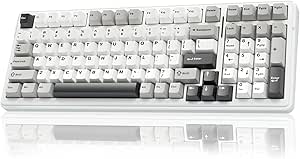 | Best Versatile Wireless for Programmers | Layout: 96% compact, 99 keys | Connectivity: Bluetooth 5.0, 2.4 GHz wireless, USB-C wired | Multi-device support: Up to 5 devices | VIEW LATEST PRICE | See Our Full Breakdown |
| ASUS ROG Strix Scope II 96 Wireless Mechanical Gaming Keyboard |  | Best Compact Gaming-Style for Programmers | Layout: 96% | Number of keys: 96 | Switches: Pre-lubricated, hot-swappable ROG NX Snow linear | VIEW LATEST PRICE | See Our Full Breakdown |
| CHERRY KC 200 MX Wired Mechanical Office Keyboard with Silent Red Switches |  | Best Quiet, Durable Wired for Professional Coding | Brand: CHERRY | Model: KC 200 MX | Switch type: CHERRY MX2A Silent Red | VIEW LATEST PRICE | See Our Full Breakdown |
| Keychron K2 HE 75% Wireless Magnetic Hall Effect Keyboard |  | Best Magnetic Switch Innovation for Programmers | Layout: 75% | Number of keys: 84 | Switches: Gateron Double-Rail Magnetic linear | VIEW LATEST PRICE | See Our Full Breakdown |
| Newmen GM325 Pro Full-Size Mechanical Gaming Keyboard with Linear Red Switches |  | Best Full-Size Wired for Classic Reliability | Brand: Newmen | Model: GM325 Pro | Switch type: Linear red | VIEW LATEST PRICE | See Our Full Breakdown |
| Keychron V6 8K Full-Size Wired Mechanical Keyboard with Programmable Knob, RGB Backlighting, Hot-Swappable Brown Switches |  | Best Overall for Programmers Who Value Customization and Low Latency | Layout: Full-size QWERTY, 104 keys | Connectivity: Wired USB-C | Polling rate: 8000 Hz | VIEW LATEST PRICE | See Our Full Breakdown |
| Redragon K580 VATA Wired RGB Mechanical Gaming Keyboard |  | Best for Programmers Who Want Macro Keys and Custom RGB Without Soldering | Layout: QWERTY, 104 keys | Connectivity: Wired USB-C | Switch type: Clicky Outemu Blue, hot-swappable | VIEW LATEST PRICE | See Our Full Breakdown |
| Keychron C2 Full-Size Wired Mechanical Keyboard with Brown Switches, Retro Color |  | Best Budget-Friendly, Non-Backlit Full-Size for Light Office Use | Layout: Full-size QWERTY, 104 keys | Switch type: Tactile Keychron Brown | Connection: Wired USB-C | VIEW LATEST PRICE | See Our Full Breakdown |
| Redragon K556 Wired RGB Mechanical Gaming Keyboard, 104-Key Aluminum |  | Best for Programmers Who Want a Durable, Aluminum Frame with Adjustable RGB | Connection: Wired | Key count: 104 | Frame material: Brushed aluminum | VIEW LATEST PRICE | See Our Full Breakdown |
| Logitech G PRO Mechanical Tenkeyless Gaming Keyboard, GX Blue Clicky Switches, Black |  | Best Compact Tenkeyless for Programmers Who Value Tactile Feedback and Portability | Layout: Tenkeyless QWERTY | Number of keys: 90 | Switch type: GX Blue Clicky | VIEW LATEST PRICE | See Our Full Breakdown |
| Logitech Alto Keys K98M Wireless Mechanical Keyboard, Graphite |  | Best Overall for Programmers Who Need Wireless Convenience and Long Battery Life | Layout: 98-key compact 1800-style QWERTY with numpad | Switches: Hot-swappable Marble mechanical switches | Mount: UniCushion gasket mount | VIEW LATEST PRICE | See Our Full Breakdown |
| SteelSeries Apex 5 Hybrid Mechanical Gaming Keyboard |  | Best for Tactile Feedback and Customization in a Versatile Gaming-Style Keyboard | Switch type: Hybrid Blue, tactile and clicky | Switch durability: 20 million keypresses | Display: Customizable OLED smart display | VIEW LATEST PRICE | See Our Full Breakdown |
| Redragon K668 108-Key Hot-Swap Wired RGB Gaming Keyboard |  | Best for Budget-Conscious Programmers Who Want Customization and Full Size | Number of keys: 108 | Layout: QWERTY | Switch type: Linear red switches | VIEW LATEST PRICE | See Our Full Breakdown |
| Logitech G413 SE Full-Size Mechanical Gaming Keyboard |  | Best for Durable, Tactile Typing with Media Control in a Wired Layout | Connectivity: USB 2.0 wired | Layout: Full-size QWERTY | Number of keys: 108 | VIEW LATEST PRICE | See Our Full Breakdown |
| Logitech MX Mechanical Wireless Illuminated Keyboard, Clicky |  | Best for Wireless, Low-Profile, Tactile Feedback in a Full-Size Format | Switch type: Clicky mechanical | Layout: Full-size QWERTY | Number of keys: 104 | VIEW LATEST PRICE | See Our Full Breakdown |
| mechanical keyboards for programmer | Layout | Connectivity | Switch type | Backlighting |
|---|---|---|---|---|
| AULA F99 Tri-Mode Wireless Mec | 96% compact, 99 keys | Bluetooth 5.0, 2.4 GHz wireless, USB-C wired | — | — |
| ASUS ROG Strix Scope II 96 Wir | 96% | Bluetooth, 2.4GHz wireless, USB wired | — | Per-key RGB |
| CHERRY KC 200 MX Wired Mechani | — | USB-A wired | CHERRY MX2A Silent Red | — |
| Keychron K2 HE 75% Wireless Ma | 75% | 2.4 GHz, Bluetooth 5.2, USB-C | — | — |
| Newmen GM325 Pro Full-Size Mec | Full-size 104-key | Wired USB-C | Linear red | — |
| Keychron V6 8K Full-Size Wired | Full-size QWERTY, 104 keys | Wired USB-C | Tactile brown | RGB with 22+ effects |
| Redragon K580 VATA Wired RGB M | QWERTY, 104 keys | Wired USB-C | Clicky Outemu Blue, hot-swappable | RGB |
| Keychron C2 Full-Size Wired Me | Full-size QWERTY, 104 keys | — | Tactile Keychron Brown | — |
| Redragon K556 Wired RGB Mechan | — | — | Brown tactile | — |
| Logitech G PRO Mechanical Tenk | Tenkeyless QWERTY | Wired, Detachable Micro USB | GX Blue Clicky | LIGHTSYNC RGB |
| Logitech Alto Keys K98M Wirele | 98-key compact 1800-style QWERTY with numpad | Bluetooth Low Energy, Logi Bolt USB receiver | — | Single-color white; non-RGB |
| SteelSeries Apex 5 Hybrid Mech | AZERTY | USB | Hybrid Blue, tactile and clicky | Per-key RGB |
| Redragon K668 108-Key Hot-Swap | QWERTY | — | Linear red switches | RGB, 19 preset modes |
| Logitech G413 SE Full-Size Mec | Full-size QWERTY | USB 2.0 wired | Tactile mechanical | Single-color white LED |
| Logitech MX Mechanical Wireles | Full-size QWERTY | Bluetooth Low Energy, USB-C, Logi Bolt receiver | Clicky mechanical | Single-color smart illumination |
More Details on Our Top Picks
AULA F99 Tri-Mode Wireless Mechanical Keyboard
The AULA F99 stands out for its tri-mode connectivity, allowing seamless switching between Bluetooth, wireless, and wired setups. Unlike the Keychron K2 HE, which emphasizes magnetic switches and customization, the F99’s hot-swappable switches and multi-device support make it ideal for programmers juggling multiple devices or working remotely. Its compact layout retains essential keys without sacrificing portability, but the water-repellent feature is limited and may not withstand heavy spills. Compared to wired-only options like the CHERRY KC 200 MX, this model offers greater flexibility in placement. The RGB lighting and programmable macros enhance usability, though the non-standard AZERTY layout could be a drawback for some users.
Pros:- Supports three connection modes and up to five devices
- Hot-swappable switches for easy customization
- Compact layout with full arrow keys and number pad
Cons:- Limited water resistance—only water-repellent
- AZERTY layout may not suit all users
Best for: Programmers who need a versatile, multi-device wireless keyboard for multitasking across devices and locations.
Not ideal for: Users seeking a water-resistant keyboard or those who prefer a traditional wired setup with minimal features.
- Layout:96% compact, 99 keys
- Connectivity:Bluetooth 5.0, 2.4 GHz wireless, USB-C wired
- Multi-device support:Up to 5 devices
- Switches:Pre-lubed linear, hot-swappable 3-pin and 5-pin
- Keycaps:Double-shot PBT
- Battery capacity:8000 mAh
Our verdict“This keyboard is best for programmers who prioritize multi-device flexibility and switch customization in a compact form.”
ASUS ROG Strix Scope II 96 Wireless Mechanical Gaming Keyboard
The ASUS ROG Strix Scope II offers a 96% layout with a dedicated number pad, making it appealing for programmers who value a full set of keys in a compact form. Compared to the Newmen GM325 Pro, which emphasizes durability and RGB lighting, the Scope II’s dual connectivity modes and sound-dampening materials make it a quieter, more adaptable choice. Its hot-swappable switches and programmable keys support customization, but the listed switch inconsistency—mentioning ROG NX Snow switches versus ROG RX Red—raises questions about its exact feel. Unlike the Keychron K2 HE, which is more flexible for macOS and Linux, this keyboard is primarily tailored for Windows with limited compatibility. Its non-water resistance may be a concern for those in humid environments or prone to spills.
Pros:- Includes a number pad in a compact layout
- Supports tri-mode connectivity and programmable keys
- Sound-dampening materials reduce typing noise
Cons:- Inconsistent switch specifications raise reliability questions
- Not water resistant for spill-prone environments
Best for: Programmers who want a compact, customizable keyboard with a number pad and prefer a slightly gaming-oriented design.
Not ideal for: Users seeking a fully water-resistant, Windows-only device with no focus on sound dampening or quiet operation.
- Layout:96%
- Number of keys:96
- Switches:Pre-lubricated, hot-swappable ROG NX Snow linear
- Connectivity:Bluetooth, 2.4GHz wireless, USB wired
- Battery life:Up to 1,500 hours in 2.4GHz mode
- Backlighting:Per-key RGB
Our verdict“This keyboard suits programmers who want a compact, feature-rich layout with quiet operation but are okay with limited water resistance.”
CHERRY KC 200 MX Wired Mechanical Office Keyboard with Silent Red Switches
The CHERRY KC 200 MX makes a strong case for those who prioritize quiet operation and durability. Its Silent Red switches provide smooth, linear actuation with minimal noise, ideal for open-office environments or late-night coding sessions. The aluminum plate and laser-etched keycaps promise longevity and consistent feel, but the wired-only design limits flexibility—especially compared to wireless alternatives like the Keychron K2 HE. The full 104-key layout and dedicated controls for volume and calculator streamline workflow, but the focus on Windows compatibility could be restrictive for users on other OSes. For those who prefer a traditional, no-fuss setup, this model offers high-quality build and quiet typing, but lacks wireless convenience and water resistance.
Pros:- Quiet, smooth linear switches for minimal noise
- Durable aluminum plate and laser-etched keycaps
- Full N-key rollover and dedicated control keys
Cons:- Wired connection restricts placement options
- Limited OS compatibility details provided
Best for: Professional programmers working in office environments who need a durable, quiet keyboard with a standard layout.
Not ideal for: Users who require wireless connectivity or need a water-resistant, portable setup for travel or flexible workspaces.
- Brand:CHERRY
- Model:KC 200 MX
- Switch type:CHERRY MX2A Silent Red
- Keyboard layout:104-key QWERTY
- Connectivity:USB-A wired
- Key durability:Over 50 million actuations
Our verdict“This keyboard is ideal for professionals who prioritize durability, quiet operation, and a straightforward wired setup for office use.”
Keychron K2 HE 75% Wireless Magnetic Hall Effect Keyboard
The Keychron K2 HE introduces magnetic Hall effect switches, offering a novel typing experience with adjustable actuation and rapid trigger support. Unlike the ASUS ROG Strix II, which emphasizes sound dampening and gaming features, the K2 HE’s magnetic switches deliver a unique feel that some programmers may find more responsive. Compatibility with macOS, Windows, and Linux adds flexibility, and its wireless options—Bluetooth 5.2 and 2.4 GHz—make it suitable for hybrid workspaces. However, the switch compatibility is limited strictly to Gateron Double-Rail Magnetic switches, and the non-shine-through keycaps can be hard to read in low light. Its lack of water resistance might be a concern for those in humid environments or prone to accidental spills.
Pros:- Adjustable magnetic actuation with rapid trigger
- Supports multiple wireless and wired connections
- Compatible across Linux, macOS, and Windows
Cons:- Switch compatibility limited to Gateron Double-Rail Magnetic switches
- Legends on keycaps are not shine-through, affecting visibility
Best for: Tech-savvy programmers interested in innovative switch technology and multi-OS support with wireless flexibility.
Not ideal for: Users who prefer standard mechanical switches, need water resistance, or require a more traditional, non-magnetic typing experience.
- Layout:75%
- Number of keys:84
- Switches:Gateron Double-Rail Magnetic linear
- Connectivity:2.4 GHz, Bluetooth 5.2, USB-C
- Polling rate:1000 Hz
- Compatible OS:Linux, macOS, Windows
Our verdict“This keyboard is best suited for enthusiasts eager to explore magnetic switch technology while maintaining multi-OS wireless connectivity.”
Newmen GM325 Pro Full-Size Mechanical Gaming Keyboard with Linear Red Switches
The Newmen GM325 Pro offers a full-size, wired experience with linear red switches that deliver responsive, smooth input, making it comparable to the CHERRY KC 200 MX in build quality. Its metal top panel and RGB side lighting add durability and visual flair, but the inconsistent layout description—QWERTY in the title versus AZERTY in specs—could cause confusion for users in different regions. The software support for macros and lighting customization enhances productivity, yet the preset rainbow effects are somewhat limited for personalized aesthetics. Unlike wireless options, the GM325 Pro’s cable management is less flexible, and its focus on RGB effects may be less appealing for minimalists.
Pros:- Responsive linear red switches for fast typing
- Full-key rollover and anti-ghosting for accurate input
- Metal top panel and side RGB lighting for durability and style
Cons:- Inconsistent layout details may cause confusion
- RGB effects limited to preset rainbow modes
Best for: Programmers who prefer a traditional, full-size wired keyboard with reliable switches and durable construction.
Not ideal for: Those seeking wireless or portable keyboards with advanced customization or minimalistic design.
- Brand:Newmen
- Model:GM325 Pro
- Switch type:Linear red
- Layout:Full-size 104-key
- Connectivity:Wired USB-C
- Lighting:RGB side lighting with preset effects
Our verdict“This keyboard suits programmers who want a reliable, full-size wired setup with durable build quality and customizable macros.”
Keychron V6 8K Full-Size Wired Mechanical Keyboard with Programmable Knob, RGB Backlighting, Hot-Swappable Brown Switches
The Keychron V6 8K stands out for its extremely high polling rate of 8000 Hz, which can reduce input delay—ideal for fast coding and multitasking. Unlike the Redragon K556, which offers a sturdy all-metal frame but lacks the ultra-low latency, the V6 emphasizes responsiveness crucial for programmers needing quick feedback. Its hot-swappable switches and programmable firmware make customizing a breeze, though the plastic enclosure may feel less premium and impact durability over time. The RGB lighting and macOS/Windows compatibility add versatility, but wired-only connectivity limits flexibility compared to wireless options. This pick makes the most sense for programmers who prioritize responsiveness and customization but don’t mind a plastic build.
Pros:- 8000 Hz polling rate for minimal input delay
- Hot-swappable switches allow easy customization without soldering
- Programmable via QMK firmware and Keychron Launcher
- Supports macOS, Windows, Linux
Cons:- Wired connection only limits placement flexibility
- Plastic enclosure may feel less premium and impact durability
Best for: Programmers who require ultra-low latency and extensive customization options.
Not ideal for: Users seeking a wireless keyboard or a more premium, durable build for long-term heavy use.
- Layout:Full-size QWERTY, 104 keys
- Connectivity:Wired USB-C
- Polling rate:8000 Hz
- Switch type:Tactile brown
- Hot-swappable:Supports most 3-pin and 5-pin MX-style switches
- Backlighting:RGB with 22+ effects
- Compatible OS:macOS, Windows, Linux
- Enclosure material:Plastic
- Warranty:1 year
Our verdict“This is best suited for programmers who prioritize responsiveness and customizability over build material and wireless convenience.”
Redragon K580 VATA Wired RGB Mechanical Gaming Keyboard
The Redragon K580 VATA offers a full-sized layout with five dedicated macro keys, making it appealing for programmers who automate repetitive tasks. Compared with the Keychron V6, which excels in responsiveness, the K580 emphasizes macro flexibility and RGB customization through companion software, although this requires installation and can be less reliable on Linux. Its hot-swappable Outemu Blue switches provide satisfying tactile feedback but are quite loud, which could be distracting in shared spaces. The aluminum plate enhances stability, and full anti-ghosting supports fast multi-key presses—crucial for complex coding workflows. However, the plastic enclosure and reliance on software for advanced lighting mean it sacrifices some durability and simplicity. This makes sense for programmers who want macro capabilities and vibrant lighting at a budget-friendly price.
Pros:- Five dedicated macro keys for automation
- Hot-swappable switches for easy customization
- Full anti-ghosting supports rapid multi-key inputs
- Includes aluminum plate for added stability
Cons:- Blue switches are loud and may disturb others
- Advanced lighting effects require software and may be less reliable on Linux
Best for: Programmers who value macro keys and customizable lighting for enhancing productivity.
Not ideal for: Quiet environments or users who prefer a more subtle, minimalist setup without loud clicky switches.
- Layout:QWERTY, 104 keys
- Connectivity:Wired USB-C
- Switch type:Clicky Outemu Blue, hot-swappable
- Macro keys:5 onboard
- Backlighting:RGB
- Material:ABS enclosure, aluminum plate
- Weight:1200 g
- Dimensions:15.75 × 5.91 × 0.98 in
- Compatibility:Linux, macOS, Windows
Our verdict“This keyboard is ideal for programmers seeking macro flexibility and vibrant lighting, accepting noise and reliance on software as tradeoffs.”
Keychron C2 Full-Size Wired Mechanical Keyboard with Brown Switches, Retro Color
The Keychron C2 offers a straightforward, full-size layout with tactile Brown switches, making it suitable for programmers who want a reliable keyboard without extra frills. Compared to the Redragon K556, which features a brushed aluminum frame, the C2’s plastic body keeps costs down but feels less premium. Its non-backlit design makes it less distracting in quiet office environments, and the included extra keycaps and adjustable feet improve comfort. However, the absence of backlighting and water resistance limits its appeal for those working in dim environments or seeking durability. It’s a solid choice for budget-conscious programmers who prioritize basic function over flashy features or extensive customization.
Pros:- Full-size layout with number pad
- Compatible with Mac and Windows
- Tactile switches rated for up to 50 million keystrokes
- Includes extra keycaps and adjustable feet
Cons:- No backlighting for low-light use
- Wired connection only limits flexibility
- Lacks water resistance
Best for: Budget-conscious programmers seeking a simple, durable full-size keyboard for daily coding tasks.
Not ideal for: Environments requiring backlit keys or advanced customization, or those who prefer wireless setups.
- Layout:Full-size QWERTY, 104 keys
- Switch type:Tactile Keychron Brown
- Connection:Wired USB-C
- Compatibility:MacOS, Windows
- Keycap material:ABS
- Included accessories:USB cable, keycap puller, extra keycaps
Our verdict“This keyboard suits programmers who want a dependable, simple full-size setup without the need for lighting or wireless features.”
Redragon K556 Wired RGB Mechanical Gaming Keyboard, 104-Key Aluminum
The Redragon K556 combines a robust brushed aluminum frame with tactile Brown switches, making it a durable choice for long coding sessions. While it shares features with the Keychron V6 in terms of hot-swappability and RGB lighting, the K556 emphasizes build quality with its metal chassis, which can withstand heavier use. Its 20 RGB modes offer plenty of visual customization, though advanced effects require software, similar to the Redragon K580. The full anti-ghosting and hot-swappable sockets support fast, multi-key inputs, essential for complex tasks. However, the wired-only nature and reliance on software for customization may limit flexibility. This keyboard appeals to programmers seeking durability and aesthetic flair in a more stationary setup.
Pros:- Sturdy brushed aluminum frame for durability
- Hot-swappable switches support customization
- 20 RGB modes for visual personalization
- Full anti-ghosting for fast multi-key inputs
Cons:- Requires wired connection, limiting placement
- Advanced RGB effects depend on companion software
Best for: Programmers who prioritize durability and a premium feel in their wired keyboard while enjoying extensive RGB customization.
Not ideal for: Users who prefer wireless or lighter keyboards, or those in shared workspaces where noise and cable clutter are concerns.
- Connection:Wired
- Key count:104
- Frame material:Brushed aluminum
- Switch type:Brown tactile
- Switch sockets:Hot-swappable, supports most 3-pin and 5-pin switches
- Lighting:20 RGB modes
- Compatibility:Windows and Mac
- Customization:Companion software for RGB effects and macros
Our verdict“This keyboard is ideal for programmers needing a durable, stylish wired setup with extensive RGB options and switch customization.”
Logitech G PRO Mechanical Tenkeyless Gaming Keyboard, GX Blue Clicky Switches, Black
The Logitech G PRO TKL provides a compact, tenkeyless layout with GX Blue Clicky switches, making it a strong option for programmers who prefer tactile, audible feedback and need a space-saving design. Compared to the Keychron C2, which offers a full-size layout, the G PRO’s smaller footprint frees desk space for mouse movement, boosting productivity in tight setups. Its LIGHTSYNC RGB supports customizable lighting effects, and onboard memory retains profiles—though F-key programming requires Logitech G HUB software, adding some complexity. The detachable cable and adjustable feet enhance portability and comfort, but its reliance on software for customization and lack of water resistance could be drawbacks for some users. This is ideal for programmers who want a portable, tactile keyboard with advanced lighting and minimal footprint.
Pros:- Compact tenkeyless layout saves desk space
- Tactile, clicky GX Blue switches for responsive feedback
- Onboard memory for saving lighting profiles
- Detachable cable and adjustable feet for portability
Cons:- Requires Logitech G HUB software for macro programming
- No water resistance, so caution needed in shared or cluttered spaces
Best for: Programmers needing a portable, space-efficient keyboard with tactile feedback and customizable lighting.
Not ideal for: Those seeking a fully wireless setup or a quieter typing experience in shared environments.
- Layout:Tenkeyless QWERTY
- Number of keys:90
- Switch type:GX Blue Clicky
- Connectivity:Wired, Detachable Micro USB
- Backlighting:LIGHTSYNC RGB
- Compatibility:Windows 10 and PC
- Features:Onboard memory, adjustable feet
- Warranty:2 years
Our verdict“This keyboard suits programmers who want a portable, tactile, and customizable keyboard with a small footprint for limited desk space.”
Logitech Alto Keys K98M Wireless Mechanical Keyboard, Graphite
This wireless option stands out for its gasket mount design that effectively absorbs typing vibrations, making it comfortable for extended programming sessions. Compared with the Logitech MX Mechanical, it offers a more traditional mechanical feel thanks to the hot-swappable Marble switches, which can be customized or replaced easily. Its compact layout with a numpad hits a sweet spot for those who want functionality without bulk. The long-lasting battery—up to 12 months—and the ability to charge via USB-C while in use make it particularly practical for busy coders. However, its single-color white backlighting and the need for software to program Action Keys could be limiting for users who prefer full RGB customization or plug-and-play simplicity. Overall, this makes a strong case for programmers who prioritize wireless freedom and vibration damping but don’t need flashy lighting.
Pros:- Gasket mount absorbs typing vibrations for comfort
- Hot-swappable Marble mechanical switches for customization
- Long battery life with USB-C charging while in use
- Includes a numpad in a compact layout
Cons:- White-only backlighting limits aesthetic customization
- Programmable Action Keys require extra software setup
Best for: Programmers seeking a wireless, long-lasting keyboard with a tactile feel and vibration dampening
Not ideal for: Gamers who want RGB lighting and customizable macros without needing a numpad or wireless features
- Layout:98-key compact 1800-style QWERTY with numpad
- Switches:Hot-swappable Marble mechanical switches
- Mount:UniCushion gasket mount
- Backlighting:Single-color white; non-RGB
- Connectivity:Bluetooth Low Energy, Logi Bolt USB receiver
- Battery life:Up to 12 months
- Charging:USB-C
- Compatibility:Windows and macOS
- Dimensions:17 × 7.1 × 1.9 in
Our verdict“Best suited for programmers who want a wireless, comfortable, and long-lasting mechanical keyboard with a focus on vibration damping.”
SteelSeries Apex 5 Hybrid Mechanical Gaming Keyboard
This model combines tactile, clicky hybrid switches favored for their responsiveness, making it appealing for programmers who prefer a distinct feedback feel. Compared to the Logitech G413, its per-key RGB lighting and customizable OLED display offer more visual and functional customization, though it may be noisier during long coding sessions. The sturdy aluminum frame and magnetic wrist rest provide comfort during extended typing. Its IP32 water resistance adds durability, making it suitable for busy work environments. The AZERTY layout, however, could be a drawback for users with QWERTY preferences, and the clicky switches might be distracting in shared spaces. Overall, this makes sense for programmers who value tactile feedback and a high degree of customization, especially if they also game occasionally.
Pros:- Tactile, clicky hybrid switches rated for 20 million keystrokes
- Per-key RGB lighting and a customizable OLED display
- Aluminum alloy frame and magnetic wrist rest for durability and comfort
- Water resistance adds longevity
Cons:- Clicky switches can be noisy in quiet environments
- AZERTY layout may not suit all users
Best for: Programmers who want tactile, clicky switches with customizable lighting and a durable build
Not ideal for: Quiet-focused coders or those needing a QWERTY layout, as AZERTY might be inconvenient
- Switch type:Hybrid Blue, tactile and clicky
- Switch durability:20 million keypresses
- Display:Customizable OLED smart display
- Backlighting:Per-key RGB
- Frame material:Aluminum alloy
- Wrist rest:Magnetic
- Water resistance:IP32
- Connectivity:USB
- Layout:AZERTY
Our verdict“Ideal for programmers who value tactile feedback, visual customization, and a durable build, even if the noise level is higher.”
Redragon K668 108-Key Hot-Swap Wired RGB Gaming Keyboard
This full-size wired keyboard offers a highly customizable experience thanks to its hot-swappable switches that support both 3-pin and 5-pin options, making it accessible for users who want to experiment with different switch types. Its RGB lighting with 19 preset modes and music sync, combined with dedicated shortcut keys and macros, appeals to programmers who like visual feedback and quick access to functions. The inclusion of two keycap sets and adjustable feet enhances user comfort and personalization. Compared with pricier options like the Logitech MX Mechanical, it provides more hardware flexibility at a lower cost. However, the wired-only connection and the slightly bulkier size may be downsides for those seeking portability or wireless convenience. This pick fits budget-conscious programmers who want full-size functionality and switch customization.
Pros:- Hot-swappable switches support easy customization without soldering
- Multiple preset RGB modes and music sync for visual feedback
- Includes two keycap sets and adjustable feet for comfort
- Dedicated shortcut keys and macros improve workflow
Cons:- Wired connection limits portability and flexibility
- Software compatibility primarily listed for Windows
Best for: Programmers on a budget who want a full-size, customizable wired keyboard with RGB lighting
Not ideal for: Travelers or those preferring wireless setups, as it relies solely on wired connection
- Number of keys:108
- Layout:QWERTY
- Switch type:Linear red switches
- Hot-swappable:Supports 3-pin and 5-pin switches
- Backlighting:RGB, 19 preset modes
- Included keycaps:2 sets
- Dimensions:17.3 × 4.7 × 17.3 in
- Water resistance:Water resistant
- Warranty:1 year
Our verdict“A flexible, full-size wired keyboard that offers great customization options for budget-conscious programmers.”
Logitech G413 SE Full-Size Mechanical Gaming Keyboard
The Logitech G413 SE excels in durability and tactile feedback, making it a solid choice for coding sessions that require consistent keystrokes. Its PBT keycaps resist wear and provide a premium feel compared to standard ABS caps, and the brushed aluminum-magnesium alloy top case adds structural strength. The tactile mechanical switches deliver satisfying feedback, similar to the Redragon K668, but with a more refined build quality. Its full-size layout with dedicated media controls is convenient, though the wired-only connection and single-color backlighting are limitations for those who prefer wireless or customizable aesthetics. Compared to the Logitech Alto Keys K98M, this model is more straightforward but less feature-rich in lighting and wireless options. It’s an excellent choice for users prioritizing durability and tactile response over lighting customization or wireless features.
Pros:- Durable PBT keycaps resist wear and tear
- Tactile mechanical switches for responsive typing
- Sturdy brushed aluminum top case for durability
- Includes dedicated media controls
Cons:- Wired connection only, limiting flexibility
- Single-color backlighting offers limited aesthetic options
Best for: Programmers wanting a durable, tactile keyboard with a full-size layout and media controls
Not ideal for: Those seeking wireless operation, RGB lighting, or a compact form factor
- Connectivity:USB 2.0 wired
- Layout:Full-size QWERTY
- Number of keys:108
- Switch type:Tactile mechanical
- Keycap material:PBT
- Backlighting:Single-color white LED
- Anti-ghosting:6-key rollover
- Dimensions:17.13 × 1.97 × 1.43 in
Our verdict“Ideal for programmers who need a durable, tactile, and full-size keyboard built to withstand frequent use.”
Logitech MX Mechanical Wireless Illuminated Keyboard, Clicky
This full-size wireless keyboard features low-profile clicky switches that combine tactile feedback with a slim profile, making it suitable for programmers who prefer a quieter, more modern aesthetic. Its smart backlighting automatically adjusts to ambient light, reducing distractions. Compared to the Alto Keys K98M, it offers a more traditional low-profile keycap design and multi-device pairing, providing flexibility for multi-tasking. The rechargeable battery supports up to 15 days with backlighting on, making it a convenient choice for mobile or multitasking workflows. However, the clicky switches may still be audible in quiet environments, and some advanced features require Logi Options+ software, which could be an extra step for setup. It’s best for programmers who want a sleek, wireless, and tactile keyboard with multi-device capabilities.
Pros:- Low-profile clicky switches provide tactile feedback with a slim design
- Smart backlighting adjusts automatically to ambient light
- Pairs with up to three devices for multi-tasking
- Rechargeable battery lasts up to 15 days with backlighting
Cons:- Clicky switches may be noisy in quiet settings
- Some features depend on software installation (Logi Options+)
Best for: Programmers who prefer a wireless, low-profile, tactile keyboard with multi-device pairing and smart backlighting
Not ideal for: Quiet office workers or users in noise-sensitive environments, due to the clicky switches
- Switch type:Clicky mechanical
- Layout:Full-size QWERTY
- Number of keys:104
- Connectivity:Bluetooth Low Energy, USB-C, Logi Bolt receiver
- Device pairing:Up to 3 devices
- Backlighting:Single-color smart illumination
- Battery:Rechargeable Li-Po, 1500 mAh
- Dimensions:1.02 × 17.08 × 5.18 in
- Weight:29.2 oz
Our verdict“Best suited for programmers who want a sleek, wireless, tactile, and multi-device capable keyboard with adaptive lighting.”

How We Picked
The keyboards in this roundup were evaluated based on a combination of build quality, typing feel, versatility, and value for money. Priority was given to models that offer reliable performance, comfortable key action, and features beneficial for programmers such as programmability, customizable keys, or wireless connectivity. We also considered durability, ease of maintenance, and whether the keyboard suits different work environments—from home offices to shared workspaces. The ranking reflects a balance between premium features and affordability, aiming to guide both casual coders and professional developers toward the best fit for their needs.Factors to Consider When Choosing Mechanical Keyboards For Programmers
When selecting a mechanical keyboard for programming, it’s important to consider several factors beyond just switch type or aesthetics. Your choice impacts comfort during long coding sessions, workflow efficiency, and overall satisfaction. Here are key considerations to keep in mind:Switch Type and Typing Feel
Switches dramatically influence the typing experience. Brown switches are often favored for programming because they provide tactile feedback without being too loud, making them a good all-around choice. Red switches are smoother and quieter, suitable for those who prefer a softer touch, while Blue switches offer clicky feedback but can be distracting in shared environments. Consider your environment and preference when choosing switches, as a switch type can affect long-term comfort and productivity.
Connectivity and Power
Deciding between wired and wireless keyboards depends on your workspace setup and portability needs. Wireless models reduce clutter and increase flexibility, but they may introduce latency or battery management concerns. Wired keyboards tend to offer more consistent performance and usually cost less, but limit mobility. Evaluate how often you move your setup and whether wireless convenience outweighs the simplicity of wired connections.
Size and Layout
The size of your keyboard affects both desk space and ergonomics. Full-size keyboards include a number pad, which can be useful for data entry or certain workflows, but may be bulky. Tenkeyless (TKL) models save space and promote better mouse positioning, which can reduce strain. Compact layouts like 75% or 60% are excellent for minimalists but may lack dedicated function keys or navigation clusters. Your workflow and available desk space should guide your choice.
Build Quality and Durability
Durability is essential for a tool you’ll use daily. Keyboards with metal or high-quality plastic cases tend to last longer and feel more solid during typing. Aluminum cases often add weight and premium feel but can increase cost. Stabilizers, keycap quality, and switch construction also influence longevity and typing consistency. Consider long-term use and whether the investment in a more durable build aligns with your budget.
Customization and Features
Features like programmable keys, RGB lighting, hot-swappable switches, and multimedia controls can enhance your workflow and personalization. Programmable keys allow for shortcuts, which can save time during coding. RGB lighting is mostly aesthetic but can also improve visibility in low light. Hot-swappable switches are increasingly popular for those who want to customize their typing feel without soldering. Balance these features with your actual needs to avoid overpaying for extras you won’t use.
Frequently Asked Questions
Is a mechanical keyboard worth it for programming?
Many programmers find that mechanical keyboards improve typing comfort and reduce fatigue during long coding sessions. The tactile feedback and durability often justify the investment, especially if you spend hours at your desk. While membrane keyboards can be cheaper, they typically lack the precision and responsiveness that make mechanical switches appealing. Ultimately, a mechanical keyboard can be a worthwhile upgrade if you value a better typing experience and longer-lasting build quality.
Should I choose a wired or wireless mechanical keyboard?
Wired keyboards generally provide more consistent performance with zero latency, which can be advantageous for precise typing and fast workflows. Wireless models, however, offer greater flexibility and reduce desk clutter, making them ideal for minimalist setups or those who move around. Modern wireless keyboards often include low-latency connections and long battery life, but it’s worth considering how often you’ll need to recharge or replace batteries versus the convenience of wireless operation.
What switch type is best for programming?
Brown switches tend to strike the best balance for programming, offering tactile feedback without excessive noise. Red switches are smoother and quieter, suitable if you prefer a softer feel and work in shared spaces. Blue switches provide audible click feedback, which some find satisfying but can be distracting in quiet environments. The choice depends on your preference for feedback and noise levels, but Brown switches are generally recommended for most programmers.
Are hot-swappable switches worth the extra cost?
Hot-swappable switches allow you to change switches without soldering, offering a high degree of customization and maintenance convenience. They are especially beneficial if you like experimenting with different switch types or want to replace faulty switches easily. However, they can increase the initial cost of the keyboard and may introduce slight variability in switch feel. For dedicated programmers or enthusiasts, hot-swappable options are a valuable feature that can enhance long-term flexibility.
How important is keycap quality for programming?
High-quality keycaps, typically made from PBT plastic, tend to be more durable, resistant to shine, and provide a better typing feel. Double-shot or dye-sublimated legends prevent fading over time, maintaining a crisp appearance. Low-quality keycaps can become shiny and worn, affecting typing accuracy and aesthetics. Investing in good keycaps can significantly improve the overall experience and lifespan of your keyboard, especially if you type many hours daily.
Conclusion
For most programmers, the Logitech MX Mechanical offers an excellent balance of performance, build quality, and wireless convenience, making it the best overall choice. Those on a budget should consider the Redragon K580 VATA for solid value without sacrificing too much in feel or durability. If you prioritize customization and long-term flexibility, the Keychron V6 8K with hot-swappable switches and extensive features is ideal. Beginners or casual users might prefer simpler, more affordable models, while professional developers seeking premium features should look toward high-end options with durable builds and advanced customization. This lineup aims to cater to every type of programmer, ensuring you find a keyboard that enhances your coding sessions.